










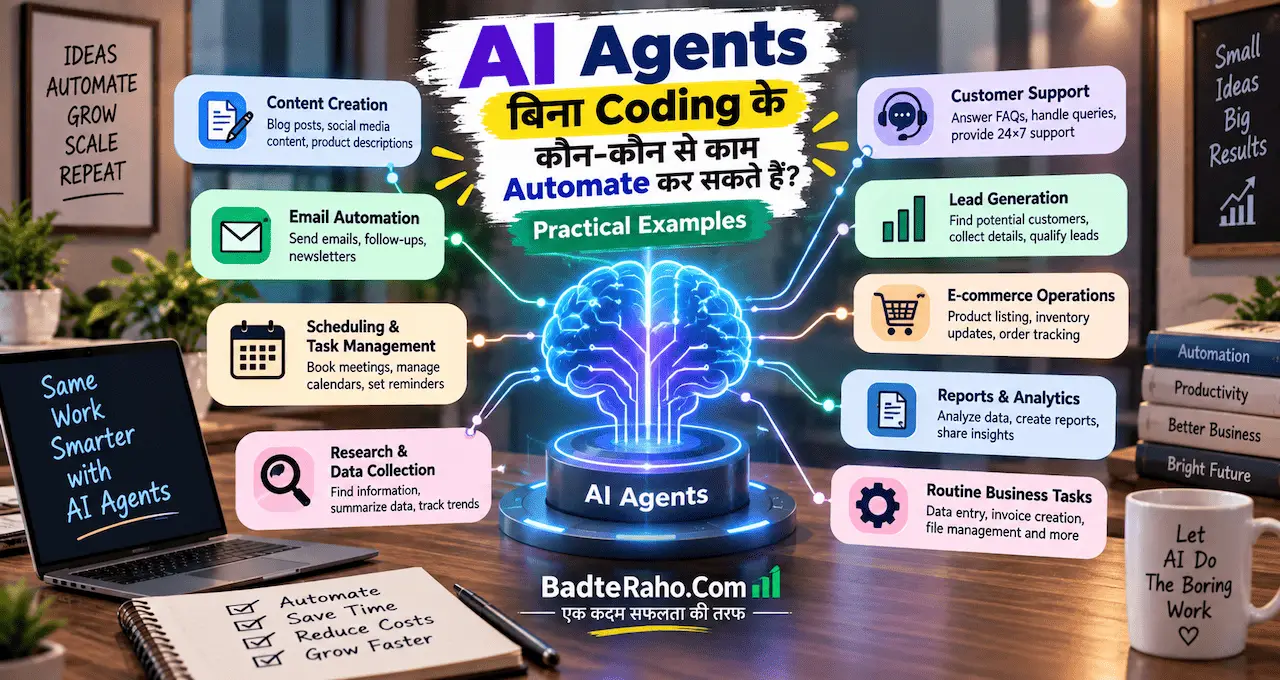





अगर आपने AI से कभी email draft, summary या content idea बनवाया है, तो आपने AI को एक task दिया और output लिया।
AI Agent का idea इससे एक step आगे जाता है। Agent किसी goal को समझकर multiple steps plan कर सकता है, connected tools से information ले सकता है, बीच में decision ले सकता है और defined limits के अंदर action भी कर सकता है।
यही वजह है कि AI Agents को सिर्फ़ “smart chatbot” समझना सही नहीं है। लेकिन “agent” सुनते ही यह मान लेना भी गलत है कि वह बिना supervision के पूरा business चला देगा। सही use case, permissions और human approval अभी भी बहुत important हैं।
अब practical examples से समझते हैं कि बिना coding के AI Agents कहाँ genuinely useful हो सकते हैं।
इस लेख में आप क्या सीखेंगे?
- AI Agent का मतलब
- chatbot से मुख्य difference
- no-code setup कैसे होता
- practical agent use cases
- human approval कहाँ रखें
- common risks कैसे समझें
AI Agent क्या होता है?
AI Agent ऐसा system है जो सिर्फ़ एक answer generate करने की बजाय किसी goal को पूरा करने के लिए कई steps पर काम कर सकता है।
एक simple chatbot workflow हो सकता है:
Question दें
↓
Answer मिले
लेकिन agent workflow कुछ ऐसा हो सकता है:
Goal दें
↓
Relevant information खोजे
↓
Available tools चुने
↓
Multiple steps complete करे
↓
Result check करे
↓
ज़रूरत हो तो next action ले
↓
Final output या approval माँगे
यानी agent में सिर्फ़ language generation नहीं, workflow execution भी शामिल हो सकता है।
अगर Generative AI की basic working पहले समझनी है, तो Generative AI क्या है? ChatGPT और दूसरे AI Tools कैसे काम करते हैं? useful रहेगा।
AI Agent, Chatbot और Automation में क्या Difference है?
तीनों terms related हैं, लेकिन same नहीं हैं।
Chatbot
आप सवाल पूछते हैं और वह जवाब देता है।
उदाहरण:
“इस email का professional reply लिखो।”
Output मिल गया। Task खत्म।
Automation
पहले से तय trigger और rules के हिसाब से workflow चलता है।
उदाहरण:
Form submit हुआ
↓
Spreadsheet में row add हुई
↓
Confirmation email भेजा गया
यह deterministic workflow है।
AI Agent
Agent goal के आधार पर decide कर सकता है कि कौन-सा next step लेना है और कौन-सा tool use करना है।
उदाहरण:
“कल की client meeting के लिए brief तैयार करो।”
Agent supported tools और permissions होने पर:
calendar से meeting देख सकता है,
connected documents खोज सकता है,
previous notes summarize कर सकता है,
open questions identify कर सकता है,
और final brief बना सकता है।
यही multi-step behavior agent को normal chatbot से अलग करता है।
हालाँकि हर AI feature जिसे “agent” कहा जाए, उसकी capability same नहीं होगी। Platform, plan, available tools और permissions के हिसाब से फर्क हो सकता है।
बिना Coding के AI Agent कैसे बनाया जा सकता है?
हर agent बनाने के लिए programming जानना ज़रूरी नहीं है।
कुछ modern AI platforms conversational या visual setup देते हैं जहाँ आप broadly यह define कर सकते हैं:
- agent का goal
- instructions
- knowledge/files
- connected apps
- allowed actions
- approval rules
- output format
Basic no-code flow इस तरह हो सकता है:
Goal Define करें
↓
Instructions दें
↓
Tools Connect करें
↓
Permissions तय करें
↓
Test Cases चलाएँ
↓
Approval Steps जोड़ें
↓
Limited Use से शुरू करें
लेकिन “no-code” का मतलब “no setup” नहीं है।
Agent को सही context, permissions, examples और boundaries फिर भी देनी पड़ती हैं। खराब process को agent के अंदर डाल देने से वह automatically अच्छा process नहीं बन जाता।
Prompt और instructions बेहतर लिखने के लिए Prompt Engineering क्या है? AI से बेहतर जवाब पाने के लिए Prompt कैसे लिखें? useful foundation है।
Practical Example 1: Daily Email Summary Agent
मान लीजिए आपको हर सुबह बहुत-से emails check करने पड़ते हैं।
Agent का goal हो सकता है:
“पिछले 24 घंटे के important emails summarize करो और जिनमें मेरी action needed है उन्हें अलग दिखाओ।”
Supported email access मिलने पर agent:
New emails देखे,
Newsletters और low-priority mail अलग करें,
Important senders identify करे,
Action items निकाले,
और morning brief तैयार करें।
Useful output:
Urgent: client approval pending
Today: invoice response चाहिए
Waiting: vendor reply नहीं आया
FYI: 4 informational emails
यह सिर्फ़ email summary से आगे है क्योंकि agent context के आधार पर priority और required action organize कर सकता है।
लेकिन शुरुआत में agent को emails delete, archive या reply automatically करने की unlimited permission देना सही नहीं है।
पहले read-only या draft-only mode ज्यादा safe हो सकता है।
Practical Example 2: Meeting Preparation Agent
Professionals का काफी time meeting से पहले context collect करने में जाता है।
Agent के लिए instruction हो सकती है:
“हर external client meeting से पहले एक short preparation brief बनाओ।”
Connected calendar, documents और notes available हों तो agent:
Meeting identify करे,
Participant information देखे,
Previous meeting notes खोजे,
Pending decisions निकाले,
और discussion points तैयार करें।
Final brief में:
Meeting purpose
Previous commitments
Open questions
Documents to review
Suggested agenda
हो सकता है।
यही agentic workflow का practical फायदा है—एक ही goal के लिए कई sources को combine करना।
Microsoft के current Copilot direction में work apps और agent-based workflows का integration बढ़ रहा है; related context के लिए Microsoft लाया Professionals के लिए Copilot Super App, Word-Excel से AI Agent तक पढ़ सकते हैं।
Practical Example 3: Research और Report Agent
मान लीजिए आपको हर week competitors या industry updates की report चाहिए।
Simple chatbot से आप एक बार search और summary करवा सकते हैं।
Agent-based workflow repeatable बनाया जा सकता है:
Defined Sources Check करे
↓
Relevant Updates Collect करे
↓
Duplicates हटाए
↓
Changes Categorize करे
↓
Short Summary बनाए
↓
Final Report तैयार करे
लेकिन यहाँ verification बहुत important है।
Agent अगर कोई unsupported fact, statistic या conclusion देता है, तो report गलत हो सकती है। AI confident language में गलत information भी generate कर सकता है।
इसी risk को detail में AI Hallucination क्या है? ChatGPT गलत जवाब क्यों देता है और कैसे पहचानें? में समझाया गया है।
Research agent का rule रखें:
Source उपलब्ध नहीं → claim final नहीं।
Practical Example 4: Customer Enquiry Triage Agent
Small business या service team के पास अलग-अलग तरह की enquiries आ सकती हैं।
Agent incoming enquiry से identify कर सकता है:
customer क्या चाहता है,
कितनी urgency है,
कौन-सी information missing है,
किस team/person को भेजना है।
उदाहरण:
Customer लिखता है:
“हमें अगले Friday तक 200 customized notebooks चाहिए। Logo print होगा और Delhi delivery चाहिए।”
Agent structured summary बना सकता है:
Product: Customized notebooks
Quantity: 200
Deadline: Next Friday
Location: Delhi
Need: Logo printing
Missing: Size, paper specification, budget
इसके बाद वह approved template से reply draft कर सकता है।
लेकिन price, stock या delivery commitment agent को invent नहीं करना चाहिए। ये verified business data या human approval से आने चाहिए।
Practical Example 5: Document Review Agent
अगर आपकी job में बार-बार PDFs, proposals, policies या reports पढ़नी पड़ती हैं, तो agent repetitive review को आसान कर सकता है।
Goal हो सकता है:
“इस folder में आने वाले नए proposals से key terms और pending questions निकालो।”
Agent:
Document पढ़े,
Important sections identify करे,
Specified fields extract करे,
Missing information flag करे,
Comparison summary बनाएँ।
अगर documents के साथ AI use करना नया है, तो ChatGPT में File Upload करके क्या-क्या कर सकते हैं? PDF और Documents से काम लेने का तरीका basic workflow समझने में मदद करेगा।
Sensitive documents के case में permissions और data policy ज़रूर check करें।
Practical Example 6: Content Repurposing Agent
Creator या small marketing team एक long-form content को कई formats में बदल सकती है।
उदाहरण goal:
“हर published blog post को social media distribution pack में बदलो।”
Agent workflow:
New Article Identify करे
↓
Core Points निकाले
↓
3 Social Posts बनाए
↓
Short Video Script बनाए
↓
Newsletter Summary बनाए
↓
Human Review के लिए रखे
यह काम normal AI से manually भी किया जा सकता है, लेकिन agent का फायदा repeatable workflow है।
फिर भी publishing automatically enable करने से पहले review रखें, क्योंकि title, claims और brand tone गलत हो सकते हैं।
Practical Example 7: Spreadsheet Cleanup और Weekly Report
बहुत-से teams spreadsheets में sales leads, tasks या operations track करती हैं।
Agent-defined rules के साथ:
duplicate entries identify कर सकता है,
missing fields flag कर सकता है,
categories suggest कर सकता है,
weekly summary बना सकता है,
unusual patterns highlight कर सकता है।
लेकिन financial calculations या final accounting numbers के लिए deterministic formulas ज्यादा reliable होते हैं।
Better setup:
Formula numbers calculate करे
↓
Agent explanation और summary दे
↓
Human final report review करे
AI को calculator, accountant और final approver तीनों एक साथ न बनाएँ।
Practical Example 8: Personal Task Coordinator
Individual users के लिए agent कई small tasks coordinate कर सकता है।
उदाहरण:
“हर Monday मेरी week planning brief तैयार करो।”
Supported calendar/tasks access होने पर agent:
upcoming meetings देखे,
deadlines identify करे,
open tasks group करे,
conflicts highlight करे,
और week priorities suggest करें।
लेकिन calendar event delete करना, meeting cancel करना या किसी को message भेजना higher-impact action है।
ऐसे actions के लिए confirmation रखना बेहतर है।
AI Agent को कौन-से Tools चाहिए होते हैं?
Agent की usefulness सिर्फ़ model intelligence पर depend नहीं करती।
उसे सही tools और context भी चाहिए।
Possible tools:
- calendar
- cloud files
- spreadsheets
- web/search
- CRM
- task manager
- messaging apps
- business databases
अगर agent के पास tool access नहीं है, तो वह सिर्फ़ आपको instructions या draft दे सकता है।
अगर access है, तो वह actions भी ले सकता है—लेकिन वही जगह permissions important हो जाती हैं।
Simple principle:
Agent को उतनी ही access दें जितनी task के लिए ज़रूरी है।
पूरे account की permission सिर्फ़ convenience के लिए न दें।
Human Approval कहाँ ज़रूरी रखना चाहिए?
Agent autonomy useful है, लेकिन हर action autonomous नहीं होना चाहिए।
इन कामों में approval रखना practical है:
पैसे से जुड़े Actions
Payment, refund, purchase या subscription changes.
External Communication
Important client reply, legal message या public post.
Data Deletion
Files delete करना, records हटाना या emails permanently remove करना.
Account Changes
Passwords, permissions या access settings.
High-impact Decisions
Hiring, legal, medical, financial या policy-related final decisions.
Low-risk task automatically हो सकता है।
High-impact task:
AI prepare करे
↓
Human Review करे
↓
Action Execute हो
यही responsible agent design है।
AI Agent में Privacy Risk कहाँ आता है?
Agent जितने ज्यादा tools connect करेगा, उतना ज्यादा data access कर सकता है।
इसलिए setup से पहले पूछें:
Agent कौन-सा data पढ़ सकता है?
क्या वह external action ले सकता है?
क्या private files accessible हैं?
कौन-सी information logs में जा सकती है?
Team में कौन agent use कर सकता है?
अगर personal या customer data involved है, तो permissions और platform data policy समझना ज़रूरी है।
AI इस्तेमाल करते समय Privacy कितनी सुरक्षित है? Personal Data बचाने के 10 तरीके इस point पर useful background देते हैं।
पहला No-Code AI Agent कैसे Test करें?
पहला agent complicated न बनाएँ।
एक low-risk repetitive workflow चुनें।
उदाहरण:
“हर Friday weekly meeting notes से action items summary बनाओ।”
Step 1: Goal Clear करें
Final output क्या चाहिए?
Step 2: Data Source तय करें
Meeting notes कहाँ हैं?
Step 3: Output Format बनाएँ
Task, owner, deadline, status.
Step 4: Missing Data Rule दें
Deadline नहीं है तो “Not specified” लिखें।
Step 5: 10 पुराने Examples पर Test करें
Agent ने क्या miss किया?
क्या invent किया?
Step 6: Human Review रखें
पहले automatically action न लें।
Step 7: धीरे-धीरे Scope बढ़ाएँ
Reliable होने पर next tool या action add करें।
Agent building में सबसे useful mindset है:
Small workflow → test → errors → guardrails → expand
किन कामों के लिए AI Agent सही Choice नहीं है?
हर repetitive task के लिए agent की ज़रूरत नहीं है।
अगर workflow पूरी तरह fixed है:
“Form submit हो तो confirmation email भेजो”
तो simple automation ज्यादा predictable और cheaper हो सकती है।
Agent तब useful होता है जब task में:
unstructured information,
multiple possible paths,
tool selection,
context-based decision
या multi-step reasoning
की ज़रूरत हो।
इसलिए पहले पूछें:
क्या मुझे वास्तव में agent चाहिए, या simple automation काफी है?
Technology को problem से बड़ा न बनने दें।
आख़िर में एक छोटी सी बात
AI Agents का सबसे interesting हिस्सा यह नहीं है कि वे “इंसान की तरह” दिखते हैं। असली value यह है कि वे एक goal लेकर multiple steps, tools और information sources को एक workflow में जोड़ सकते हैं।
बिना coding के भी कुछ agent workflows बनाना अब practical हो रहा है, लेकिन इसका मतलब unlimited autonomy नहीं है।
पहले low-risk task चुनें।
Agent को minimum permissions दें।
Real examples पर test करें।
जहाँ money, customer communication, sensitive data या irreversible action involved हो, वहाँ human approval रखें।
और अगर simple automation ही काम कर सकती है, तो सिर्फ़ “AI Agent” label के लिए system को complicated न करें।
आप किस काम के लिए अपना पहला AI Agent बनाना चाहेंगे—email summary, meeting preparation, research, content workflow या कोई business task? Comments में बताएँ; उसी use case पर practical setup guide बनाई जा सकती है।