












Pinterest पर लाखों views आना exciting है, लेकिन views अपने-आप income नहीं बनते। कमाई तब बनती है जब सही लोग आपके Pin से blog, product, affiliate offer या service तक पहुँचते हैं।
इसीलिए Pinterest को सिर्फ़ social-media account की तरह नहीं, बल्कि traffic और discovery channel की तरह देखना ज़्यादा useful है। आपका goal followers बढ़ाना भर नहीं, बल्कि ऐसा content बनाना है जो search हो, click मिले और किसी clear earning destination तक ले जाए।
अगर आप beginner हैं, तो पहले earning model चुनना और उसके बाद Pins बनाना सबसे practical approach है।
इस लेख में आप क्या सीखेंगे?
- Pinterest earning model समझें
- सही income path चुनें
- Pinterest SEO सीखें
- Click-worthy Pins बनाएँ
- Analytics से decisions लें
- 90-day roadmap follow करें
Pinterest से कमाई का real model क्या है?
Pinterest आपको सामान्य creator salary नहीं देता। Practical model यह है कि Pinterest attention और traffic लाए, जबकि actual earnings आपके blog, affiliate programme, digital product, service या store पर बने।
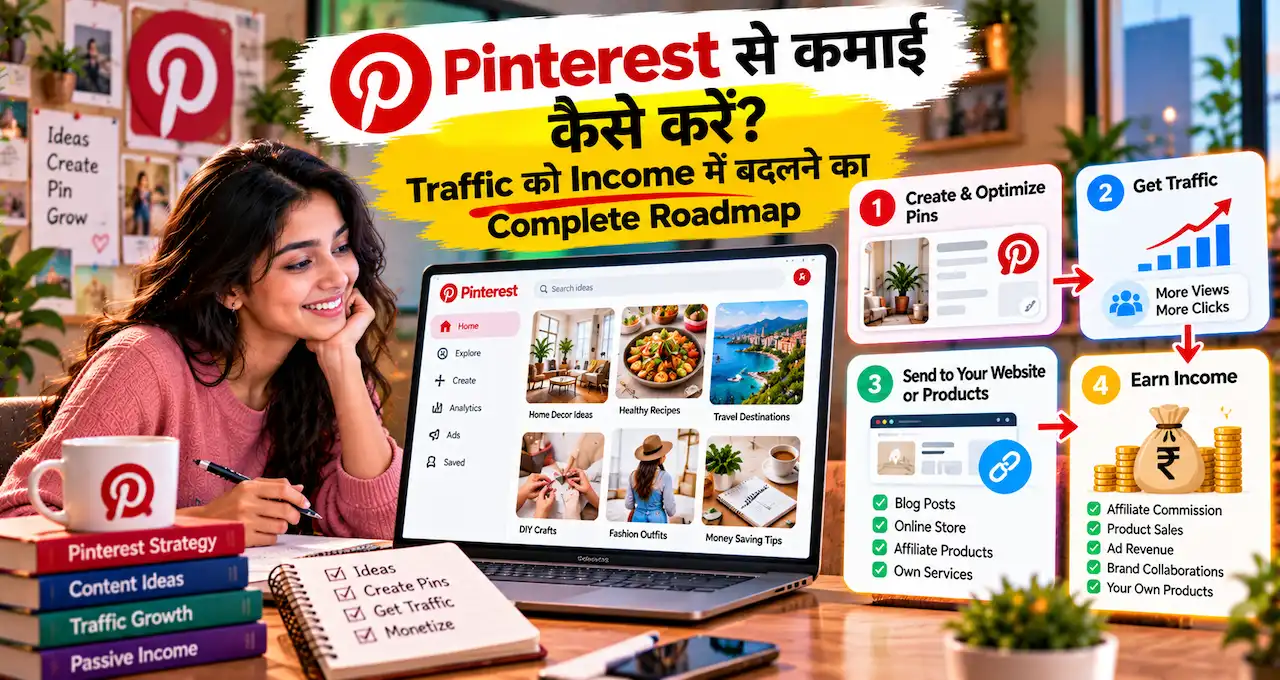
Simple funnel ऐसा दिख सकता है:
Search/Feed → Pin → Outbound click → Landing page → Conversion → Income
यही reason है कि monthly views impressive दिख सकते हैं, लेकिन business result के लिए outbound clicks और conversions ज़्यादा useful metrics हैं। Pinterest Analytics business accounts को impressions, saves, Pin clicks और outbound clicks जैसे metrics दिखाता है।
अगर online earning के अलग रास्ते compare करना चाहते हैं, तो AI से कमाई के practical options देखकर यह समझ सकते हैं कि Pinterest आपके लिए primary model होगा या सिर्फ़ traffic channel।
पहले तय करें: Pinterest से income किस तरीके से बनानी है?
एक beginner की common mistake है कि account बनाते ही random Pins publish करना शुरू कर देता है। पहले यह तय करें कि click के बाद user कहाँ जाएगा और वहाँ earning कैसे होगी।
| Earning model | Pinterest का role | आपको क्या चाहिए |
|---|---|---|
| Blog + display ads | Blog traffic लाना | Useful articles + website |
| Affiliate marketing | Product/service recommendation तक user भेजना | Relevant affiliate programme |
| Digital products | Printable, template, ebook या course बेचना | Product + landing page |
| Services | Enquiry या lead लाना | Portfolio + clear offer |
| Own products/store | Product discovery और store traffic | Product page/store |
इनमें से एक primary model चुनें। बाद में दूसरा income stream add किया जा सकता है, लेकिन शुरुआत में हर model को साथ चलाने से content direction unclear हो सकती है।
Pinterest Business Account से foundation बनाएँ
अगर goal earning या traffic है, तो free Pinterest Business Account useful रहेगा। Pinterest के अनुसार business account में Pinterest Analytics और Business Hub जैसे tools मिलते हैं; personal account को business account में convert भी किया जा सकता है।
Profile में niche और destination clear रखें। “Home Ideas” की जगह “Small Apartment Storage Ideas” जैसी positioning content planning को आसान बनाती है।
अगर आपकी अपनी website है, तो उसे claim करना useful हो सकता है। Pinterest के अनुसार claimed website से आपको यह समझने में मदद मिलती है कि आपकी site का content Pinterest पर कैसे share और perform हो रहा है; claim के लिए domain ownership और verification access चाहिए।
Pinterest SEO: लोग क्या search कर रहे हैं, वहीं से शुरू करें
Pinterest पर अच्छा visual important है, लेकिन सिर्फ़ सुंदर Pin काफी नहीं है। Pin को उस search intent से match होना चाहिए जिसे user वास्तव में खोज रहा है।
Broad keyword “home decor” की जगह specific searches सोचें:
- Small balcony decor ideas
- Diwali home entrance decoration
- Study room setup for students
- Wedding invitation calligraphy
- Weekly meal planner printable
Pinterest Trends अलग regions में search, save और shopping trends का historical view देता है और keywords compare करने में मदद कर सकता है। कुछ features region-specific या testing में हो सकते हैं, इसलिए जो data आपके account में available हो वही use करें।
Keyword मिलने के बाद उसे Pin title, description और relevant board context में naturally use करें। Keyword stuffing से बेहतर है कि user click करने से पहले साफ़ समझ पाए कि destination page पर क्या मिलेगा।
कौन-से Pins click ला सकते हैं?
Pinterest visual-first platform है, इसलिए Pin को feed में तुरंत समझ आना चाहिए। Current Pinterest creative guidance vertical 2:3 format recommend करती है; standard image guidance में 1000 × 1500 pixels एक recommended size है।
“Best Tips” जैसा vague text कम useful है। “7 Small Balcony Storage Ideas” या “Free Weekly Study Planner” user को click का reason देता है।
एक ही article के लिए अलग angles test किए जा सकते हैं। लेकिन same creative और same link को repetitive large volume में publish करना strategy नहीं बनना चाहिए।
Creative business का practical example देखना हो तो calligraphy startup में Instagram और Pinterest के use वाला guide relevant रहेगा।
Shreya Dalela का example क्या सिखाता है?
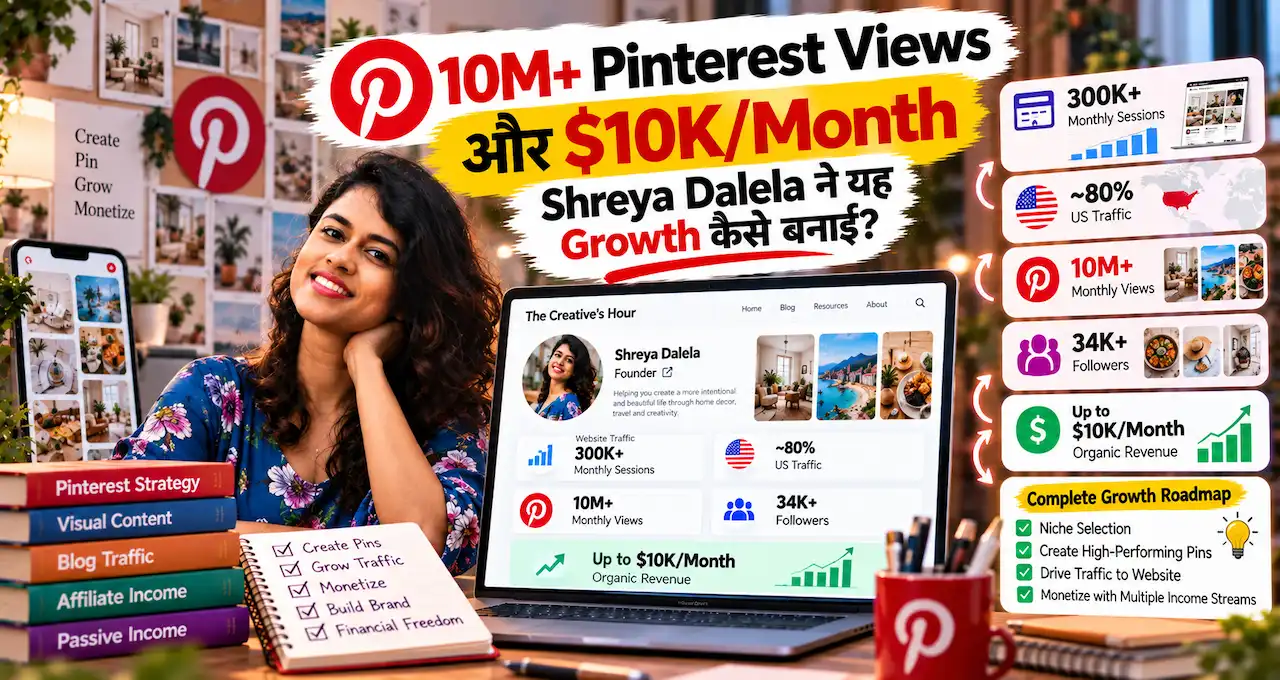
The Creatives Hour की founder Shreya Dalela ने अपनी April 2024 article में self-reported Pinterest journey share की थी।
उनके अनुसार consistent pinning, seasonal content, Pinterest SEO और website traffic strategy के साथ account 10M+ monthly viewers और लगभग 250,000 monthly sessions तक पहुँचा; उन्होंने ads से $10,000 per month तक income report की। The Creatives Hour
इन numbers को guaranteed benchmark नहीं मानना चाहिए। यह एक creator का historical result है, लेकिन इसका useful lesson clear है: views की value तब बनी जब Pinterest traffic website पर गया और website के पास monetization system था।
Shreya ने seasonal content, Trends, high-value posts, regular publishing और ad monetization को growth system का हिस्सा बताया।
अगर आप जानना चाहते हैं कि Shreya ने 10M+ Pinterest views और $10K/month तक की self-reported growth कैसे बनाई, तो उनकी पूरी Pinterest growth journey में strategy, turning points और repeatable tactics के details से समझ सकते हैं।
Seasonal content Pinterest पर क्यों powerful हो सकता है?
Pinterest पर लोग कई बार future planning के लिए ideas save करते हैं। इसलिए festival, wedding season, school planning, summer, monsoon, gifting या home makeover जैसे topics event के दिन से पहले interest पकड़ सकते हैं।
Shreya Dalela की source article seasonal content को major growth lever बताती है। उन्होंने trends, seasonal keywords और content calendar का use किया, फिर viewers को website visitors में convert करने पर focus किया। The Creatives Hour
India-focused account के लिए possible seasonal themes हो सकते हैं:
- Diwali decor
- Wedding invitations
- Festive outfits
- Exam planners
- Summer recipes
- Monsoon gardening
- New Year planning
लेकिन trend देखकर unrelated content न बनाएँ। Trend तभी useful है जब वह आपके niche और earning destination से fit करता हो।
Blog से earning करनी है तो Pinterest को traffic engine की तरह use करें
Bloggers के लिए Pinterest का काम article को discover कराना है। Search-friendly Pin user को blog post तक ले जाता है; वहाँ earning display ads, affiliate links, email list या products से हो सकती है।
High-value list posts, tutorials, checklists और inspiration-based guides Pinterest-friendly हो सकते हैं क्योंकि उनका benefit visual headline में quickly communicate किया जा सकता है।
लेकिन ad income के लिए traffic alone enough नहीं है। Ad network eligibility, visitor geography, pageviews, niche और advertiser demand जैसे factors earning बदलते हैं, इसलिए किसी दूसरे creator का monthly income result copy नहीं किया जा सकता।
अगर blogging को long-term content business की तरह समझना है, तो Indian bloggers की blogging journeys useful comparison देती हैं।
Affiliate marketing से Pinterest income कैसे बन सकती है?
Affiliate model में आप useful content से किसी relevant product या service तक user भेजते हैं। Purchase या eligible action होने पर programme rules के अनुसार commission मिल सकता है।
Pinterest affiliate links allow करता है, लेकिन current policy original value, transparency और moderation पर जोर देती है। Commercial nature clear होना चाहिए; repetitive high-volume affiliate Pins, fake accounts या artificial saves जैसी manipulation prohibited है।
Practical approach:
Pin: “Beginner Calligraphy Tools Checklist”
Destination: Detailed guide या affiliate-supported resource page
Earning: Eligible purchase पर commission
Product को सिर्फ़ commission के लिए recommend न करें। Affiliate programme की अपनी disclosure और linking rules भी अलग हो सकते हैं, इसलिए दोनों policies follow करें।
Digital products और services के लिए Pinterest कैसे use करें?
Pinterest उन offers के लिए useful हो सकता है जिन्हें visual problem-solution format में दिखाया जा सके।
Digital products में study planners, Canva templates, budget spreadsheets, ebooks और printables हो सकते हैं। Services में design, calligraphy, photography, coaching या freelance writing शामिल हो सकते हैं।
मान लीजिए आप wedding invitation designer हैं। “5 Minimal Wedding Invitation Styles” वाला Pin portfolio page तक जा सकता है, और वहाँ से enquiry बन सकती है।
अगर service-based earning आपकी strength है, तो AI की मदद से freelancing में services शुरू करने वाला guide parallel option समझने में मदद करेगा।
कितने Pins publish करने चाहिए?
Shreya Dalela ने अपनी source article में 10 Pins per day की strategy describe की थी। इसे universal rule नहीं मानना चाहिए, क्योंकि niche, team capacity, content library और platform behaviour अलग हो सकते हैं।
Beginner के लिए sustainable consistency बेहतर है। उदाहरण के लिए, week में 3–5 strong Pins से शुरुआत करें, 6–8 weeks का data collect करें और फिर volume तभी बढ़ाएँ जब quality और destination content maintain हो सके।
Pinterest की current guidance fresh, original Pins और quality content पर focus करती है। Platform अपने performance guidance में fresh content create करने और high-quality visuals use करने की सलाह देता है।
सिर्फ़ monthly views नहीं, ये numbers track करें
Business account के बाद Analytics का use करें। Pinterest core metrics में impressions, saves, Pin clicks और outbound clicks दिखाए जाते हैं।
Earning-focused dashboard में ये numbers useful हैं:
- Impressions: Pin कितनी बार दिखा?
- Saves: कितने लोगों ने future के लिए save किया?
- Pin clicks: कितनों ने Pin खोलकर देखा?
- Outbound clicks: कितने लोग Pinterest छोड़कर destination पर गए?
- Conversion: destination पर कितने sign-ups, enquiries या sales बने?
अगर impressions high हैं लेकिन outbound clicks low हैं, तो headline, creative या offer unclear हो सकता है। अगर clicks high हैं लेकिन sales zero हैं, तो problem landing page, pricing या offer में हो सकती है।
Pinterest income की simple calculation कैसे करें?
Income को views से नहीं, funnel numbers से calculate करें।
Example: 50,000 impressions से 2,000 outbound clicks आए, उनमें 20 sales हुईं और product ₹499 का था। Gross revenue ₹9,980 होगा।
यह profit नहीं है। Payment fees, platform charges, taxes जहाँ applicable हों, refunds, design tools और advertising cost निकालने के बाद actual profit calculate होगा।
इसी तरह affiliate model में clicks × conversion rate × average commission देखना useful है। Blog ads में sessions, pageviews और ad revenue track करें।
Beginners के लिए 90-day Pinterest earning roadmap
Pinterest से कमाई शुरू करने के लिए पहले 90 days को “income target” की तरह नहीं, बल्कि working traffic-to-income system बनाने की अवधि की तरह देखें।
इन 90 दिनों के अंत तक ideally आपके पास एक clear niche, monetization destination, searchable content library, tested Pins और इतना data होना चाहिए कि अगला कदम guesswork से नहीं लेना पड़े।
Day 1–7: पहले earning model और niche fix करें
पहले Pinterest account बनाने से भी ज़्यादा important है यह तय करना कि traffic आने के बाद earning कहाँ बनेगी।
एक primary model चुनें:
- Blog + display ads
- Affiliate marketing
- Digital products
- Freelance/service leads
- Own products या online store
मान लीजिए आपने digital products चुना। अब broad niche “productivity” रखने के बजाय “students के लिए study planners” जैसी narrower direction तय करना content planning आसान कर देगा।
इस stage पर एक simple sentence लिखें:
मैं [Audience] को [Problem/Goal] में मदद करने वाला Pinterest content बनाऊँगा और उन्हें [Monetization Destination] तक भेजूँगा।
Example:
मैं college students के लिए study-planning ideas बनाऊँगा और उन्हें अपने printable planners तक भेजूँगा।
अगर यह sentence clear नहीं है, तो Pins बनाना अभी शुरू न करें।
Day 8–14: Pinterest foundation properly set up करें
अब Pinterest Business Account set up करें, profile description में niche clear करें और शुरुआत में लगभग 5–8 focused boards बनाएँ।
Boards सिर्फ़ categories नहीं, बल्कि user intent reflect करें।
उदाहरण:
“Study”
की जगह:
“Exam Study Planner Ideas”
“College Notes Organisation”
“Weekly Study Schedule”
“Student Productivity Tips”
अगर आपकी अपनी website है, तो Pinterest पर उसे claim करना useful है क्योंकि इससे website से जुड़े Pins की performance और sharing के बारे में अतिरिक्त insight मिल सकती है। Pinterest domain ownership और verification access मांगता है।
इसी सप्ताह Pinterest Analytics खोलकर यह भी देख लें कि impressions, saves, Pin clicks और outbound clicks कहाँ दिखाई देते हैं। अभी numbers छोटे हों तो चिंता न करें; इस stage का goal dashboard समझना है।
Day 15–21: 15–20 keyword ideas की अपनी list बनाएँ
अब Pinterest search को user की तरह use करें।
अपने niche का एक broad keyword डालें और उससे निकलने वाले specific topics note करें। Pinterest Trends available हो तो seasonal और rising interest भी compare करें।
Example:
Broad topic:
1 | study planner |
इसके आसपास content ideas हो सकते हैं:
- Weekly study planner
- Exam revision timetable
- Study schedule for college students
- Printable study tracker
- Daily study routine
- Semester planning template
हर keyword के सामने एक बात लिखें:
इस search करने वाले user को आखिर चाहिए क्या?
“Printable study planner” search करने वाला शायद downloadable product चाहता है।
“Study routine ideas” search करने वाला पहले informational article पढ़ना चाहेगा।
यह difference तय करेगा कि Pin किस page पर जाना चाहिए।
Day 22–30: पहले destination pages तैयार करें
बहुत से beginners इस step को skip करके सीधे Pins बनाते हैं। यही बाद में problem बनती है—click तो आता है, लेकिन user को आगे क्या करना है यह clear नहीं होता।
पहले कम से कम 3 strong destination assets तैयार करें।
Blog model में:
- एक detailed evergreen article
- एक list/tutorial article
- एक high-intent article जिसमें affiliate/product opportunity हो
Digital-product model में:
- एक product landing page
- एक useful free resource या related guide
- एक comparison/problem-solving page
Service model में:
- Portfolio/service page
- Example/work showcase
- Enquiry या contact page
हर page के लिए खुद से पूछें:
अगर Pinterest user इस page पर पहुँचे तो उसका अगला obvious action क्या है?
अगर answer नहीं मिलता, तो landing page अभी monetization-ready नहीं है।
Day 31–45: पहली Pin library बनाएँ और controlled testing शुरू करें
अब हर destination page के लिए सिर्फ़ एक Pin न बनाएँ।
एक ही page के लिए 3–5 genuinely different creative angles test करें।
मान लीजिए destination है:
1 | Weekly Study Planner |
Possible Pin angles:
- “Free Weekly Study Planner”
- “7-Day Study Schedule Template”
- “Exam Week Planning Checklist”
- “Students के लिए Simple Weekly Planner”
इन सभी का destination same हो सकता है, लेकिन user hook अलग होगा।
Pinterest vertical 2:3 creative recommend करता है और standard image के लिए 1000 × 1500 pixels commonly recommended size है। Pinterest fresh, original और quality Pins create करने तथा duplicate Pins repeatedly upload न करने की सलाह भी देता है।
Beginner के रूप में पहले ऐसा publishing cadence रखें जिसे कम से कम 6–8 weeks तक consistently maintain कर सकें।
उदाहरण के लिए, 3–5 strong Pins per week से शुरुआत करना 10 weak Pins daily publish करने से बेहतर हो सकता है।
इस phase में क्या track करें?
एक simple spreadsheet बनाएँ:
| Pin | Topic | Destination | Publish Date | Impressions | Saves | Outbound Clicks | Conversion |
|---|---|---|---|---|---|---|---|
| Pin A | Study planner | Product page | 5 Nov | ||||
| Pin B | Exam timetable | Blog post | 7 Nov |
हर दिन numbers check करने की ज़रूरत नहीं है।
Week में एक fixed दिन Analytics review करें और pattern देखें।
Day 46–60: सिर्फ़ “कौन-सा Pin चला?” नहीं, “क्यों चला?” समझें
अब आपके पास initial data होना शुरू हो जाना चाहिए।
Pinterest पर Pins तुरंत perform करना ज़रूरी नहीं है। Pinterest खुद बताता है कि Pins hours, days, months या even years बाद भी engagement gain कर सकते हैं, और seasonality तथा trends performance बदल सकते हैं।
इसलिए किसी Pin को दो दिन में failure declare न करें।
चार simple situations देखें:
High impressions + low outbound clicks
Pinterest Pin दिखा रहा है, लेकिन लोग आगे नहीं जा रहे हैं।
Possible issues:
- Headline weak है
- Visual clear नहीं है
- User को click benefit समझ नहीं आ रहा
- Pin search intent से पूरी तरह match नहीं कर रहा
Action: same topic पर नया headline/creative test करें।
Low impressions + good click response
जितने लोगों ने Pin देखा, उनमें से कुछ ने click किया, लेकिन reach कम है।
Possible issue keyword, board context या topic demand में हो सकता है।
Action: related keyword angles और fresh Pins test करें।
Good outbound clicks + zero conversion
अब Pinterest शायद अपना काम कर रहा है।
Problem destination page में हो सकती है:
- Offer unclear
- Page slow
- Price mismatch
- Weak CTA
- Wrong audience
- Affiliate product relevant नहीं
Action: Pinterest को blame करने से पहले landing page inspect करें।
Good clicks + conversions
यही आपका signal है कि topic + Pin + destination + offer का combination काम कर सकता है।
Action: इसे repeat करें, copy-paste नहीं।
Same winning topic के आसपास related content और fresh creative angles बनाएँ।
Day 61–75: Winners पर double down करें
अब पूरे account को बराबर attention देना बंद करें।
अपने top 20–30% Pins identify करें जो बाकी content की तुलना में better outbound clicks, saves या conversions ला रहे हैं।
मान लीजिए:
“Weekly study planner” वाले Pins लगातार clicks ला रहे हैं।
तो अगला content हो सकता है:
- Monthly study planner
- Exam revision planner
- Semester planner
- Study habit tracker
- Printable timetable
यह random content production से अलग है।
अब आपका content calendar actual user behaviour से बन रहा है।
Pinterest Analytics individual Pins और overall account performance review करने देता है। Outbound click वह action है जिसमें user Pinterest से आपकी destination URL पर जाता है, इसलिए earning-focused account में यह key metric है।
Day 76–90: Traffic को actual income system में बदलें
अब अंतिम phase में सिर्फ़ Pinterest numbers मत देखें।
Pinterest के बाहर का result track करें।
Blog model:
Pinterest outbound clicks → website sessions → ad/affiliate revenue
Affiliate model:
Pinterest clicks → affiliate page/product clicks → conversions → commission
Digital product:
Pinterest clicks → product page visits → purchases → net revenue
Service model:
Pinterest clicks → portfolio visits → enquiries → paid clients
अब एक basic monthly funnel लिखें।
Example:
60,000 impressions → 1,800 outbound clicks → 900 product-page visitors → 18 sales
अगर product ₹499 का है:
18 × ₹499 = ₹8,982 gross sales
यह guaranteed result नहीं है। यह सिर्फ़ बताता है कि Pinterest earnings को measurable funnel की तरह कैसे देखना चाहिए।
अब इसी funnel में सबसे weak number identify करें।
अगर impressions कम हैं → content discovery improve करें।
अगर impressions हैं लेकिन clicks कम हैं → Pin improve करें।
अगर clicks हैं लेकिन conversion कम है → landing page/offer improve करें।
अगर conversion अच्छा है → उसी successful system में more quality traffic लाने पर focus करें।
90 days के बाद आपको क्या पता होना चाहिए?
तीन महीने पूरे होने पर सिर्फ़ यह मत देखें कि “कितने followers हुए?”
इन सवालों के जवाब आपके पास होने चाहिए:
- कौन-से 3–5 topics सबसे ज़्यादा outbound clicks लाते हैं?
- कौन-से Pin formats/headlines better perform करते हैं?
- कौन-से boards meaningful traffic ला रहे हैं?
- Pinterest से कौन-से destination pages पर traffic जा रहा है?
- किस page पर conversion सबसे अच्छा है?
- कौन-सा monetization model actual result दे रहा है?
- कौन-सा content सिर्फ़ impressions ला रहा है लेकिन business value नहीं?
- अगले 30 days में किन winners को scale करना है?
अगर इन questions के answers आपके पास हैं, तो 90 days successful रहें—even अगर अभी income छोटी है।
क्योंकि अब आपके पास random pinning नहीं, बल्कि measurable Pinterest earning system है।
एक simple weekly routine आगे भी रखें
90 days के बाद Pinterest को daily full-time task बनाने की ज़रूरत नहीं है।
एक practical weekly workflow ऐसा हो सकता है:
Monday: keyword/topic research
Tuesday: destination content update/create
Wednesday: Pin creatives बनाएँ
Thursday: Pins publish/schedule करें
Friday: Analytics review करें
Weekend: winners और next-week topics decide करें
Pinterest consistent original content publish करने और performance review करने की सलाह देता है; Pinterest के मुताबिक original content weekly create करना reach grow करने में मदद कर सकता है।
इस routine का goal ज़्यादा pins बनाना नहीं है।
Goal है हर महीने यह system बेहतर करना:
Better topic → Better Pin → More relevant click → Better destination → More conversions
Pinterest से कमाई में ये mistakes avoid करें
Views को income समझना
10 lakh views भी useless हो सकते हैं अगर लोग monetization destination तक नहीं पहुँच रहे हैं।
पहले Pins बनाना, offer बाद में सोचना
Destination और earning model पहले तय करें।
हर topic पर Pin बनाना
Focused niche search context और audience expectation clear रखता है।
Affiliate spam करना
Original value और transparent disclosure के बिना repetitive affiliate content risk बढ़ाता है।
Copyrighted visuals copy करना
Pinterest पर image दिखना reuse permission नहीं है। Own, licensed या authorized visuals use करें।
Analytics ignore करना
Data के बिना आप reach और actual business result का difference नहीं समझ पाएँगे।
एक creator का exact routine copy करना
Shreya का 10-Pins-per-day model उनकी system और capacity के लिए काम किया। आपका sustainable cadence अलग हो सकता है।
क्या Pinterest आपके लिए सही earning channel है?
Pinterest ज़्यादा useful हो सकता है अगर आपका niche visual, searchable या planning-oriented है।
Blog, design, decor, food, education, weddings, DIY, fashion, printables, productivity और कुछ service categories इसके natural examples हैं।
अगर आपके पास अभी website, product, service या affiliate offer कुछ भी नहीं है, तो पहले monetization destination बनाना ज़्यादा important है। सिर्फ़ account growth income model नहीं है।
अगर आप अभी online earning model ही choose कर रहे हैं, तो AI और digital skills से earning के शुरुआती रास्ते compare करके तय करें कि Pinterest आपके business का source होगा या support channel।
आख़िर में एक छोटी सी बात
Pinterest से कमाई का practical रास्ता viral Pin ढूँढने से कम और useful content को सही earning destination से जोड़ने से ज़्यादा बनता है।
Shreya Dalela का example दिखाता है कि बड़ी reach useful हो सकती है, लेकिन real value तब बनी जब traffic website और monetization system तक पहुँचा।
Beginner के लिए पहला target 10M views नहीं होना चाहिए। पहला target ऐसा repeatable funnel बनाना है जहाँ आपको साफ़ पता हो कि कौन-सा Pin click लाता है और वह click income action में बदलता है या नहीं।
आप Pinterest को blog traffic, affiliate marketing, digital products, services या अपने products में से किस model के लिए use करना चाहेंगे?
अगर आपने Pinterest से traffic या earning test की है, तो अपना experience भी comment में share करें।