



















Customer दुकान पर आया, product देखा और बोला—“भैया, WhatsApp पर photos भेज देना।”
दूसरा customer price पूछता है। तीसरा delivery status। चौथा वही सवाल पूछता है जिसका जवाब आप दिन में दस बार दे चुके हैं।
अगर पूरा business personal WhatsApp से manage हो रहा है, तो कुछ समय बाद chats, orders और personal messages आपस में mix होने लगते हैं।
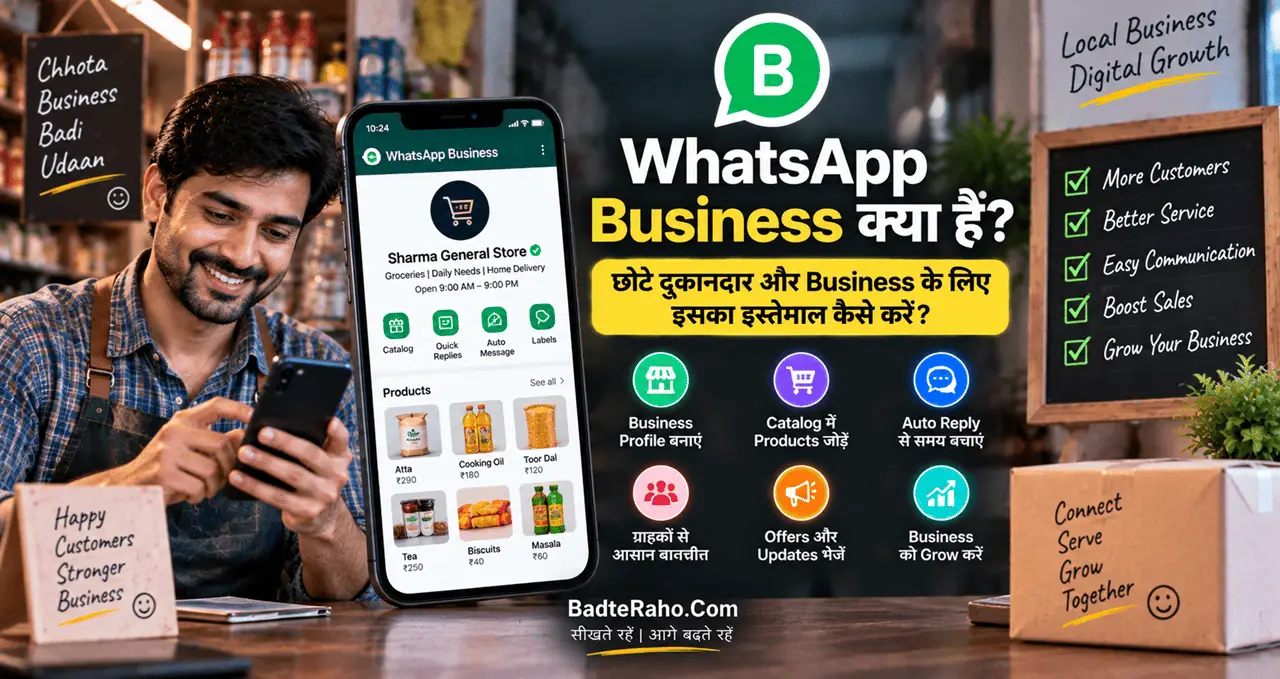
यहीं WhatsApp Business useful हो सकता है। यह सिर्फ chatting app नहीं, बल्कि छोटे business के लिए customer communication को थोड़ा organised बनाने वाला practical tool है।
अब समझते हैं कि WhatsApp Business को सिर्फ install करने के बजाय ऐसा setup कैसे करें कि customer enquiry से order और follow-up तक काम आसान हो।
इस लेख में आप क्या सीखेंगे?
- WhatsApp Business का मतलब
- Business profile का setup
- Product catalog का इस्तेमाल
- Customer chats को manage करना
- Quick replies का फायदा
- Order follow-up का तरीका
- Common mistakes से बचाव
WhatsApp Business क्या है?
WhatsApp Business छोटे businesses और दुकानदारों के लिए बनाया गया अलग app है, जिसमें normal WhatsApp messaging के साथ business-oriented tools मिलते हैं।
आप customers से chat कर सकते हैं, photos और documents भेज सकते हैं, लेकिन इसके साथ business profile, product catalog और messaging tools जैसी सुविधाएँ भी मिलती हैं।
इसका simple purpose है:
Personal chatting से अलग customer communication को थोड़ा professional और organised बनाना।
मान लीजिए आपकी:
Clothing shop है।
Home bakery है।
Beauty parlour है।
Repair service है।
Tuition या coaching service है।
Handmade products का business है।
या local grocery store है।
ऐसे businesses में customer अक्सर पहले WhatsApp पर पूछता है:
“Price क्या है?”
“Available है?”
“Location भेजिए।”
“Delivery होगी?”
“कल दुकान कितने बजे खुलेगी?”
WhatsApp Business इन repeated conversations को manage करने में मदद कर सकता है।
अगर अभी business शुरू करने की planning stage में हैं, तो Business कैसे शुरू करें? Business के लिए 10 जरूरी कदम और Practical Roadmap पहले useful रहेगा।
Normal WhatsApp और WhatsApp Business में फर्क क्या है?
दोनों apps messaging के लिए हैं, लेकिन उनका purpose अलग है।
Normal WhatsApp personal conversations के लिए बनाया गया है।
WhatsApp Business customer communication और business presence के लिए extra tools देता है।
Business account में आप अपना:
Business name
Category
Description
Address
Business hours
Email
Website
जैसी information add कर सकते हैं।
इससे customer को हर बार अलग से basic details भेजने की जरूरत कम हो सकती है।
अगर कोई पहली बार आपका WhatsApp profile देखता है, तो उसे तुरंत idea मिलना चाहिए:
आप कौन हैं, क्या बेचते हैं और आपसे contact क्यों करना चाहिए?
Step 1: Business Profile सही बनाएं
बहुत से लोग WhatsApp Business install तो कर लेते हैं, लेकिन profile लगभग खाली छोड़ देते हैं।
यहीं पहली opportunity miss हो जाती है।
Business profile customer के लिए mini introduction की तरह काम करती है।
Business Name
वही नाम रखें जो दुकान, Instagram, visiting card या Google listing पर use करते हैं।
Example:
Sharma Electronics
या
Ayesha Home Bakery
नाम बार-बार change करने वाली habit avoid करें।
Description
Description में सिर्फ:
“Best Quality Products”
लिखने से customer को ज्यादा information नहीं मिलती।
Better example:
Custom birthday cakes और eggless cakes available. Pre-order required. Local delivery available in Meerut.
इसमें customer को तुरंत useful information मिल रही है।
Business Hours
अगर आपकी दुकान सुबह 10 से रात 8 बजे तक खुलती है तो hours add करें।
इससे रात 11 बजे enquiry करने वाला customer समझ सकता है कि reply अगले business hours में आएगा।
Address और Website
Physical shop है तो location helpful है।
Website, Facebook Page या Instagram Business profile है तो relevant links भी add किए जा सकते हैं।
Profile का goal decoration नहीं है।
Customer के basic questions कम करने हैं।
Step 2: Catalog को Mini Product Showcase बनाएं
WhatsApp Business का catalog छोटे product-based businesses के लिए सबसे useful features में से एक हो सकता है।
मान लीजिए आप sarees बेचते हैं।
हर customer को manually 20 photos भेजने के बजाय selected products catalog में add किए जा सकते हैं।
Product listing में available options के अनुसार:
Product name
Image
Description
Price
Website link
Product code
जैसी details रखी जा सकती हैं।
Customer chat से catalog browse कर सकता है और interested product के बारे में enquiry कर सकता है।
Catalog में हर चीज़ मत डालिए
अगर आपके पास 500 products हैं, तो जरूरी नहीं कि शुरुआत में सभी upload कर दें।
पहले 15–30 important products रखें।
उदाहरण:
Best sellers
New arrivals
Popular services
Festival products
High-demand items
Catalog clean रहेगा तो customer के लिए browse करना आसान होगा।
Product Photo साफ रखें
Dark या blurry photo product की value कम दिखा सकती है।
Simple background.
Proper light.
Product clearly visible.
और misleading editing से बचें।
WhatsApp catalog आपका पूरा e-commerce store नहीं है, लेकिन छोटे business के लिए digital product shelf जैसा काम कर सकता है।
Step 3: Repeated Questions के Ready Replies बनाएं
अगर customer रोज पूछते हैं:
“Location?”
“Delivery charge?”
“Payment कैसे करें?”
“Sunday open है?”
तो हर बार वही answer manually type करना time waste है।
WhatsApp Business messaging tools का फायदा repeated communication को faster बनाने में है।
आप frequently used replies पहले से तैयार रख सकते हैं।
Example:
नमस्ते! हमारी दुकान सुबह 10 बजे से रात 8 बजे तक खुली रहती है। Location यहाँ है: [location]
या:
Delivery available है। Final delivery charge area और order value के according confirm किया जाएगा।
ध्यान रखें:
Ready reply का मतलब robotic reply नहीं है।
Customer ने specific question पूछा है तो answer भी specific होना चाहिए।
Templates time बचाएँ, conversation खराब न करें।
Step 4: Greeting Message को Useful बनाएं
First-time customer message करता है और उसे कई घंटे तक reply नहीं मिलता, तो वह किसी दूसरे seller के पास जा सकता है।
Greeting message एक basic acknowledgement दे सकता है।
लेकिन generic:
Welcome to our business.
से बेहतर है:
नमस्ते! Sharma Electronics से contact करने के लिए धन्यवाद। कृपया product name या अपनी requirement भेज दें। हम business hours में जल्द reply करेंगे।
इस message से customer को next action पता चलता है।
वह सिर्फ इंतजार नहीं करता।
वह requirement भेज देता है।
Business के लिए हर automated message का goal यही होना चाहिए:
Customer को अगले step तक ले जाना।
Step 5: Away Message से Expectation Set करें
छोटे business owner 24 घंटे phone पर नहीं रह सकते।
लेकिन customer को यह भी नहीं पता होता कि आप reply क्यों नहीं कर रहे हैं।
Away message इस gap को manage कर सकता है।
Example:
नमस्ते! अभी हमारे business hours खत्म हो चुके हैं। हम सुबह 10 बजे के बाद आपके message का reply करेंगे। अगर order enquiry है तो product photo या requirement भेज सकते हैं।
इससे दो फायदे होते हैं:
Customer को पता है reply कब मिलेगा।
और वह अपनी requirement पहले ही share कर सकता है।
लेकिन automated message लगाने के बाद अगले दिन actual reply करना मत भूलिए।
Automation सिर्फ acknowledgement है, customer service का replacement नहीं।
Customer Chats को Organised कैसे रखें?
WhatsApp पर sales बढ़ने के साथ सबसे बड़ी problem messages की संख्या नहीं, follow-up भूलना बन सकती है।
आज customer ने price पूछा।
कल उसने colour confirm किया।
फिर payment pending हो गई।
तीन दिन बाद आपको याद ही नहीं कि किसका order कहाँ तक पहुँचा था।
इसलिए customer chats को stages में सोचना useful है।
उदाहरण:
New enquiry
Interested customer
Payment pending
Order confirmed
Dispatched
Delivered
Follow-up
हर business का workflow अलग होगा।
लेकिन principle same है:
Chat को सिर्फ conversation न समझें—उसे customer journey समझें।
इसी तरह की systematic customer handling sales improvement में भी useful होती है। Sales कैसे बढ़ाएं? छोटे Business के लिए 10 Practical तरीके और Customer Growth Guide में इस process को detail में समझा जा सकता है।
WhatsApp Business से Order Process कैसे बनाएं?
छोटे seller के लिए simple workflow ऐसा हो सकता है:
Customer enquiry
→ Product/catalog share
→ Requirement confirm
→ Price confirm
→ Payment method share
→ Order confirmation
→ Delivery update
→ Delivery confirmation
→ Follow-up
इसका फायदा यह है कि business owner random तरीके से chat नहीं कर रहा है।
हर customer किसी stage पर है।
Order Confirm करते समय क्या भेजें?
Customer के साथ final confirmation में लिखें:
Product/service
Quantity
Final price
Delivery charge
Delivery address
Expected delivery
Payment status
Example:
आपका order confirm है:
Product: Blue Cotton Kurti
Quantity: 1
Total: ₹899
Delivery: ₹60
Expected dispatch: 2 October
Payment: Received
इससे आगे misunderstanding कम हो सकती है।
Payment लेते समय Professional रहें
WhatsApp Business का इस्तेमाल कर रहे हैं तो payment process भी clear रखें।
Customer को पहले final amount बताएं।
UPI payment हो तो सही UPI ID या QR share करें।
Payment screenshot मिलने पर सिर्फ screenshot देखकर order confirm न करें—अपने bank/app में actual payment check करें।
Fake payment screenshot छोटे दुकानदारों के लिए real risk हो सकता है।
Product देने या order dispatch करने से पहले payment status verify करें।
Business communication professional होने का मतलब fancy language नहीं है।
Clear information + clear confirmation ही काफी है।
WhatsApp Status का Smart Use करें
Status छोटे business के लिए daily visibility channel बन सकता है।
लेकिन हर घंटे सिर्फ:
BUY NOW
SALE SALE SALE
ORDER FAST
पोस्ट करने से लोग status mute भी कर सकते हैं।
Better mix रखें।
उदाहरण:
New product
Customer review
Behind the scenes
Useful tip
Restock update
Limited offer
Business timing
Frequently asked question
अगर bakery है तो सिर्फ cake price न डालें।
कभी packaging दिखाएँ।
कभी custom design.
कभी delivery slots.
कभी customer feedback.
Customer को business alive और active दिखना चाहिए।
हर Customer को Promotional Message भेजना सही नहीं
WhatsApp personal communication जैसा feel देता है।
यही इसकी strength भी है और risk भी।
अगर आपने बिना relevance के बार-बार लोगों को promotional messages भेजना शुरू कर दिया तो customers irritate हो सकते हैं, block कर सकते हैं या business की image खराब हो सकती है।
इसलिए marketing में frequency और relevance दोनों important हैं।
हर दिन offer भेजने के बजाय meaningful updates भेजें।
उदाहरण:
New collection launch.
Festival booking open.
Important stock update.
Useful repeat-order reminder.
और customer की preference का respect करें।
WhatsApp को spam machine बनाने के बजाय relationship channel की तरह use करें।
छोटे दुकानदार के लिए एक Practical Setup
मान लीजिए आपकी local clothing shop है।
WhatsApp Business setup कुछ ऐसा हो सकता है:
Profile
Shop name, timing, location और Instagram link.
Catalog
20 best-selling products.
Greeting
“कौन-सा product देखना चाहते हैं?”
Ready Replies
Location, delivery, payment और timing.
Customer Stages
New enquiry → interested → payment → order → delivered.
Status
Daily 2–4 useful product/business updates.
Follow-up
Purchase के कुछ दिनों बाद polite feedback या repeat requirement.
अब WhatsApp सिर्फ message app नहीं रहा।
यह आपके business का basic customer communication system बन गया।
WhatsApp Business से Sales बढ़ेंगी?
App install करने से अपने आप sales नहीं बढ़तीं।
WhatsApp Business एक tool है।
Result इस पर depend करेगा कि:
आपका product कैसा है?
Pricing सही है या नहीं?
Customer को timely reply मिलता है या नहीं।
Photos clear हैं या नहीं?
Order handling reliable है या नहीं।
Follow-up होता है या नहीं?
WhatsApp communication improve कर सकता है, लेकिन खराब product या poor service को fix नहीं कर सकता।
अगर small business में technology का broader use समझना चाहते हैं तो AI छोटे दुकानदारों और कारोबारियों का Business कैसे बदल सकता है? 10 Practical Uses भी useful है।
WhatsApp Business इस्तेमाल करते समय 6 गलतियों से बचें
Personal और Business Chats Mix करना
Possible हो तो business communication को structured रखें।
हर Message का Auto Reply
Automation overuse करने से conversation unnatural लग सकती है।
Product Details अधूरी रखना
Customer को बार-बार basic questions पूछने पड़ते हैं।
Payment Verify न करना
Screenshot और actual credit अलग चीजें हैं।
Customer को Spam करना
ज़्यादा promotions trust कम कर सकते हैं।
Follow-up भूल जाना
कई sales पहली enquiry पर नहीं, बाद के follow-up पर होती हैं।
आज से क्या setup करें?
अगर आपने WhatsApp Business अभी शुरू किया है, तो एक दिन में complex system बनाने की जरूरत नहीं है।
पहले ये काम करें:
Business profile complete करें।
10 important products catalog में add करें।
Greeting message बनाएं।
4–5 repeated questions के replies तैयार करें।
Customer enquiries के लिए simple stages decide करें।
Order confirmation का standard message बनाएं।
फिर एक हफ्ते तक देखें कि customers सबसे ज्यादा क्या पूछ रहे हैं।
उसी feedback के आधार पर system improve करें।
Technology तभी useful है जब वह actual business problem solve करे।
आख़िर में एक छोटी सी बात
छोटे दुकानदार के लिए WhatsApp Business की सबसे बड़ी value यह नहीं है कि उसमें normal WhatsApp से कुछ extra buttons हैं।
असल value है customer communication को organised बनाने में।
Customer को आपकी basic information आसानी से मिले।
Products देखने में आसानी हो।
Repeated questions का जल्दी जवाब मिले।
Order clear तरीके से confirm हो।
Payment verify हो।
Delivery update मिले।
और interested customer follow-up में खो न जाए।
यानी WhatsApp Business को सिर्फ chatting app की तरह use करने के बजाय एक simple flow बनाएं:
Enquiry → Product → Confirmation → Payment → Delivery → Follow-up
अगर यह flow consistently चलता है, तो छोटा business भी बिना complex software के customer handling को काफी professional बना सकता है।
अगर आप किसी shop, home business या service business के लिए WhatsApp इस्तेमाल करते हैं, तो comment में बताएं कि आपको सबसे ज्यादा problem customer replies, catalog, orders या follow-up में कहाँ आती है। आपका सवाल किसी दूसरे small-business owner के भी काम आ सकता है।