





















अगर Facebook Reels में बार-बार वही type का content आ रहा है जो आप देखना नहीं चाहते, तो अब सिर्फ scroll करके algorithm को signal देने की जरूरत नहीं है। Facebook का नया Your Algorithm feature users को सीधे अपनी पसंद के topics बताने देता है।
Meta ने 13 October 2026 को इस AI-powered control का rollout announce किया। User Feed और Reels में कौन-से topics ज्यादा या कम देखना चाहता है, इसे words में बता सकता है, topics add/manage कर सकता है और Interested/Not Interested feedback को ज्यादा detailed बना सकता है।
Meta के मुताबिक ranking system इन preferences को real time में use करके recommendations adjust कर सकता है। लेकिन यह feature rollout phase में है, इसलिए हर account पर तुरंत दिखाई देना जरूरी नहीं है।
इस guide में समझेंगे Your Algorithm कहाँ मिलेगा, topics कैसे change करें, unwanted Reels कैसे कम करें और creators के लिए इसका practical meaning क्या है।
इस लेख में आप क्या सीखेंगे?
- Your Algorithm क्या है
- Feature कहाँ मिलेगा
- Topics कैसे add करें
- Unwanted Reels कैसे कम करें
- Interested feedback कैसे काम करता है
- Creators पर क्या असर होगा
Facebook Your Algorithm Feature क्या है?
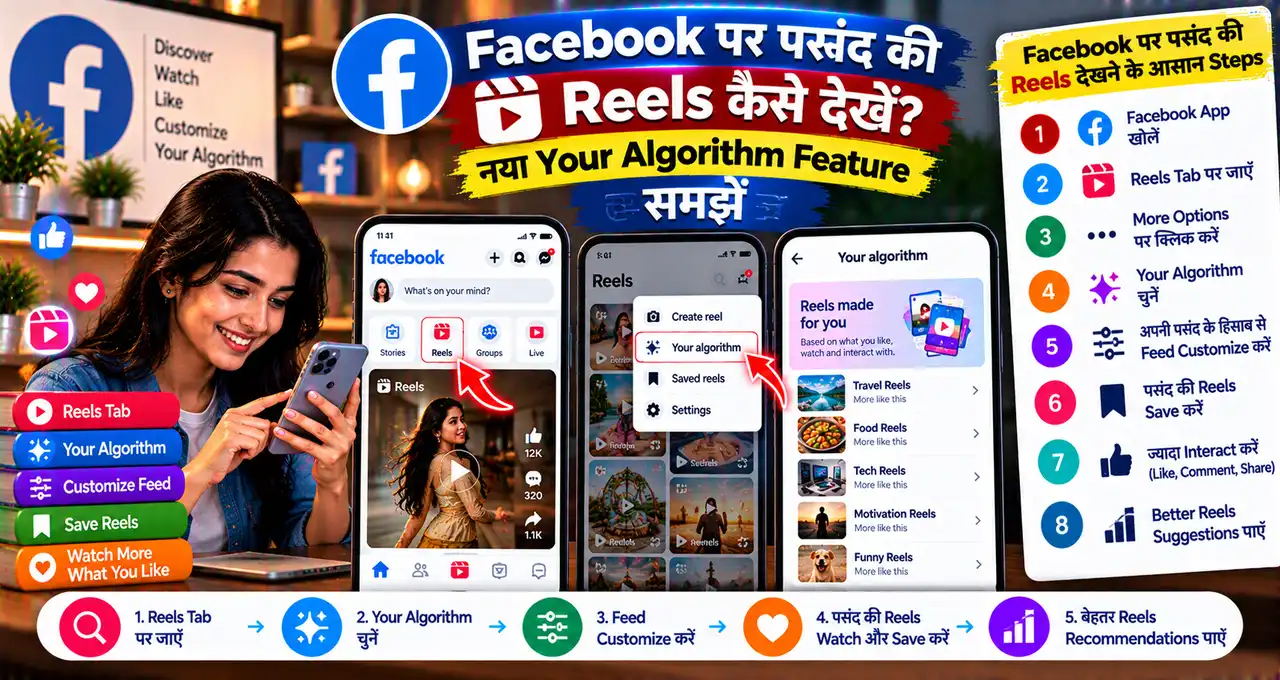
Your Algorithm Facebook का नया preference-control space है जहाँ user directly बता सकता है कि उसे Feed और Reels में किस तरह का content ज्यादा देखना है।
पहले recommendation system आपके likes, comments, watch time और दूसरे signals से interests infer करता था। अब user natural language में भी preferences दे सकता है।
Example:
- DIY Crafts ज्यादा दिखाओ
- Technology और AI content ज्यादा दिखाओ
- Cooking recipes कम दिखाओ
- Cricket highlights कम दिखाओ
Meta के मुताबिक large language models freeform text में context और intent समझकर ranking system को preferences update करने में मदद करते हैं।
Your Algorithm कहाँ मिलेगा?
Meta ने बताया है कि Your Algorithm को Facebook posts के updated three-dot menu से access किया जा सकता है।
Basic workflow:
- Facebook app update करें।
- Feed या Reels में किसी post का three-dot menu खोलें।
- Your Algorithm / recommendation customization option दिखाई दे तो tap करें।
- Current topics/interests देखें।
- जिन topics को ज्यादा देखना चाहते हैं उन्हें add/manage करें।
- Unwanted topics को reduce/remove करें।
Feature rollout gradual है। Option दिखाई न दे तो app update, account availability और rollout का इंतजार करें।
Interested और Not Interested कैसे काम करेंगे?
Facebook पहले से Interested और Not Interested feedback देता था, लेकिन नए update में feedback ज्यादा conversational बन रहा है।
किसी post या Reel पर Interested/Not Interested choose करने के बाद Facebook follow-up question पूछ सकता है कि आपको उस content में exactly क्या पसंद या नापसंद आया।
आप अपने words में बता सकते हैं:
“इस तरह के budget travel tips ज्यादा दिखाओ”
या:
“Celebrity gossip कम दिखाओ, technology explainers ज्यादा दिखाओ।”
Meta कहता है कि recommendations same session में real-time में adapt कर सकती हैं।
Unwanted Reels कम करने का Practical तरीका
अगर आपके Reels feed में irrelevant content ज्यादा है, तो सिर्फ एक setting पर depend न करें। Multiple signals consistently दें:
- Irrelevant Reel पर three-dot menu खोलें।
- Not Interested choose करें।
- Follow-up option आए तो reason/topic detail दें।
- Your Algorithm में unwanted topic reduce/remove करें।
- जिस तरह का content पसंद है उस पर Interested select करें।
- Useful creators/pages को follow करें।
- Unwanted content को repeatedly पूरा watch न करें।
Algorithm आपकी explicit preference के साथ actual behavior signals भी use करता है, इसलिए contradictory actions recommendations को confuse कर सकते हैं।
क्या सिर्फ एक Topic लिखने से पूरा Feed बदल जाएगा?
नहीं। Your Algorithm एक strong input है, लेकिन Facebook ranking सिर्फ एक preference field पर depend नहीं करती।
Meta हजारों signals का reference देता है—जैसे likes, comments, watch behavior, follows और content interactions। Natural-language preference इन existing signals के साथ combine होती है।
इसलिए “Technology ज्यादा दिखाओ” लिखते ही हर post tech नहीं बन जाएगी। Algorithm gradually recommendation mix adjust करेगा।
क्या इससे Ads भी Control होंगे?
Meta की announcement Your Algorithm को Feed और Reels recommendations के context में describe करती है। इसे ad-preference control या ad-blocking feature समझना सही नहीं है।
Sponsored ads के लिए Meta की अलग advertising preferences/settings हो सकती हैं। Your Algorithm primarily organic/recommended content experience customize करने के लिए है।
Feature दिखाई नहीं दे रहा तो क्या करें?
सबसे पहले Facebook app latest version पर update करें। फिर different posts/Reels के three-dot menu check करें।
अगर option अभी भी नहीं है, तो rollout आपके account तक नहीं पहुंचा हो सकता है। Meta ने feature को rolling availability के रूप में announce किया है।
इन चीजों की जरूरत नहीं है:
- Unknown APK install करना
- Account password third-party tool को देना
- Fake “algorithm unlock” website use करना
- VPN से feature force करने की कोशिश करना
Official app और normal rollout का इंतजार करना safer है।
क्या Your Algorithm आपकी Reels की Reach बढ़ाएगा?
Directly नहीं।
यह creator growth button नहीं है। Feature user को यह control देता है कि वह क्या देखना चाहता है।
लेकिन creators के लिए indirect implication important है: अगर users clearly किसी topic में interest बताते हैं, तो Facebook का recommendation system उस interest से matching content identify करने की कोशिश कर सकता है।
इसका मतलब creator को “algorithm hack” नहीं करना चाहिए। Better strategy clear topic, consistent audience value और accurate content signals हैं।
Facebook पर selling और creator/business tools कैसे बदल रहे हैं, यह Facebook Seller App और AI Marketplace tools वाली guide में भी देख सकते हैं।
Creators को अब क्या बदलना चाहिए?
1. Topic Clear रखें
अगर Reel एक साथ finance, comedy और travel तीन अलग directions में है, तो recommendation system के लिए audience match कठिन हो सकता है।
2. Caption में Real Context दें
Caption और spoken content में actual topic clear रखें। Keyword stuffing से ज्यादा useful natural description है।
3. Audience को Mislead न करें
Clickbait से short-term watch मिल सकता है लेकिन Not Interested feedback बढ़ सकता है।
4. Consistency रखें
Specific niche पर repeated useful content audience-interest mapping मजबूत कर सकता है।
5. Feedback देखें
Views के साथ comments, completion behavior और audience response समझें।
क्या अब Facebook Algorithm को “बोलकर” Control किया जा सकता है?
Conceptually हाँ—Meta का नया direction यही है कि user natural language में preferences बता सके।
पहले ranking mostly implicit signals पढ़ती थी। अब explicit freeform input भी ranking context बन सकता है।
यह social-media recommendation systems में interesting change है क्योंकि user सिर्फ like/dislike नहीं, nuance भी बता सकता है। Example:
“Home business ideas दिखाओ, लेकिन crypto और get-rich-quick content कम दिखाओ।”
LLM इस sentence के multiple interests/constraints को parse करके recommendation system तक signal पहुंचा सकता है।
Privacy के लिहाज से क्या समझें?
Your Algorithm use करने पर आप Facebook को अपने interests explicitly बता रहे हैं। यह recommendation quality improve कर सकता है, लेकिन preferences भी account data का हिस्सा बन सकती हैं।
बहुत sensitive personal information freeform feedback में लिखने की जरूरत नहीं है। Topic preference general रखें।
Example के लिए “fitness content ज्यादा दिखाओ” कहना पर्याप्त है; personal medical history लिखना जरूरी नहीं।
AI systems में personal data share करते समय minimum-information principle useful रहता है।
क्या Follow/Unfollow की जरूरत खत्म हो जाएगी?
नहीं। Your Algorithm एक extra control है, replacement नहीं।
Follow, unfollow, hide, Interested, Not Interested और watch behavior सभी signals useful रहेंगे।
अगर कोई specific Page बिल्कुल पसंद नहीं है तो सिर्फ topic reduce करने के बजाय unfollow/hide करना ज्यादा direct हो सकता है।
Feed और Reels दोनों पर काम करेगा?
Meta की official announcement Your Algorithm को Feed और Reels दोनों के लिए describe करती है।
इसलिए feature सिर्फ short videos तक limited नहीं है। Recommended posts और Reels दोनों के topic mix पर preference signals काम कर सकते हैं।
लेकिन अलग surfaces में ranking logic और available inventory अलग हो सकते हैं, इसलिए exact result identical नहीं होगा।
क्या Facebook अभी भी आपका Behavior Track करेगा?
Your Algorithm existing behavioral ranking signals को replace नहीं करता। Meta ने साफ किया है कि likes, comments, watch activity और दूसरे signals पहले की तरह relevant रहेंगे।
New feature इन inferred interests के ऊपर user की explicit input जोड़ता है।
इसलिए recommendation system अब broadly दो तरह के signals use कर सकता है:
- Implicit: आपने क्या देखा, like किया, comment किया
- Explicit: आपने खुद कहा कि क्या ज्यादा/कम देखना है
Parents या Family Accounts के लिए Useful है?
अगर adult user का own Facebook feed irrelevant topics से भर गया है, तो preference controls useful हो सकते हैं। लेकिन इसे parental-control या child-safety feature न समझें।
Age-based safety, teen controls और account supervision अलग product settings हैं। Your Algorithm recommendation preference tool है।
Beginners किन Mistakes से बचें?
- Your Algorithm को reach-boost button समझना
- एक दिन में बहुत contradictory preferences देना
- Not Interested करने के बाद वही Reels पूरा watch करना
- Third-party “algorithm reset” tools use करना
- Feature rollout न होने पर fake APK install करना
- Freeform preference में sensitive personal details लिखना
Facebook recommendations को 7 दिनों में बेहतर कैसे करें?
Your Algorithm feature available हो तो उसे सिर्फ एक बार use करके छोड़ने के बजाय कुछ दिनों तक consistent signals देना ज्यादा practical है। पहले दिन 3–5 topics add करें जिन्हें आप सच में ज्यादा देखना चाहते हैं। फिर अगले दिनों में irrelevant Reels पर Not Interested और useful content पर Interested/follow जैसे signals दें।
एक साथ बहुत ज्यादा opposite instructions न दें। उदाहरण के लिए “fitness ज्यादा दिखाओ” कहने के बाद लगातार celebrity gossip Reels पूरा watch करेंगे, तो system को mixed signals मिलेंगे। Meta के मुताबिक ranking system freeform preferences को likes, comments, watch behavior और दूसरे existing signals के साथ combine करता है।
- Day 1: Your Algorithm में preferred topics add करें।
- Day 2–3: Irrelevant content पर Not Interested दें।
- Day 4: Useful creators/pages follow करें।
- Day 5: Unwanted Pages unfollow/hide करें।
- Day 6–7: Feed/Reels mix देखें और topics refine करें।
Creators के लिए इसका मतलब यह नहीं कि audience से “हमारा topic algorithm में add करो” कहना जरूरी है। Better approach clear niche, accurate captions और genuinely useful content है, ताकि interested users का explicit feedback और normal engagement दोनों एक ही topic direction दिखाएँ।
अगर किसी unwanted topic की Reels फिर भी आती रहें, तो सिर्फ topic preference बदलने के साथ उस source को hide/unfollow भी करें। Topic-level control और source-level control अलग काम करते हैं: पहला recommendation mix बदलता है, जबकि दूसरा specific Page या creator से content कम करने में ज्यादा direct हो सकता है।
आख़िर में एक छोटी सी बात
Facebook का Your Algorithm feature users को recommendation system के साथ ज्यादा direct conversation देता है। अब सिर्फ likes और watch time पर depend रहने के बजाय आप topics add करके और natural-language feedback देकर बता सकते हैं कि Feed/Reels में क्या ज्यादा या कम चाहिए।
Creators के लिए इसका lesson “algorithm hack” नहीं है। Clear topic और useful content बनाना ज्यादा important होगा, क्योंकि users के पास अपनी preference और explicit तरीके से बताने का control बढ़ रहा है।
आप Facebook Reels में किस topic को ज्यादा और किसे कम देखना चाहेंगे? Your Algorithm option आपके account में आया हो तो comments में बताएं कि recommendations में कितना फर्क दिखा।