














Internet के बिना UPI payment अब कुछ supported keypad और feature phones पर PhonePe के जरिए possible हो रही है।
PhonePe ने August 2026 में UPI 123Pay launch किया था, जो SMS-based architecture के जरिए feature-phone users को money transfer और merchant payment करने देता है। October में itel 2165C पर PhonePe support की reporting ने इस capability को फिर चर्चा में ला दिया है।
लेकिन itel 2165C की exact activation प्रक्रिया और सभी supported transaction types अभी पूरी तरह clear नहीं हैं। इसलिए इस guide में official PhonePe UPI 123Pay workflow, device support और safety को अलग-अलग समझेंगे।
पहले यह समझना जरूरी है कि “बिना internet” payment असल में कैसे काम करती है।
इस लेख में आप क्या सीखेंगे?
- PhonePe UPI 123Pay क्या है
- बिना internet payment कैसे होती है
- कौन-से feature phones supported हो सकते हैं
- UPI activation का general process
- Payment करने के available तरीके
- Safety और limitations क्या हैं
PhonePe UPI 123Pay क्या है?
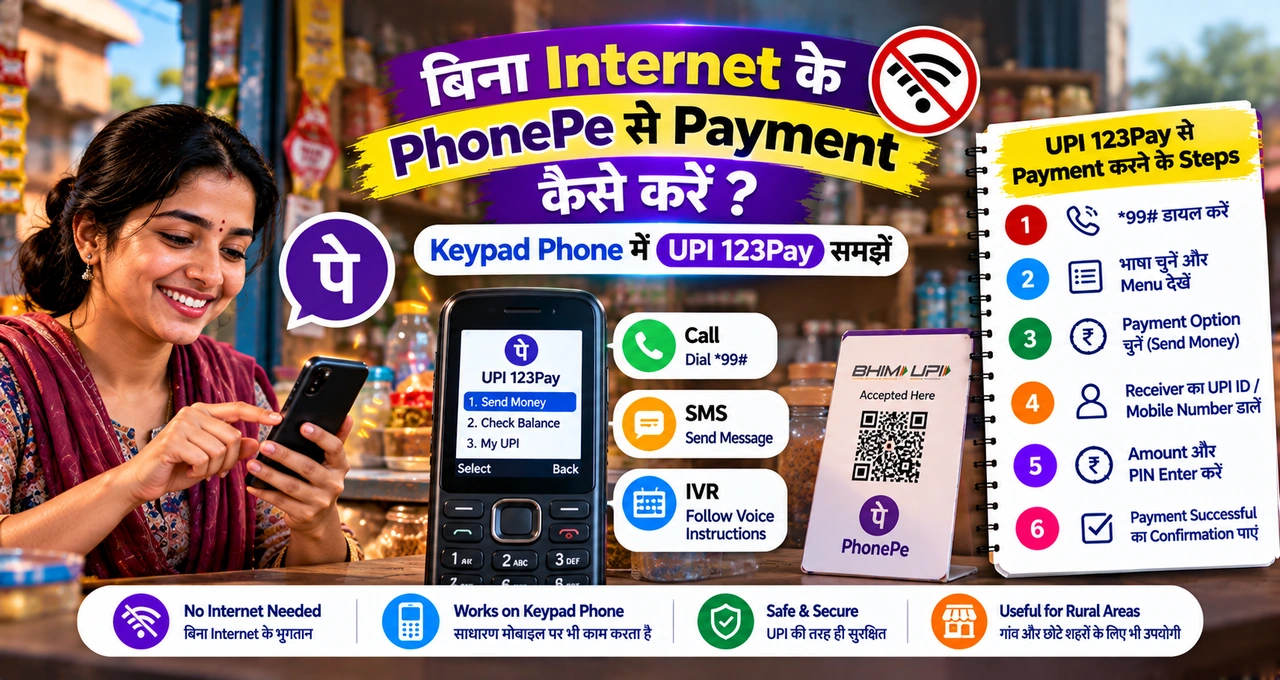
PhonePe UPI 123Pay feature-phone users के लिए बनाया गया UPI payment experience है। इसका main purpose यह है कि smartphone app और mobile data के बिना भी supported phone से basic UPI transactions किए जा सकें।
PhonePe की official announcement के अनुसार service SMS-based architecture use करती है और limited 2G connectivity वाले areas में भी transactions support करने के लिए designed है।
Company ने Nokia, HMD, Lava और Itel जैसे handset makers के साथ pre-bundled availability की बात कही है। इसका मतलब हर keypad phone automatically supported नहीं होगा; compatible device और enabled PhonePe experience जरूरी है।
अगर आप UPI का basic difference समझना चाहते हैं, तो UPI, wallet और card payment का difference पहले देख सकते हैं।
बिना Internet के PhonePe Payment कैसे काम करती है?
Normal smartphone PhonePe app internet connection पर depend करती है। Feature-phone version का architecture अलग है और transaction instructions SMS-based channel से process कर सकता है।
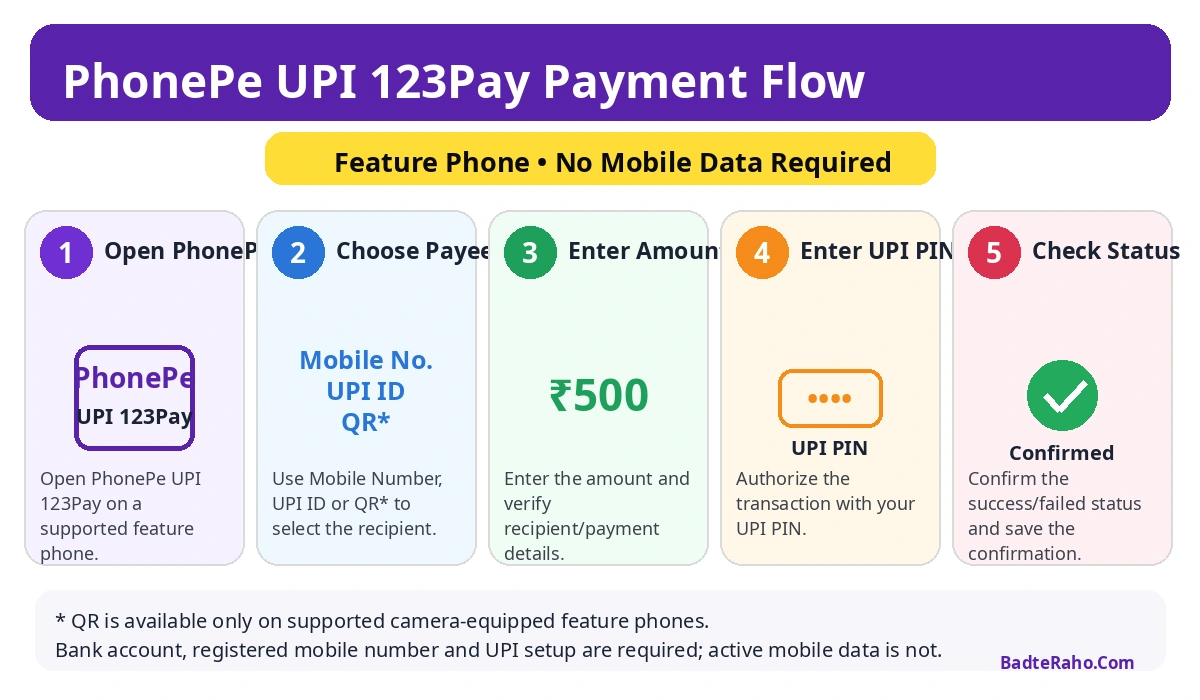
User supported PhonePe application या pre-bundled interface खोलता है, payee choose करता है, amount enter करता है और UPI PIN से payment authorize करता है। PhonePe के official material में mobile number, UPI ID और supported camera devices पर QR scan जैसे payment options बताए गए हैं।
यह “offline cash” जैसा system नहीं है। Bank account, registered mobile number, UPI setup और network signalling अभी भी जरूरी हो सकते हैं; फर्क यह है कि active internet data connection की requirement हटाई जाती है।
इसीलिए weak 2G areas और smartphone न use करने वाले users के लिए यह model useful हो सकता है।
itel 2165C में PhonePe Support का नया Update क्या है?
October 2026 की reporting के अनुसार itel 2165C feature phone में PhonePe-based digital payments without internet support की जानकारी सामने आई है। Device में 2-inch display, 1,200mAh battery और multiple Indian languages का support reported है।
लेकिन इस specific model पर activation के exact screens, all supported transaction types और rollout details reporting में पूरी तरह documented नहीं हैं।
इसलिए general PhonePe UPI 123Pay steps को itel 2165C के exact device-specific steps बताना सही नहीं होगा। अगर आपके phone में PhonePe option preloaded है, तो device instructions और PhonePe support flow follow करें।
नई capability को “PhonePe ने October में पहली बार बिना internet UPI launch किया” कहना भी गलत होगा, क्योंकि underlying UPI 123Pay launch August 31, 2026 को हो चुका था।
PhonePe UPI 123Pay Activate करने के General Steps
Official PhonePe guidance के अनुसार supported feature phone पर activation process में device registration, bank selection और UPI PIN setup शामिल हो सकता है। Exact screen labels handset के हिसाब से बदल सकते हैं।
- Supported device पर PhonePe UPI 123Pay application या payment option खोलें।
- Terms and conditions accept करके device registration complete करें।
- अपना bank select करें।
- Debit card के last 6 digits और expiry details enter करें, जहाँ required हो।
- UPI PIN set करें और generated UPI ID verify करें।
अगर device manufacturer का flow अलग है, तो उसी official on-screen setup को follow करें। किसी unofficial YouTube video या third-party APK को activation का authoritative source न मानें।
Payment कैसे करें?
PhonePe के official feature-phone workflow में multiple payment methods बताए गए हैं।
Mobile Number: recipient का registered mobile number enter करके payment initiate किया जा सकता है।
UPI ID: payee की UPI ID enter करके transaction किया जा सकता है।
Scan & Pay: camera-equipped supported feature phones पर QR scan option available हो सकता है।
Details verify करने के बाद amount enter करें, UPI PIN डालें और payment confirm करें। Transaction complete होने के बाद confirmation message या transaction status जरूर check करें।
क्या हर Keypad Phone में PhonePe चलेगा?
नहीं। “Feature phone” या “keypad phone” होना अकेले पर्याप्त नहीं है। PhonePe UPI 123Pay के लिए supported handset, compatible software और required banking setup चाहिए।
PhonePe ने handset manufacturers के साथ pre-bundled partnerships announce की हैं, लेकिन exact models और rollout समय अलग हो सकता है। इसलिए नया phone सिर्फ इस feature के लिए खरीदने से पहले official product page या manufacturer support से compatibility verify करें।
अगर किसी unsupported phone पर website या APK आपको “PhonePe offline install” करने को कहे, तो उसे suspicious मानें।
क्या QR Code से Payment हो सकती है?
Official PhonePe announcement के अनुसार camera support वाले feature phones पर Scan & Pay capability possible है। लेकिन हर feature phone में camera नहीं होता और हर supported model पर same UI होना जरूरी नहीं है।
QR scan के बाद merchant name और amount verify करना उतना ही important है जितना smartphone UPI में। गलत QR या edited QR code fraud का risk बना सकता है।
UPI payments में common mistakes से बचने के लिए UPI से पैसे भेजते समय 7 जरूरी checks भी useful हैं।
UPI PIN की जरूरत होगी?
हाँ, transaction authorization के लिए UPI PIN core security layer है। “Internet नहीं है” का मतलब “PIN नहीं चाहिए” नहीं होता।
UPI PIN किसी दुकानदार, customer-care caller, SMS link या unknown person के साथ share न करें। PhonePe या bank employee भी payment receive करने के लिए आपका UPI PIN नहीं मांगता।
UPI PIN security को detail में समझने के लिए UPI PIN को सुरक्षित रखने की guide पढ़ सकते हैं।
क्या Money Transfer और Merchant Payment दोनों Possible हैं?
PhonePe की official launch information P2P यानी person-to-person transfers और P2M यानी merchant payments दोनों का support बताती है। Mobile number या UPI ID से transfer और merchant UPI/QR payment जैसे options शामिल हैं।
साथ में account balance check और transaction history जैसी capabilities भी announced हैं। Future updates में bill payments, recharges और Aadhaar-based UPI onboarding जैसी features लाने की बात कही गई है।
लेकिन किसी specific handset पर कौन-से options live हैं, यह device-specific availability पर depend कर सकता है।
अगर Payment Failed या Pending हो जाए तो क्या करें?
Network-data requirement कम होने के बावजूद transaction banking rails पर process होती है, इसलिए pending, failed या delayed confirmation जैसी situations possible हैं।
Same payment तुरंत बार-बार repeat न करें। पहले transaction history या SMS confirmation check करें और bank balance verify करें।
अगर amount debit हो गई लेकिन recipient को नहीं मिली, तो transaction reference note करें और official PhonePe/bank support use करें। General refund issue के लिए online payment refund pending हो तो क्या करें वाला guide useful हो सकता है।
Feature Phone Users के लिए Safety Checks
- सिर्फ preinstalled या official supported PhonePe interface use करें।
- UPI PIN किसी से share न करें।
- Payee का नाम और UPI ID confirm करें।
- Payment के बाद confirmation SMS/history check करें।
- Unknown number से आए “UPI activate” instructions follow न करें।
- Device खो जाए तो SIM और bank access तुरंत secure करें।
Scammers नए feature का नाम use करके fake activation calls या messages चला सकते हैं। याद रखें: पैसे receive करने के लिए UPI PIN enter नहीं करना पड़ता।
Fraud patterns समझने के लिए UPI scam से बचने की practical guide भी जरूर देखें।
क्या यह Smartphone PhonePe का Replacement है?
Feature-phone UPI 123Pay का उद्देश्य smartphone app की सारी capabilities copy करना नहीं है। इसका focus essential payments को उन users तक पहुँचाना है जिनके पास smartphone या reliable mobile internet नहीं है।
Smartphone PhonePe में richer interface, broader services और faster navigation मिल सकती है। Feature-phone experience simpler और device-limited होगा, लेकिन basic transfer और merchant payment के लिए यही simplicity advantage भी हो सकती है।
किसके लिए यह Feature सबसे Useful है?
यह खासकर ऐसे users के लिए useful हो सकता है जो basic keypad phone use करते हैं, ग्रामीण या low-connectivity area में रहते हैं, या smartphone apps prefer नहीं करते।
Small merchants के लिए भी इसका indirect benefit है क्योंकि ज्यादा customers UPI ecosystem में participate कर सकते हैं।
लेकिन financial inclusion तभी practical होगी जब setup simple, language support clear और fraud education मजबूत हो। PhonePe ने voice-first AI helpline और multiple Indian languages support की भी बात कही है, जो onboarding में मदद कर सकती है।
Registered SIM और Bank Account का क्या Role है?
Feature-phone UPI setup में registered mobile number important रहेगा क्योंकि UPI identity bank account और mobile verification से जुड़ी होती है। इसलिए जिस SIM number से bank account linked है, वही supported device में active होना चाहिए जहाँ setup process इसकी requirement बताए।
SIM बदलने, duplicate SIM लेने या device registration change होने पर verification दोबारा required हो सकती है। ऐसे cases में unofficial workaround use न करें; bank, PhonePe या handset manufacturer के official support instructions follow करें।
अगर mobile number bank records से match नहीं करता, तो सिर्फ PhonePe app दिखाई देने से payment setup complete नहीं होगा।
क्या Internet बिल्कुल Zero होना जरूरी है?
“Without internet” का अर्थ यह है कि transaction के लिए normal mobile-data session required नहीं है। Service SMS-based communication और telecom network signalling पर depend कर सकती है, इसलिए active SIM/network coverage अभी भी practical requirement है।
अगर phone में बिल्कुल network signal नहीं है, तो transaction process होने की expectation नहीं रखनी चाहिए। Limited 2G connectivity वाले क्षेत्रों के लिए system useful हो सकता है, लेकिन zero-network situation अलग है।
इस distinction को समझना जरूरी है ताकि users offline UPI को airplane-mode payment जैसा न समझें।
अभी सबसे जरूरी बात क्या याद रखें?
PhonePe UPI 123Pay एक real feature-phone payment system है और इसका official launch August 31, 2026 को हुआ था। October की itel 2165C reporting इस broader rollout का device-specific example है, नया underlying launch नहीं।
Supported feature phones पर mobile number, UPI ID और कुछ camera devices पर QR payment possible हो सकती है, लेकिन exact device support verify करना जरूरी है।
Internet requirement कम होने के बावजूद UPI PIN, bank verification और fraud safety rules बिल्कुल वही seriousness मांगते हैं।
आख़िर में एक छोटी सी बात
Feature phone पर PhonePe UPI 123Pay digital payments को उन users के लिए ज्यादा accessible बना सकता है जो smartphone ecosystem से बाहर हैं। सबसे बड़ा फायदा convenience से ज्यादा inclusion है।
लेकिन device-specific activation को लेकर assumptions न बनाएं—अपने handset और PhonePe के official instructions verify करके ही setup करें।
अगर आपके feature phone में PhonePe UPI 123Pay option दिखाई दे रहा है, पहले bank और device details verify करके छोटा test transaction करें। UPI PIN और activation details किसी unknown caller या third-party app के साथ कभी share न करें।