















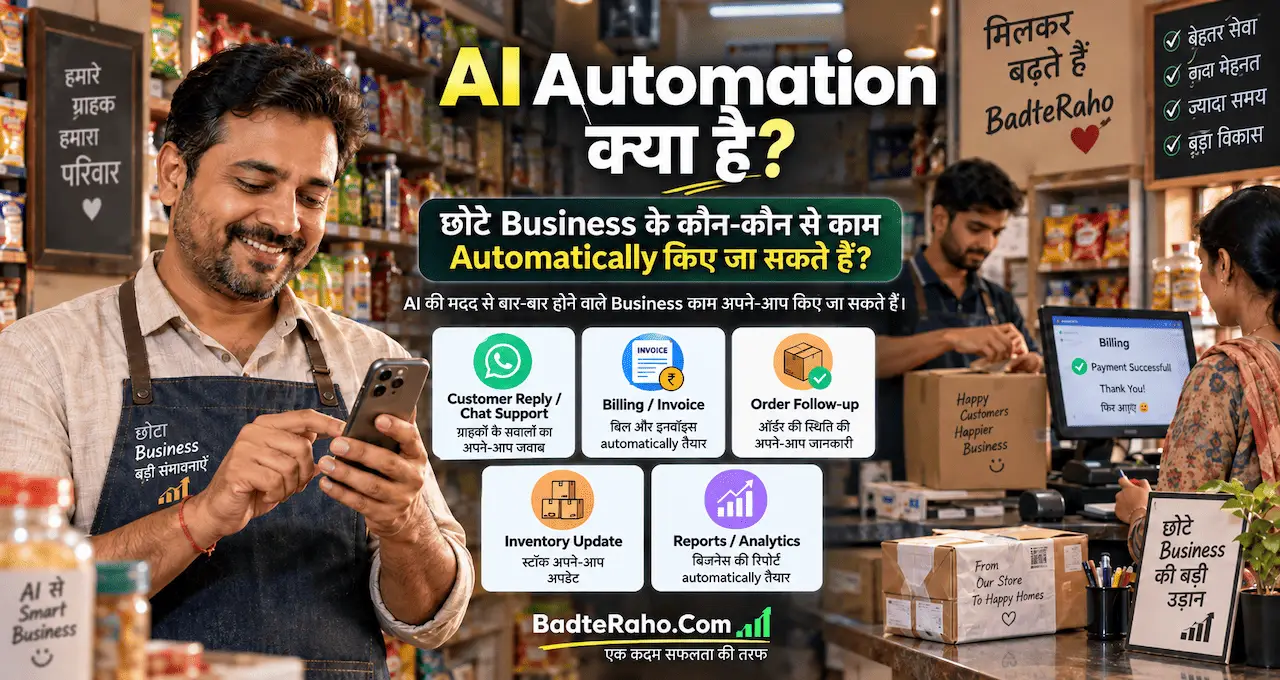




कई छोटे business owners रोज़ वही काम बार-बार करते हैं—enquiry का जवाब, order entry, reminder, follow-up और report update।
इनमें से हर काम AI से नहीं होना चाहिए, लेकिन कई repetitive steps को सही system बनाकर automatically चलाया जा सकता है। यही AI Automation का practical use है।
AI automation का मतलब business को “AI के भरोसे छोड़ देना” नहीं है। इसका मतलब है कि जहाँ कोई काम बार-बार एक pattern में होता है, वहाँ software, rules और ज़रूरत पड़ने पर AI को जोड़कर manual effort कम किया जाए।
सही automation owner का समय बचा सकती है, response तेज़ कर सकती है और missed follow-up कम कर सकती है। गलत automation customer experience खराब भी कर सकती है।
इसलिए सवाल “क्या automate किया जा सकता है?” से पहले यह होना चाहिए—“कौन-सा काम automate करना safe और useful है?”
इस लेख में आप क्या सीखेंगे?
- AI automation क्या है
- कौन-से काम automate हों
- AI कहाँ useful है
- Workflow कैसे बनता है
- किन कामों में review चाहिए
- शुरुआत कहाँ से करें
AI Automation क्या है?
Simple automation में एक fixed rule होता है:
अगर X हुआ → Y action करो
जैसे form submit होते ही Google Sheet में नई row बनाना या payment due होने से पहले reminder भेजना।
AI automation में workflow के किसी step पर AI context समझने, text classify करने, summary बनाने, draft तैयार करने या unstructured information से useful data निकालने में मदद करता है।
उदाहरण:
Customer enquiry आई
→ system enquiry capture करे
→ AI message को “sales”, “support” या “general” category में classify करे
→ सही team या person को assign करे
→ ज़रूरत हो तो reply draft तैयार करे
→ human final response approve करे
Zapier की current documentation भी workflows को trigger और actions के model पर describe करती है, और AI steps को summarization, classification, drafting तथा decision-support जैसे कामों में use करने की capability बताती है।
इसलिए हर automation को AI की ज़रूरत नहीं होती। Fixed और predictable काम traditional rules से बेहतर चल सकते हैं, जबकि messy text, classification या summarization जैसे steps में AI useful हो सकता है।
अगर AI का basic concept अभी नया है, तो Generative AI कैसे काम करता है समझने के बाद automation का role और साफ़ हो जाएगा।
छोटे business में कौन-से काम automate किए जा सकते हैं?
Automation का best use उन tasks में होता है जो repeat होते हैं, clear trigger से शुरू होते हैं और जहाँ output का format काफी predictable है।
1. Customer enquiry capture
Website form, Instagram lead form, email या किसी दूसरे channel से enquiry आने पर उसे manually notebook या spreadsheet में लिखने की ज़रूरत नहीं होनी चाहिए।
Automation enquiry से ये details capture कर सकती है:
- Name
- Phone या email
- Interested service
- Source
- Date
- Follow-up status
इसके बाद record CRM या spreadsheet में save हो सकता है और owner को notification मिल सकती है।
यह छोटा workflow enquiry खोने का risk कम करता है।
2. WhatsApp welcome और away messages
हर message का instant personal reply देना possible नहीं होता। WhatsApp Business में greeting, quick replies और away-message जैसे tools customer communication को structured बना सकते हैं।
WhatsApp की current help documentation के अनुसार away messages को schedule किया जा सकता है और यह तय किया जा सकता है कि किन customers को message भेजना है।
अगर आपका business WhatsApp पर enquiries लेता है, तो WhatsApp Business का practical setup पहले समझना useful रहेगा।
लेकिन automated message को actual conversation का replacement न बनाएँ। Complex query या unhappy customer को human response मिलना चाहिए।
3. Lead follow-up reminders
कई sales सिर्फ़ इसलिए miss होती हैं क्योंकि enquiry आने के बाद follow-up नहीं होता।
Simple automation यह कर सकती है:
New lead added
→ 24 घंटे बाद follow-up reminder
→ response नहीं आया तो 3 दिन बाद दूसरा reminder
→ status update होने पर sequence stop
AI यहाँ customer के पुराने message के आधार पर personalized follow-up draft suggest कर सकता है। लेकिन pricing, discount या commitment automatically भेजने से पहले rules clear होने चाहिए।
4. Appointment और booking reminders
Salon, consultant, tutor, clinic या service business में appointment miss होना common problem हो सकती है।
Booking confirm होते ही calendar entry, confirmation message और appointment से पहले reminder automatically trigger किए जा सकते हैं।
इसके लिए AI ज़रूरी नहीं है। यह pure rule-based automation का अच्छा example है।
यही important distinction है—हर automation को AI-powered बनाना ज़रूरी नहीं है।
5. Invoice और payment reminder
Invoice create होने पर, due date पास आने पर या payment overdue होने पर reminder workflow चलाया जा सकता है।
Example:
Invoice issued
→ due date save
→ 2 दिन पहले polite reminder
→ due date पर reminder
→ payment received होने पर sequence stop
AI reminder wording को polite या customer-specific बनाने में मदद कर सकता है, लेकिन amount, due date और payment status accounting system से ही आने चाहिए—AI से guess नहीं होना चाहिए।
6. Order और inventory updates
Small online seller या home business में नया order आने पर कई manual steps होते हैं—order sheet update करना, packing status बदलना, stock घटाना और customer को status बताना।
Connected tools होने पर इनमें से कई steps automate किए जा सकते हैं।
लेकिन inventory automation तभी useful है जब source data accurate हो। गलत stock count को automation और तेज़ी से गलत जगह भेज सकती है।
अगर आपका business अभी शुरुआती stage में है, तो घर से business शुरू करने की basic planning में process और records clear करना automation से पहले useful रहेगा।
7. Email sorting और draft replies
Business inbox में sales enquiries, vendor mails, support requests और spam mix हो सकते हैं।
AI incoming email को category में classify कर सकता है, short summary बना सकता है और reply draft तैयार कर सकता है।
यहाँ safe workflow कुछ ऐसा हो सकता है:
Email received
→ AI category detect करे
→ summary बने
→ reply draft तैयार हो
→ human review
→ send
High-value client, complaint, refund या legal issue में auto-send avoid करना बेहतर है।
8. Daily या weekly reports
अगर आप sales, enquiries, orders या expenses spreadsheet में track करते हैं, तो रोज़ manually summary बनाना ज़रूरी नहीं है।
Automation day-end या week-end पर data collect करके report बना सकती है:
- कितनी enquiries आईं
- कितने orders बने
- कितने pending हैं
- कौन-से leads follow-up माँगते हैं
- कौन-सी category सबसे active रही
AI summary को simple language में बदल सकता है—लेकिन final numbers source spreadsheet या database से आने चाहिए।
AI कहाँ सबसे ज़्यादा value जोड़ता है?
AI वहाँ useful है जहाँ input थोड़ा messy या unstructured हो।
जैसे:
- Customer message classify करना
- Long email summarize करना
- Feedback से common complaints निकालना
- Follow-up का first draft बनाना
- Meeting notes से action items निकालना
- Product enquiries को categories में बाँटना
अगर prompt vague होगा, output भी inconsistent हो सकता है। इसलिए automation में इस्तेमाल होने वाले prompts को clear instructions, expected format और boundaries देना ज़रूरी है। बेहतर AI prompts लिखने की practice इस काम में directly useful है।
एक और important point: AI गलत interpretation कर सकता है। अगर automation किसी important customer action, money, refund, contract या public claim को affect करती है, तो human approval step रखें।
AI hallucination क्यों होती है समझना automation बनाते समय खास तौर पर useful है, क्योंकि automated गलत output manual mistake से ज़्यादा तेज़ी से scale हो सकता है।
एक simple AI automation workflow कैसे सोचें?
Automation tool चुनने से पहले process कागज़ पर लिखें।
Step 1: Trigger पहचानें
Workflow कब शुरू होगा?
उदाहरण:
- New form submitted
- New email received
- New order placed
- Due date approaching
- New row added
Step 2: Required data तय करें
Workflow को कौन-सी information चाहिए?
Name, phone, order ID, due date, message text, product या status?
Step 3: Rules लिखें
कौन-सी condition पर कौन-सा action होना चाहिए?
Example:
अगर enquiry “pricing” से जुड़ी है → sales list में जाए
अगर “complaint” है → owner को priority alert मिले
Step 4: AI केवल ज़रूरत वाली जगह लगाएँ
अगर काम सिर्फ data copy करना है, AI की ज़रूरत नहीं है।
अगर message समझना, summarize करना या draft बनाना है, तब AI useful हो सकता है।
Step 5: Human review point तय करें
कहाँ automation बिना approval के आगे बढ़ सकती है और कहाँ इंसान को check करना चाहिए?
यही सबसे important safety layer है।
No-code automation platforms आज trigger-action workflows, filters और AI steps को जोड़ने देते हैं; कुछ tools plain-language assistance से workflow build करने में भी मदद करते हैं।
कौन-से काम पूरी तरह automate नहीं करने चाहिए?
Automation का मकसद human judgement खत्म करना नहीं है।
इन situations में human review रखना बेहतर है:
Customer complaints
Angry या sensitive customer को robotic reply situation खराब कर सकता है।
Refund और money decisions
Amount, eligibility और exception cases manually verify करें।
Legal या contractual communication
AI-generated draft को बिना review के send करना risk पैदा कर सकता है।
Public claims और marketing promises
Price, offer, guarantee, health, financial या performance claims verify होने चाहिए।
Employee-related decisions
Hiring, performance या disciplinary decision सिर्फ़ automated AI output पर based नहीं होना चाहिए।
Simple rule है:
Low-risk repetitive task → ज़्यादा automation
High-risk judgement task → ज़्यादा human review
Automation शुरू करने के लिए कौन-से tools चाहिए?
छोटे business को शुरुआत में complex software stack की ज़रूरत नहीं होती।
आपका workflow आम तौर पर इन categories के tools से बन सकता है:
- Form या lead source
- Spreadsheet या CRM
- Email/WhatsApp communication
- Calendar
- Payment/accounting tool
- Automation connector
- AI model
Zapier जैसे platforms अलग apps को trigger-action workflows में connect कर सकते हैं, जबकि AI step summarization, classification या drafting जोड़ सकता है। Current Zapier documentation 9,000+ app integrations का उल्लेख करती है, लेकिन किसी भी tool को सिर्फ integration count देखकर नहीं चुनना चाहिए—आपके actual apps, pricing, privacy और required workflow ज़्यादा important हैं।
कुछ browser-based AI tools websites पर multi-step काम भी कर सकते हैं। अगर आप यह area समझना चाहते हैं, तो AI Browser कैसे websites पर काम करता है एक useful background guide है।
Automation लगाने से पहले 5-point test करें
किसी task को automate करने से पहले पूछें:
- क्या यह काम बार-बार repeat होता है?
- क्या इसका clear trigger है?
- क्या input data reliable है?
- गलती होने पर नुकसान कितना होगा?
- क्या human approval की ज़रूरत है?
अगर task महीने में एक बार होता है और सिर्फ़ दो मिनट लेता है, तो automation बनाने में ज़्यादा समय खर्च करना शायद useful नहीं होगा।
इसके उलट अगर रोज़ 30 enquiries manually sheet में copy करनी पड़ती हैं, तो automation जल्दी value दे सकती है।
पहला target “सब कुछ automate करना” नहीं होना चाहिए।
एक repetitive pain point चुनें, छोटा workflow बनाएँ और उसका result measure करें।
छोटे business में AI Automation की common mistakes
Tool देखकर process बनाना
पहले problem चुनें, tool बाद में।
Broken process automate करना
अगर current process ही unclear है, तो automation confusion को तेज़ करेगी।
AI पर ज़रूरत से ज़्यादा भरोसा
AI classification या draft helpful है, final truth नहीं।
Error alerts न रखना
Automation fail हो और किसी को पता ही न चले, तो missed orders या leads हो सकते हैं।
Customer को robotic experience देना
हर message auto-send करने से communication impersonal लग सकती है।
Privacy ignore करना
Customer names, phone numbers, invoices या internal business data किन tools से गुजर रहा है, यह समझना ज़रूरी है।
आख़िर में एक छोटी सी बात
AI Automation छोटे business के लिए सबसे useful तब है जब वह किसी real repetitive problem को solve करे—सिर्फ़ इसलिए नहीं कि automation अभी popular topic है।
Enquiry capture, reminders, order updates, email sorting और reports जैसे काम छोटे workflows से शुरू किए जा सकते हैं।
जहाँ text समझना, classify करना या draft बनाना हो वहाँ AI जोड़ें; जहाँ money, complaint या important decision हो वहाँ human review रखें।
अगर आपने पहले से कोई automation लगा रखी है, तो उसका सबसे useful result भी share करें—आपका experience दूसरे small business owners को सही शुरुआत चुनने में मदद कर सकता है।
अगर आपके business में कोई काम रोज़ या हर हफ्ते बार-बार repeat होता है, comment में वह task बताइए जिसे आप सबसे पहले automate करना चाहेंगे।