





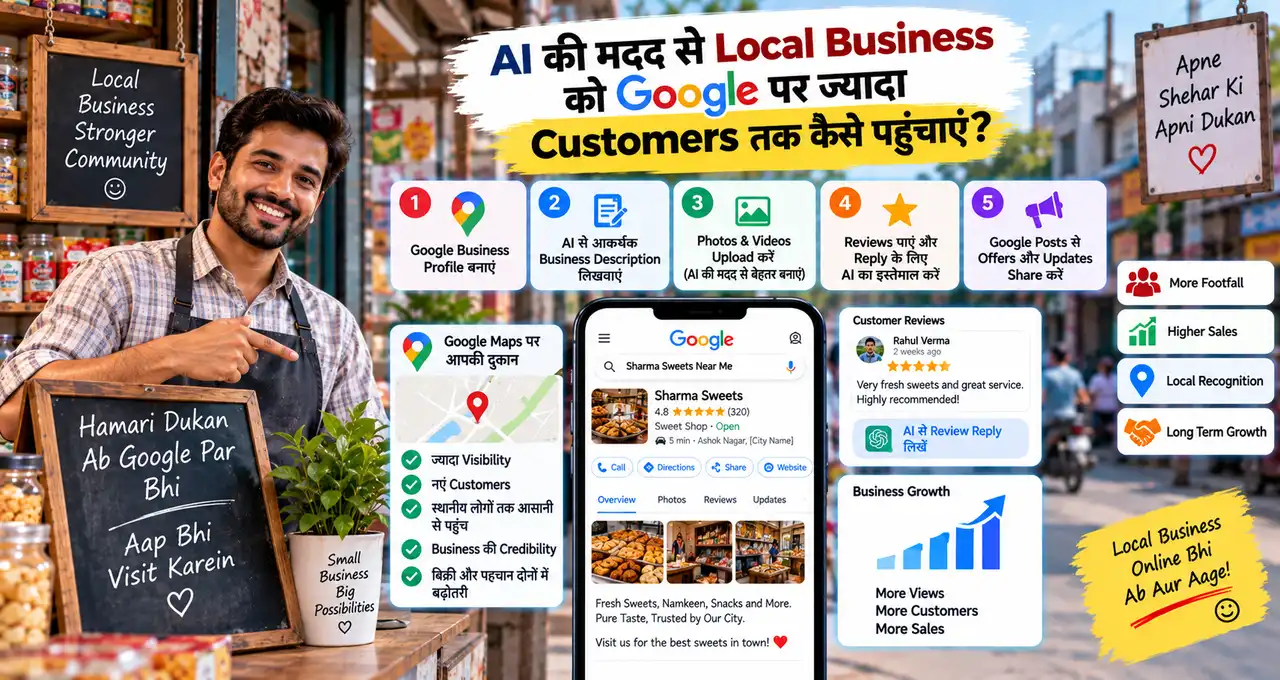
आज कोई व्यक्ति अपने आसपास “Restaurant near me”, “Salon near me”, “Mobile Repair Shop”, “Best Bakery” या किसी दूसरी Local Service को Search करता है, तो उसके सामने कई Businesses दिखाई दे सकते हैं।
यानी आज Customer के लिए आपकी दुकान तक पहुंचने का रास्ता सिर्फ़ सड़क से नहीं, Google Search और Maps से भी होकर जाता है।
लेकिन यहां एक सवाल है—
अगर आपकी दुकान या Local Business Google पर मौजूद तो है, लेकिन लोग उसे देख नहीं रहे हैं, तो क्या किया जाए?
यहीं पर AI आपकी मदद कर सकता है।
लेकिन Google पर visibility बढ़ाने के लिए AI कहाँ सच में काम आता है, और कहाँ सिर्फ़ अच्छी profile management की ज़रूरत है? आगे इसी फर्क को practical तरीके से समझेंगे।
इस लेख में आप क्या सीखेंगे?
- Google profile सही बनाना
- Local searches समझना
- AI से content बनाना
- Reviews बेहतर manage करना
- Photos और posts सुधारना
- Performance से decisions लेना
Google पर Local Business को Customers कैसे मिलते हैं?
Local customer अक्सर business का नाम नहीं जानता। वह “salon near me”, “AC repair”, “bakery near me” या किसी service + location जैसी search करता है। Google ऐसे local searches में Search और Maps पर relevant Business Profiles दिखा सकता है।
Google Business Profile free है और eligible storefront या service-area businesses के लिए बनाया गया है। Verified profile से business hours, phone, website, location या service area, photos और reviews जैसी information manage की जा सकती है।
इसलिए पहला goal “Google पर rank #1” नहीं होना चाहिए। पहले यह देखें कि customer को profile देखकर तीन सवालों का clear answer मिलता है या नहीं: आप क्या करते हैं, कहाँ service देते हैं और contact कैसे करना है?
अगर business की overall marketing अभी scattered है, तो AI की मदद से छोटे Business की Marketing कैसे करें? बिना बड़ी Marketing Team के तरीके broader marketing structure को समझने में मदद करेंगे।
सबसे पहले Google business profile claim और verify करें
अगर profile बनी ही नहीं है, तो उसे add करें। अगर Google पर business पहले से दिख रहा है, तो duplicate profile बनाने से पहले check करें कि existing listing claim की जा सकती है या नहीं।
Verification method हर business के लिए same नहीं हो सकता। इसलिए Google जो verification option दिखाए, उसी process को follow करें। Business name, address और category में ऐसी details न जोड़ें जो सिर्फ़ keywords भरने के लिए हों।
Service-area business, जैसे plumber या home-service provider, customer-facing shop न होने पर अपना address public दिखाए बिना service area set कर सकता है। Eligibility और address setup business model के हिसाब से रखें।
गलत address या fake location short-term trick नहीं, profile risk बन सकती है।
Business information को complete और consistent रखें
Profile में वही information लिखें जो customer को decision लेने में सच में चाहिए। Business name, primary category, hours, phone, website, location/service area और relevant attributes को पहले सही करें।
Category खास तौर पर important है। Primary category business के core काम को describe करनी चाहिए। Additional categories तभी जोड़ें जब वे वास्तव में offered services को represent करती हों।
मान लीजिए आपका business “women’s salon” है। सिर्फ़ broad “beauty” type wording सोचने की बजाय Google के available category options में सबसे specific relevant category चुनें। Google के अनुसार categories local results में business को relevant searches से match करने में मदद करती हैं।
Local demand समझने के लिए छोटे शहर में कौन-सा Business शुरू करें? Local Demand देखकर सही Idea चुनें का customer-problem approach यहाँ भी useful है।
AI से Local search intent map बनाएँ
अब AI का पहला practical use आता है। AI से “मुझे keywords दो” कहने की बजाय customer situations बनवाएँ।
उदाहरण के लिए local bakery के customers अलग-अलग intent से search कर सकते हैं:
- Birthday cake nearby
- Eggless cake
- Same-day cake
- Custom cake
- Bakery open now
- Cake shop in [Area]
इन phrases को blindly profile में भरना नहीं है। इनका इस्तेमाल customer language समझने के लिए करें। फिर check करें कि इनमें से कौन-सी services सच में available हैं।
AI prompt:
मेरा local business [Business Type] है और मैं [Area/City] में customers serve करता/करती हूँ।
मेरी verified services हैं: [Services].
मेरे लिए customer search intent को 5 groups में organize करें: urgent need, product/service type, location-based search, trust-based search और comparison search.
कोई ऐसी service, location, price, timing या claim invent न करें जो मैंने provide नहीं किया है। Output का use keyword stuffing के लिए नहीं, profile content और customer questions समझने के लिए होना चाहिए।
यह exercise profile description, services, posts और FAQs के लिए useful language दे सकती है।
Google local ranking को “AI Trick” की तरह न देखें
Google पर Local Business की visibility समझने के लिए ranking factors को सही context में देखना ज़रूरी है। Google की official guidance के अनुसार local results मुख्य रूप से relevance, distance और prominence पर based होते हैं।
Complete information relevance में मदद कर सकती है। Distance customer की location से जुड़ा factor है, जिसे AI बदल नहीं सकता। Prominence में business की overall recognition, web information और reviews जैसे signals शामिल हो सकते हैं।
यानी AI से review reply लिखवाकर या description polish करके आप profile management बेहतर कर सकते हैं। लेकिन AI कोई guaranteed ranking button नहीं है।
Google यह भी कहता है कि बेहतर local ranking के लिए payment करके organic position खरीदी नहीं जा सकती।
Business description और services को customer language में लिखें
Description का काम keywords की लंबी list बनाना नहीं है। इसे short, clear और specific रखें।
Weak description:
“Best salon, top salon, cheap salon, beauty salon, bridal salon…”
Better direction:
“[Area] में women’s salon जहाँ haircut, hair spa, makeup और bridal services available हैं। Appointment और current timings के लिए contact करें।”
AI से first draft लिया जा सकता है। लेकिन area, services, timing, pricing और claims owner verify करें।
अगर आपके पास कई services हैं, तो उन्हें customer-friendly groups में organize करें। उदाहरण के लिए, repair business “installation”, “routine service” और “repair” को अलग-अलग समझा सकता है।
जो service आप देते नहीं हैं, उसे सिर्फ़ search visibility के लिए add न करें।
Real photos profile को ज़्यादा useful बनाती हैं
Customer local business चुनते समय यह भी देखता है कि place और service real लग रहे हैं या नहीं। इसलिए storefront, entrance, team, products, seating, work examples या service environment की साफ़ photos helpful हो सकती हैं।
Google की current guidance कहती है कि photos clear, well-lit और reality को represent करने वाली होनी चाहिए। Heavy filters या misleading alterations avoid करने चाहिए।
AI यहाँ photo invent करने से ज़्यादा planning में useful है। उदाहरण के लिए AI से 10-photo shot list बनवा सकते हैं:
- Exterior
- Entrance
- Interior
- Team
- Best-selling product
- Service in action
- Packaging
- Seating/work area
- Signboard
- Customer-ready setup
अगर generated image actual shop या product से materially different है, तो उसे real-location proof की तरह use न करें।
Reviews को growth system की तरह manage करें
Reviews सिर्फ़ rating नहीं हैं। वे नए customer को quality, service और complaint-handling का signal देते हैं।
Satisfied customer को review link या QR code share करके genuine feedback माँगा जा सकता है। लेकिन review के बदले discount, free item या reward देना Google की policy के खिलाफ है।
हर review के लिए लंबा reply ज़रूरी नहीं है। Positive review में short thanks काफी हो सकता है। Detailed review में specific point acknowledge करें। वहीं negative review में public argument करने के बजाय issue समझें और जहाँ possible हो, resolution path दें।
AI reply draft बना सकता है:
इस customer review का 40–70 शब्द का professional reply draft करें।
Review: [Paste Review]
Tone polite और human रखें। Customer ने जो कहा नहीं है, वह invent न करें। Refund, compensation या policy promise खुद से add न करें। Negative review हो तो defensive language avoid करें और next practical step suggest करें।
Final reply publish करने से पहले owner context check करे।
Customer trust और repeat orders पर Sales कैसे बढ़ाएं? छोटे Business के लिए 10 Practical तरीके और Customer Growth Guide भी useful है।
Google Posts से offers और updates share करें
Business Profile पर updates, offers और event information post की जा सकती है। Google के अनुसार posts Search और Maps पर customers को business updates दिखाने में मदद कर सकते हैं।
AI से weekly post ideas बनवा सकते हैं, लेकिन हर post promotional होना ज़रूरी नहीं है। Content mix रखें:
- New product/service
- Festival timing
- Limited offer
- Useful customer tip
- Behind-the-scenes update
- Booking reminder
इसके अलावा एक simple AI instruction दे सकते हैं: “4 weekly post ideas बनाएं; कोई fake discount, fake urgency या unavailable service invent न करें।”
अगर social content भी grow करना है, तो AI से Social Media Marketing करके छोटे Business को Customer कैसे दिलाएं? में broader content workflow मिलेगा।
Google से WhatsApp या Website तक Next Step आसान बनाएं
Profile पर customer interest दिखता है, लेकिन sale तभी बनेगी जब अगला step clear हो। Phone, website, booking या available messaging options को सही रखें।
अगर customer WhatsApp पर enquiries करता है, तो वहाँ basic response system तैयार रखें। उदाहरण:
“नमस्ते, [Business Name] से संपर्क करने के लिए धन्यवाद। कृपया service/product, preferred date और area बताएं। हम availability check करके reply करेंगे।”
AI से quick replies बनवाए जा सकते हैं। लेकिन price, stock और delivery promise live information के हिसाब से confirm करें।
WhatsApp setup के लिए WhatsApp Business क्या है? छोटे दुकानदार और Business के लिए इसका इस्तेमाल कैसे करें? relevant guide है।
Performance Data से पता करें क्या काम कर रहा है
Verified Business Profiles में performance data available हो सकता है। इसमें profile views, searches और applicable customer interactions जैसे metrics मिल सकते हैं। Search terms से यह भी समझा जा सकता है कि लोग business तक किन queries से पहुँच रहे हैं।
हर week numbers देखकर panic न करें। इसके बजाय monthly comparison ज़्यादा useful हो सकता है।
एक simple review sheet रखें:
| Metric | पिछले Period | इस Period | क्या बदला? |
|---|---|---|---|
| Profile views | |||
| Search terms | |||
| Calls/Clicks | |||
| Direction requests | |||
| Reviews |
AI को यह data देकर pattern summary बनवा सकते हैं। फिर पूछें: “कौन-से changes के बाद improvement दिखी और कौन-से conclusions data support नहीं करते?”
इससे AI guess करने की बजाय decision-support tool बनता है।
Gemini से Business Profile Manage करना संभव है?
Google ने Business Profile को Gemini web app से connect करके कुछ management और insights tasks को support करने की सुविधा announce की है। इसमें profile information, review-reply drafts, posts और performance insights जैसे use cases शामिल हैं।
लेकिन यह feature gradual rollout में है और availability account/profile conditions पर depend कर सकती है।
इसलिए “सबको यह feature मिल गया है” assume न करें। अगर आपके account में option दिखता है, तो use करें। अगर नहीं दिखता, तो normal Google Search/Maps Business Profile management workflow अभी भी valid है।
30-Day Google Visibility Plan
पहले 30 दिनों में हर feature का use करने की कोशिश न करें। एक simple sequence रखें।
Week 1: Profile Foundation
Business claim/verify करें। Category, phone, hours, location/service area और website details check करें। गलत या duplicate information पहले fix करें।
Week 2: Trust Assets
Real photos upload करें। Services update करें। Existing genuine reviews का जवाब दें। Review-request link या QR process बनाएँ।
Week 3: Content और Enquiry
2–4 useful posts test करें। WhatsApp/phone enquiry response तैयार करें। AI से customer questions और search intents organize करें।
Week 4: Performance Review
Search terms, views और applicable interactions देखें। किस update के बाद customer actions बदले, यह note करें। अगले 30 दिनों के लिए सिर्फ़ 2–3 priorities चुनें।
एक साथ 20 बदलाव करने से यह समझना मुश्किल हो जाता है कि वास्तव में क्या काम कर रहा है।
AI से Google Business Profile Audit कराने का Prompt
आप मेरे local-business visibility assistant हैं।
Business type: [Business Type]
City/Area: [Location]
Verified services: [Services]
Current profile information: [Paste Current Details]
Recent reviews/themes: [Paste Summary]
Available photos: [Photo Types]
Performance/search terms, अगर available हों: [Data]
Profile को इन areas में audit करें: information completeness, category/service clarity, customer search intent, description clarity, photos needed, review-response gaps, post ideas और enquiry conversion.
हर suggestion को High / Medium / Low priority दें।
कोई business fact, service, price, timing, ranking result, review, location या Google policy invent न करें। जिस detail की पुष्टि चाहिए, उसे “Verify manually” mark करें।
अंत में अगले 7 दिनों के लिए सिर्फ़ 5 practical actions दें।
यह prompt strategy organize कर सकता है। Final edits Google की current profile options और business reality देखकर करें।
Common Mistakes जो Local Visibility को कमजोर कर सकती हैं
- Profile claim/verify न करना
- गलत primary category चुनना
- Hours update न रखना
- Fake location add करना
- Services keyword के लिए invent करना
- Real photos की जगह misleading visuals लगाना
- Reviews खरीदना या incentive देना
- Negative reviews से public argument करना
- हर post में fake urgency बनाना
- Performance data देखे बिना strategy बदलना
- AI draft बिना fact-check publish करना
- Google visibility को social media का replacement समझना
Google profile customer discovery का एक channel है। Social media, WhatsApp, website, local reputation और actual service quality साथ काम करते हैं।
आख़िर में एक छोटी सी बात
Google पर Local Business grow करने का सबसे practical तरीका किसी hidden SEO trick से शुरू नहीं होता। शुरुआत accurate profile, सही category, real photos, genuine reviews और clear customer next step से होती है।
AI इन tasks को faster और more organized बना सकता है। यह search-intent ideas, post drafts, review replies और performance analysis में मदद करेगा। लेकिन business facts और final judgement owner के पास ही रहने चाहिए।
अगर आपका Google Business Profile पहले से बना है, तो आज सिर्फ़ एक काम करें: उसे customer की नज़र से खोलकर देखें और पूछें—“क्या कोई नया customer 30 seconds में समझ सकता है कि हम क्या करते हैं, कहाँ हैं और contact कैसे करना है?” Comments में बताएं कि आपके profile में सबसे पहले क्या improve करने की ज़रूरत दिखी।