









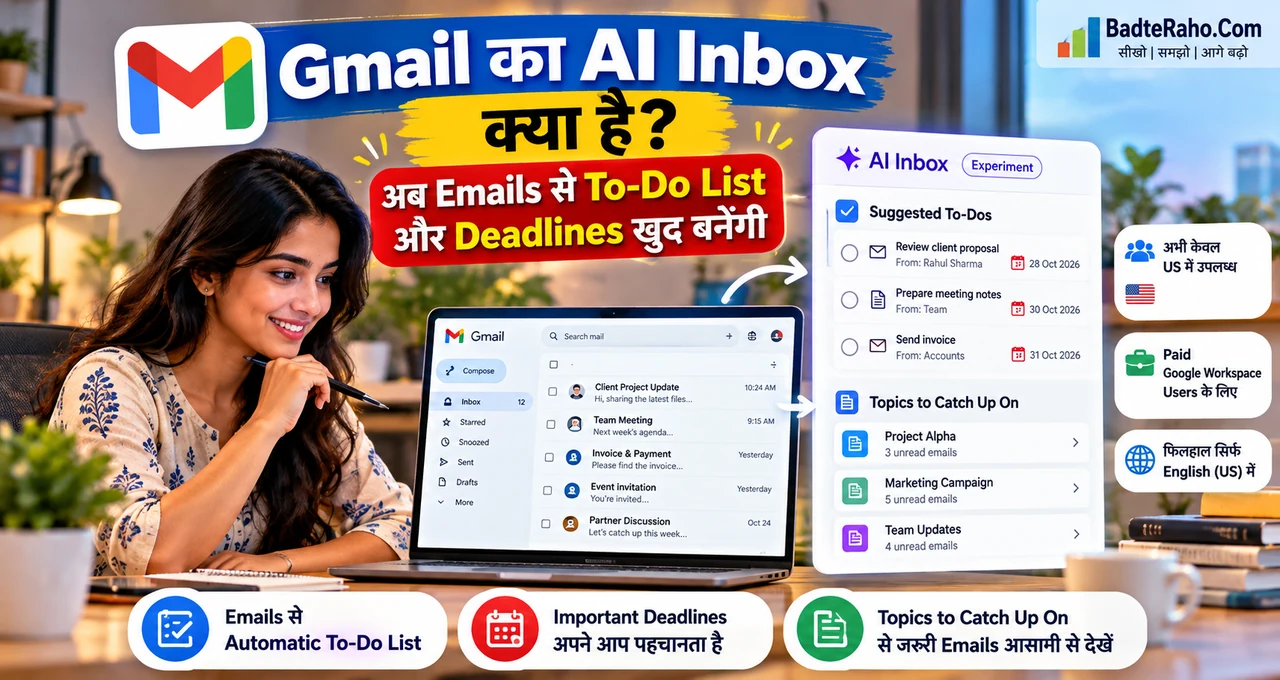





Inbox में छिपी deadlines और pending काम ढूँढना Gmail के नए AI Inbox का main purpose है।
Google ने AI Inbox को paid Workspace users तक expand करना शुरू किया है। यह email conversations से Suggested To-Dos निकाल सकता है—जैसे invoice भेजना, proposal review करना या deadline तक report complete करना—और “Topics to Catch Up On” के जरिए लंबे threads से important updates summarize कर सकता है।
लेकिन अभी availability limited है: feature US users, English (US) language और eligible paid Workspace editions तक restricted है। India के normal Gmail users के लिए इसे available feature बताना गलत होगा।
अब practical example से समझते हैं कि AI Inbox ordinary inbox से अलग कैसे काम करता है।
इस लेख में आप क्या सीखेंगे?
- Gmail AI Inbox क्या है
- Suggested To-Dos कैसे बनते हैं
- Topics to Catch Up On क्या करता है
- किन accounts को अभी access मिल रहा है
- India availability की स्थिति
- Freelancers और small teams इसे कैसे use कर सकते हैं
Gmail AI Inbox क्या है?
AI Inbox Gmail का AI-assisted view है जो सिर्फ emails की list दिखाने के बजाय inbox के अंदर important actions और topics surface करता है।
Google Workspace की 15 October announcement के मुताबिक AI Inbox paid Workspace users के daily business workflows को simplify करने के लिए expand किया जा रहा है।
Feature दो main capabilities पर focused है: Suggested To-Dos और Topics to Catch Up On। दोनों email content को analyse करके user को action और context जल्दी दिखाने की कोशिश करते हैं।
यह normal label या filter का replacement नहीं है। Filters fixed rules follow करते हैं, जबकि AI Inbox email language और conversation context से relevant work identify करने की कोशिश करता है।
Gmail AI Inbox कैसे काम करता है?
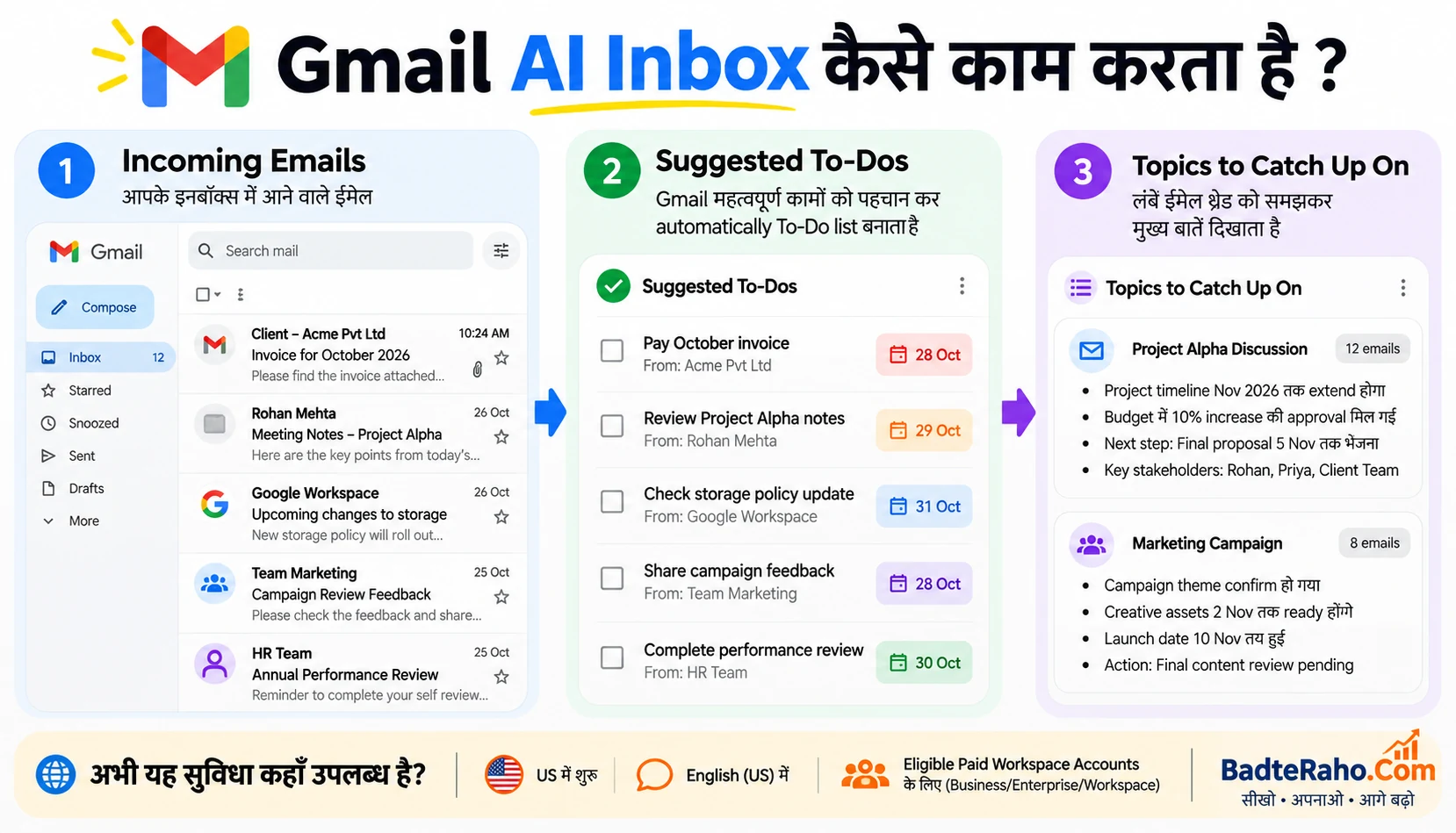
मान लीजिए client email करता है: “Friday तक revised proposal भेज दीजिए और invoice भी attach कर दें।” Normal inbox में यह instruction message body के अंदर रहती है।
AI Inbox Suggested To-Dos section में “Send revised proposal” और “Send invoice” जैसे action items identify कर सकता है, साथ में deadline surface कर सकता है।
दूसरी तरफ, अगर project पर 15-email thread चल रही है, Topics to Catch Up On important decision, status changes और latest updates का concise summary दे सकता है।
Goal यह है कि user हर thread manually scan किए बिना important काम identify कर सके। Final task completion फिर भी user की responsibility रहती है।
Suggested To-Dos क्या है?
Suggested To-Dos email conversations से action items, deliverables और deadlines automatically detect करने की capability है।
Example: manager लिखता है “Monday morning से पहले Q3 numbers verify करके deck update कर दो।” AI Inbox इसे एक actionable task के रूप में surface कर सकता है।
यह feature उन users के लिए useful है जिनके inbox में कई client, team और vendor conversations parallel चलती हैं। Important काम starred email के नीचे दबने का risk कम हो सकता है।
लेकिन AI extraction perfect मानना सही नहीं होगा। Critical deadline के लिए original email verify करना अभी भी sensible habit है।
Topics to Catch Up On क्या करता है?
यह capability multi-message threads और rapid back-and-forth discussions से key context summarize करती है।
मान लीजिए product launch thread में 20 emails हैं। AI Inbox latest decision, changed date, pending approval और key stakeholder update एक catch-up topic में दिखा सकता है।
इसका फायदा उन users को ज्यादा होगा जो meeting के बाद inbox खोलते हैं और dozens of messages पढ़ने पड़ते हैं।
अगर आप long email threads को AI से manually summarise करना सीखना चाहते हैं, BadteRaho का planned guide अलग workflow cover करेगा; AI Inbox का benefit यह है कि summary Gmail experience के अंदर surface होती है।
Freelancer के लिए Practical Example
Freelancer के पास तीन clients के emails हैं। Client A invoice मांग रहा है, Client B Friday तक draft review चाहता है और Client C ने meeting reschedule की है।
Normal workflow में freelancer inbox search या notes app में manually tasks लिख सकता है। AI Inbox important actions को Suggested To-Dos में collect कर सकता है और project threads को catch-up summaries में group कर सकता है।
इससे context switching कम हो सकती है, especially जब freelancer email को project-management tool की तरह use करता है।
फिर भी payment, legal approval या final client commitment जैसे important tasks को dedicated task manager या calendar में confirm करना बेहतर रहेगा।
Small Business Team को क्या फायदा होगा?
Small team में owner, sales और operations emails एक ही day में कई decisions carry कर सकती हैं। AI Inbox missed follow-up कम करने में मदद कर सकता है।
Sales email से “send quotation”, vendor thread से “confirm delivery date” और team message से “approve campaign” जैसे action items सामने आ सकते हैं।
Manager को हर email forward करके अलग task list बनाने की जरूरत कम हो सकती है।
लेकिन organisation को sensitive email data और AI policy समझनी चाहिए, खासकर regulated information या confidential client conversations के लिए।
किन Google Workspace Plans को AI Inbox मिल रहा है?
Google की current availability list में Business Starter, Standard और Plus; Enterprise Starter, Standard और Plus; AI Pro for Education; और Frontline Plus शामिल हैं।
Google ने note किया है कि कुछ Starter और Education editions के लिए rollout timing आगे हो सकती है। Exact eligibility account और admin configuration पर depend कर सकती है।
Feature access Gmail desktop client या mobile app menu से हो सकता है, अगर account eligible है। Admin के लिए dedicated enable/disable control इस specific feature के लिए announcement में नहीं दिया गया।
क्या Personal Free Gmail Users को यह मिलेगा?
Current Workspace announcement paid Workspace expansion पर focused है। इसे सभी free Gmail accounts के लिए universal rollout नहीं मानना चाहिए।
Google consumer AI features अलग plans और regions में available हो सकते हैं, लेकिन AI Inbox की इस specific rollout जानकारी को Workspace eligibility से ही समझना चाहिए।
अगर personal Gmail में AI Inbox option नहीं दिख रहा, तो unofficial extension install करके feature imitate करने की जरूरत नहीं।
क्या Gmail AI Inbox India में Available है?
27 October 2026 तक official announcement के अनुसार feature currently US users तक limited है और language English (US) होनी चाहिए।
इसलिए Indian Workspace account में option न दिखना normal है। India rollout date announce नहीं हुई है।
Region expansion future में हो सकती है, लेकिन exact date guess नहीं करनी चाहिए। Google rollout notes check करना safest source है।
26 October का Rollout क्यों Important है?
Google ने Rapid Release domains के लिए gradual rollout 12 October से शुरू किया था। Scheduled Release domains के लिए gradual rollout 26 October 2026 से शुरू हुआ।
यही कारण है कि feature की visibility इस week फिर बढ़ी है। Gradual rollout का मतलब eligible user को भी same day access guaranteed नहीं है; rollout up to 15 days ले सकता है।
Workspace admin को delay देखकर assume नहीं करना चाहिए कि account ineligible है। पहले edition, region, language और rollout track verify करें।
AI Inbox और Normal Gmail Search में क्या फर्क है?
Search तब useful है जब आपको पता है कि क्या ढूँढना है। AI Inbox proactive surface करता है कि कौन-से actions या topics attention मांग सकते हैं।
Example: search में आप “invoice” type करेंगे। AI Inbox client message से automatically identify कर सकता है कि invoice भेजना pending action है।
दोनों complementary हैं। Search specific retrieval के लिए बेहतर है, जबकि AI Inbox daily priority view देने की कोशिश करता है।
क्या AI Inbox Task Manager का Replacement है?
पूरी तरह नहीं। Suggested To-Dos email-derived reminders और action visibility improve कर सकते हैं, लेकिन dedicated project tools dependencies, owners, recurring tasks और complex workflows बेहतर manage करते हैं।
AI Inbox को first-pass assistant की तरह देखना practical है। यह inbox से काम identify करे, और important tasks को आप Calendar, Tasks या project-management system में move कर सकते हैं।
High-stakes deadline के लिए सिर्फ AI suggestion पर depend न करें। Original email और final due date check करें।
Privacy और Data के बारे में क्या समझें?
AI Inbox email context analyse करता है, इसलिए organisation को Google Workspace AI controls और internal data policy समझनी चाहिए।
Confidential legal, HR या financial conversations में company policy follow करना जरूरी है। User को यह भी देखना चाहिए कि account में smart features और Gemini-related controls कैसे configured हैं।
Email security basic practices—strong password, 2FA और phishing awareness—AI feature आने के बाद भी equally important हैं।
गलत To-Do बन जाए तो क्या करें?
AI context misread कर सकता है। Example: email में “invoice भेजने की जरूरत नहीं” लिखा हो और system action incorrectly surface कर दे, तो user को original message verify करना चाहिए।
Important task complete करने से पहले sender, deadline और latest thread state check करें। Long thread में पुरानी instruction superseded हो सकती है।
AI summary speed बढ़ाती है, लेकिन final judgement user के पास रहना चाहिए।
AI Inbox Available न हो तो Alternative Workflow क्या है?
India या unsupported account में आप Gmail labels, stars, filters और Google Tasks/Calendar का combination use कर सकते हैं।
Action email को star करें, label “Follow-up” दें और deadline Calendar में add करें। Long thread के लिए approved AI assistant में manually summary बनाना possible है, लेकिन sensitive content share करने से पहले privacy policy check करें।
Simple workflow disciplined हो तो AI Inbox के बिना भी missed follow-up काफी कम किए जा सकते हैं।
क्या यह Feature Productivity सच में बढ़ा सकता है?
Potential benefit उन users के लिए ज्यादा है जिनकी productivity email scanning में waste होती है। Suggested actions और summaries inbox review time कम कर सकते हैं।
लेकिन productivity तभी improve होगी जब surfaced task पर action भी लिया जाए। अगर AI Inbox नई notifications की एक और layer बन जाए और user review न करे, तो benefit limited रहेगा।
Best workflow होगा: सुबह AI Inbox review करें, important tasks validate करें और high-priority items calendar/task system में move करें।
अभी सबसे जरूरी बात क्या याद रखें?
Gmail AI Inbox email से important work surface करने के लिए बनाया गया है—Suggested To-Dos action items और deadlines पहचानता है, जबकि Topics to Catch Up On long discussions summarize करता है।
Current rollout paid Workspace users के लिए है, लेकिन US + English (US) restriction बहुत important है। India-wide availability अभी announced नहीं है।
AI suggestions useful हैं, लेकिन critical commitment के लिए original email verify करना best practice रहेगा।
आख़िर में एक छोटी सी बात
Gmail AI Inbox email को passive message list से active work dashboard की तरफ ले जाता है। Busy professionals और small teams के लिए सबसे useful part शायद यही है कि action items inbox में छिपे न रहें।
India users को अभी rollout का इंतजार करना होगा, लेकिन underlying workflow—email से task निकालना और threads summarize करना—आज भी manually adopt किया जा सकता है।
अगर आपका काम emails में बिखरा रहता है, अभी से Follow-up labels और Calendar deadlines का simple system बना लें। AI Inbox available होने पर वही disciplined workflow और ज्यादा useful हो सकता है।