










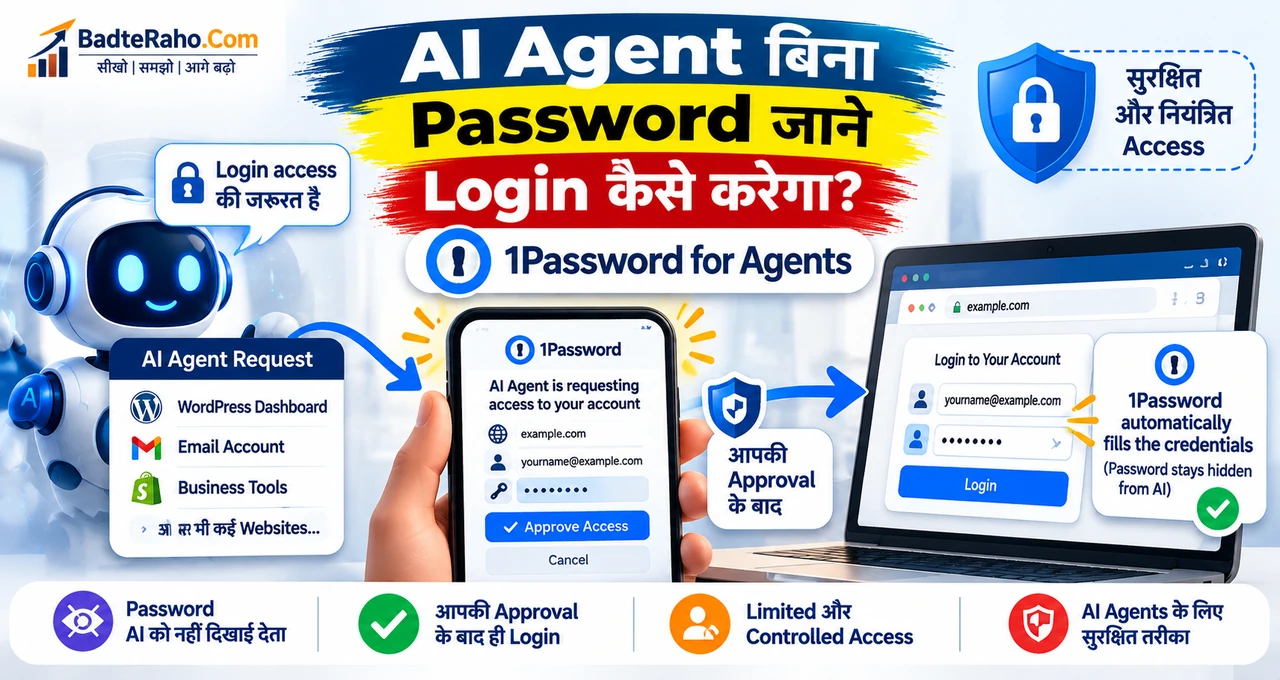




AI Agent को login access देना useful हो सकता है, लेकिन password सीधे AI को दिखाना जरूरी नहीं होना चाहिए।
इसी problem को solve करने के लिए 1Password ने “1Password for Agents” platform announce किया है। इसका idea यह है कि supported AI agent किसी website या account में login की जरूरत बताए, user अपने device पर request approve करे, और 1Password credential को सीधे sign-in form में fill कर दे—बिना actual password AI model को दिखाए।
लेकिन announcement और real availability को अलग समझना जरूरी है। अभी support सीमित है, जबकि कुछ बड़े AI-agent integrations आने वाले समय के लिए announced हैं।
पहले समझते हैं कि यह system normal password sharing से अलग कैसे काम करता है।
इस लेख में आप क्या सीखेंगे?
- 1Password for Agents क्या है
- AI Agent login कैसे करता है
- Password AI से कैसे hidden रहता है
- User approval कहाँ आता है
- Current availability क्या है
- किन risks को अभी भी समझना जरूरी है
1Password for Agents क्या है?
1Password for Agents ऐसा access layer है जो supported AI agents को user-approved login use करने देता है, लेकिन credential को agent के सामने expose करने की जरूरत कम करता है।
Company ने इसे personal AI agents के लिए trust layer की तरह position किया है। जब agent किसी task के दौरान sign-in page पर पहुँचता है, तो वह 1Password से required credential के लिए request करता है। User देख सकता है कि agent किस account में login करना चाहता है और क्यों।
Approval मिलने के बाद credential सीधे login form में fill किया जाता है। Agent task continue कर सकता है, जबकि password को copy-paste करके chat, prompt या agent memory में देने की जरूरत नहीं पड़ती।
1Password की official announcement के मुताबिक यह model उन situations के लिए बनाया गया है जहाँ AI agent को real websites और accounts पर काम करना होता है।
अगर आप पहले AI agents का basic concept समझना चाहते हैं, तो AI Agent क्या है और chatbot से कैसे अलग है वाला guide useful रहेगा।
AI Agent बिना Password देखे Login कैसे करेगा?
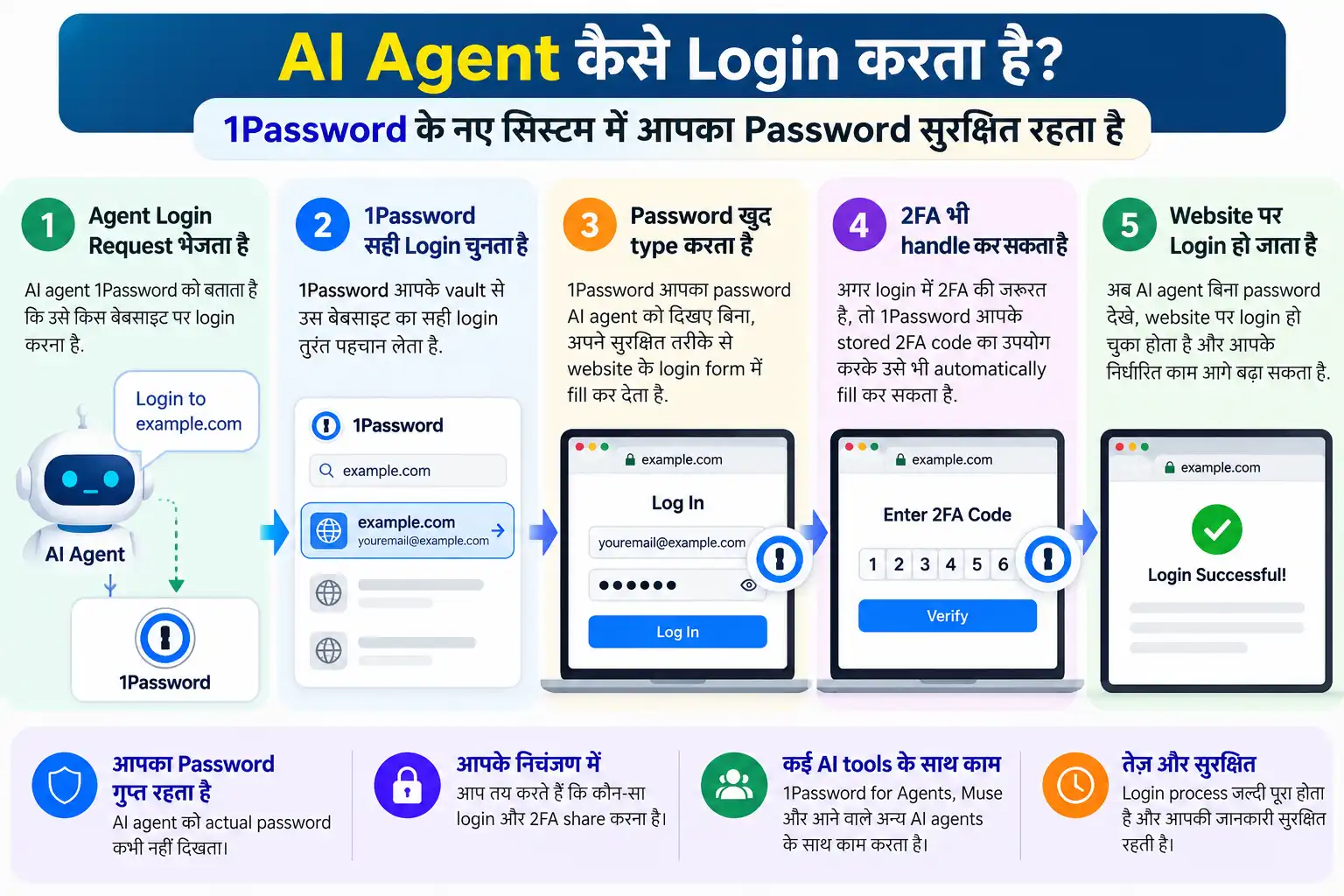
Process को आसान example से समझें। मान लीजिए आपने AI assistant को WordPress dashboard में login करके एक article draft तैयार करने का task दिया।
Agent login page तक पहुँचता है, लेकिन उसे username-password text के रूप में नहीं मिलता। Instead, वह 1Password integration के जरिए access request करता है।
User अपने trusted device पर request देखता है। वहाँ यह समझना possible होता है कि कौन-सा agent किस login को use करना चाहता है। User approve या reject कर सकता है।
Approval के बाद 1Password credential को sign-in form में fill करता है। Official explanation के अनुसार supported setup में AI model actual password को receive या store नहीं करता।
यही इस system की main security value है: login task possible रहता है, लेकिन password handover को default workflow नहीं बनाया जाता।
User Approval क्यों जरूरी है?
AI agent जितना capable होता है, उतना ही access control important हो जाता है। अगर agent को permanent और unrestricted account access दे दिया जाए, तो गलत task interpretation, accidental action या compromised workflow का impact बढ़ सकता है।
1Password का design user approval को बीच में रखता है। Agent को हर sensitive login अपने आप मिल जाए, ऐसा assumption नहीं है।
Approval step user को context देता है—कौन-सा account, किस task के लिए और किस agent के जरिए use होने वाला है।
यह human-in-the-loop approach AI security का important principle है। BadteRaho पर हमने AI agents और business-data security risks में भी permissions, access boundaries और verification की जरूरत explain की है।
Password Hidden रहने का मतलब Risk-Free होना नहीं है
Password AI को दिखाई न देना अच्छी security improvement है, लेकिन इससे पूरा task automatically safe नहीं हो जाता।
Login के बाद agent account के अंदर वही actions कर सकता है जो उस account या session को allowed हैं। उदाहरण के लिए email account खुलने के बाद agent emails पढ़ सकता है, या business dashboard में available actions execute कर सकता है—depending on integration और permissions।
इसलिए security सिर्फ “password secret है या नहीं” तक सीमित नहीं है। Scope, approvals, account permissions, activity visibility और revocation भी जरूरी हैं।
High-risk accounts—जैसे banking, payment, domain control या sensitive client-data systems—पर agent access देने से पहले extra caution जरूरी है।
AI privacy के broader angle के लिए AI use करते समय personal data बचाने के practical checks भी देख सकते हैं।
अभी कौन-से AI Agents Supported हैं?
यहाँ announcement और current support status को अलग पढ़ना जरूरी है। 1Password ने Meta Muse, Anthropic Claude Duet, OpenAI ChatGPT Work और dots, Grok Bot और दूसरे agent ecosystems के साथ integrations या partnerships announce की हैं।
लेकिन सभी integrations एक साथ live नहीं हैं। 1Password support documentation के current status के मुताबिक practical support अभी Muse पर focused है, जबकि अन्य integrations अलग rollout stages में हैं।
1Password blog में ChatGPT Work और dots तथा Claude Duet integrations को “coming soon” बताया गया है। इसलिए “ChatGPT Work अभी हर user के लिए 1Password से login कर सकता है” कहना सही नहीं होगा।
यह distinction important है, क्योंकि launch announcement partnership बताती है जबकि support page actual usable configuration की स्थिति बताता है।
1Password for Agents Use करने के लिए क्या चाहिए?
Current support page के अनुसार eligibility अभी सीमित है। 1Password.com पर Individual या Family account required हो सकता है, और supported agent account भी चाहिए।
Business, Teams या regional 1Password account types के लिए वही availability assume नहीं करनी चाहिए जब तक official support page confirm न करे।
इसी तरह supported platform भी integration-specific हो सकता है। Muse के लिए Android support available होने और iOS support आने की बात documentation में दी गई है।
इसलिए किसी भी setup से पहले 1Password support page पर current requirements check करना बेहतर है, खासकर क्योंकि agent integrations तेजी से बदल सकती हैं।
Small Business के लिए इसका Practical Use क्या हो सकता है?
Small business owner को AI agent से कई repetitive tasks करवाने की जरूरत पड़ सकती है—जैसे vendor portal खोलना, CRM में data check करना, website dashboard तक पहुँचना या recurring admin work करना।
Traditional workflow में owner password copy करके agent tool में paste कर दे, तो credential exposure बढ़ सकता है। 1Password for Agents का model इस handoff को controlled approval में बदलने की कोशिश करता है।
उदाहरण के लिए AI assistant को shipping portal में जाकर order status check करना है। Owner login request approve करता है, 1Password sign-in complete करता है, और agent task पूरा करता है।
लेकिन business को least-privilege account बनाना चाहिए। Admin account देने की बजाय वही role देना बेहतर है जिसमें सिर्फ required task के permissions हों।
Automation के practical examples के लिए AI Agents बिना coding कौन-कौन से काम automate कर सकते हैं भी useful context देता है।
क्या AI Agent को पूरा 1Password Vault मिल जाता है?
Design का purpose पूरा vault expose करना नहीं है। Agent specific login या task-related access request करता है और user approval देता है।
1Password का कहना है कि integrations credentials को agent से अलग रखने के लिए designed हैं। लेकिन exact safeguards integration के हिसाब से vary कर सकते हैं।
इसलिए “एक बार connect किया और agent को सब passwords मिल गए” वाला model नहीं होना चाहिए। फिर भी user को connected integrations और approved access regularly review करना चाहिए।
अगर किसी agent की जरूरत खत्म हो जाए, तो integration disconnect करना practical security step है।
क्या यह Password Manager को AI Tool बना देता है?
1Password for Agents का core role password generate या chat answer देना नहीं है। यह identity और access bridge की तरह काम करता है।
AI agent task समझता और execute करता है; 1Password sensitive credential को protected तरीके से use कराने की कोशिश करता है। दोनों की responsibilities अलग हैं।
इस distinction को समझना जरूरी है क्योंकि password manager पर “AI सब कुछ कर रहा है” जैसी expectation गलत होगी। Agent और credential manager अलग layers हैं।
Security के लिए कौन-से Checks रखें?
Agent access शुरू करने से पहले पाँच practical checks useful हैं।
- सिर्फ supported official integration use करें।
- Login request में account और purpose verify करें।
- Admin access की जगह limited-role account prefer करें।
- Sensitive actions के लिए manual confirmation रखें।
- Unused integrations और old sessions revoke करें।
Password hidden रहना अच्छी शुरुआत है, लेकिन account-level security, 2FA, device protection और activity monitoring की जरूरत खत्म नहीं होती।
1Password for Agents और Normal Autofill में क्या फर्क है?
Normal password-manager autofill में user खुद browser या app में login page खोलता है और saved credential fill कराता है। Agent workflow में task किसी AI assistant ने initiate किया हो सकता है, इसलिए access decision का context अलग है।
1Password for Agents इसी delegation problem को address करता है। Agent बताता है कि उसे किस login की जरूरत है, user request approve करता है और credential direct form में use होता है।
यह difference छोटा लग सकता है, लेकिन security perspective से important है क्योंकि automation में credential exposure और unintended reuse का risk ज्यादा हो सकता है।
अगर Agent गलत Website पर Login मांगे तो क्या करें?
Approval screen को सिर्फ “Allow” button की तरह treat न करें। Domain, account और task reason check करना जरूरी है। अगर expected website और requested login match नहीं करते, request reject करें और task context दोबारा verify करें।
Phishing जैसी problem AI workflows में भी possible है। Password model को दिखाई न दे, फिर भी गलत destination पर credential fill होना dangerous हो सकता है अगर integration safeguards fail हों या user गलत approval दे।
इसलिए official integrations, trusted devices और clear task boundaries use करना practical baseline है।
क्या छोटे Business को अभी इसे Use करना चाहिए?
अगर business supported agent और compatible 1Password account already use करता है, तो controlled pilot useful हो सकता है। Low-risk workflow से शुरुआत करें—जैसे read-only dashboard या non-sensitive vendor portal।
पहले दिन से billing, banking, payroll या full admin access automate करना सही approach नहीं है। Team को यह भी define करना चाहिए कि कौन approvals देगा, कौन activity review करेगा और access कब revoke होगा।
Technology promising है, लेकिन process discipline उसके बराबर important है।
अभी सबसे जरूरी बात क्या याद रखें?
1Password for Agents AI-agent security में practical direction दिखाता है: agent को काम करने दें, लेकिन credential सीधे उसके हाथ में न दें।
Launch announcement में कई major AI-agent ecosystems का नाम है, लेकिन सभी integrations अभी equally available नहीं हैं। Current support documentation check करना जरूरी है।
और सबसे important—password hidden होने के बाद भी account access powerful permission है। Agent को वही access दें जो task के लिए सच में जरूरी हो।
आख़िर में एक छोटी सी बात
AI agents useful तभी बनेंगे जब वे real accounts के साथ काम कर सकें, लेकिन convenience के साथ access control भी उतना ही मजबूत होना चाहिए। 1Password का नया model इसी balance को address करता है।
अभी इसे early-stage security infrastructure की तरह देखें, न कि हर AI tool के लिए universally available feature की तरह।
अगर आप AI agent को किसी website या business tool में login access देने की सोच रहे हैं, पहले permissions और approval flow जरूर check करें। Password share करने के बजाय controlled access हमेशा बेहतर starting point है।