











Fake bank alert, parcel delivery message, KYC update या “urgent payment” वाला SMS कई बार बिल्कुल असली जैसा दिखता है। Scammers अब सिर्फ खराब grammar वाले messages नहीं भेजते; वे लंबी बातचीत, नए domains और social-engineering tricks का इस्तेमाल कर सकते हैं।
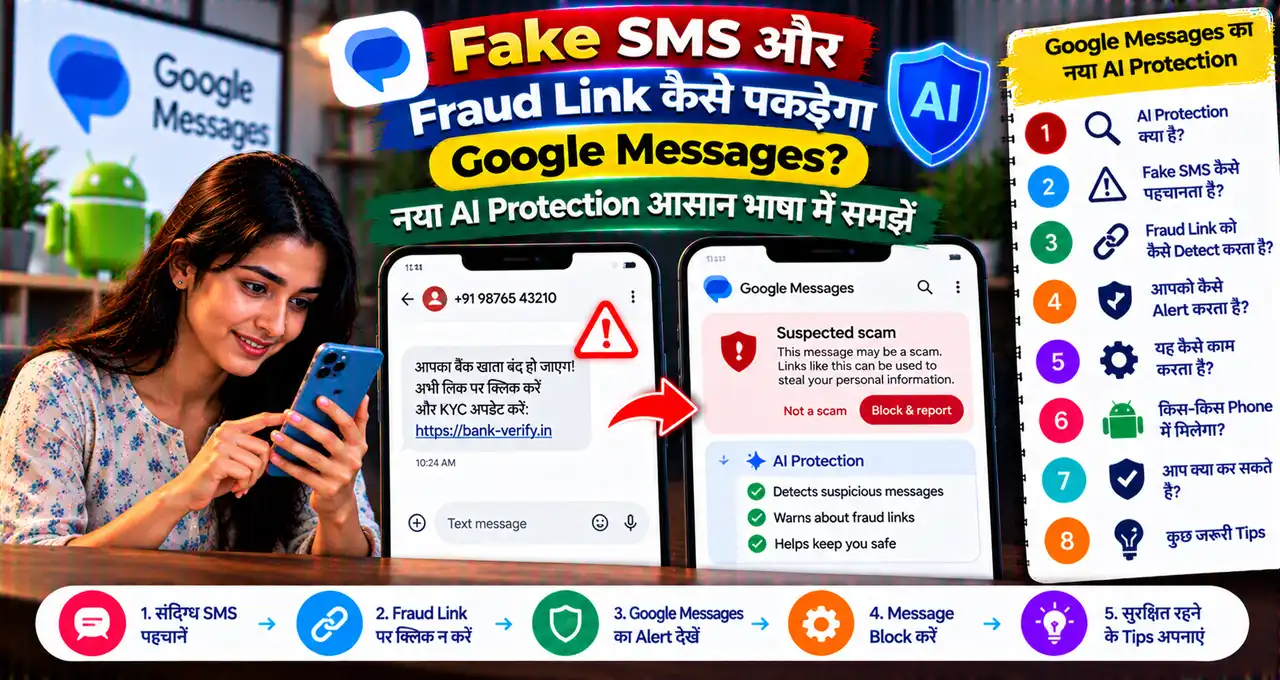
Google ने 14 October 2026 को Android के लिए नए scam-protection features announce किए, जिनमें Google Messages का नया Enhanced protection mode सबसे महत्वपूर्ण है। यह existing on-device Scam Detection को Google के cloud Gemini models, Private AI Compute और smarter link checks के साथ combine करता है।
इसका मतलब यह नहीं कि Google Messages हर scam को 100% रोक देगा या हर Android phone पर feature तुरंत available है। Rollout आने वाले हफ्तों में होगा और कुछ protections device/model availability पर depend कर सकती हैं।
इस guide में समझेंगे कि नया AI protection कैसे काम करता है, privacy कैसे handle होती है, suspicious links कैसे check होंगे और user को warning आने के बाद क्या करना चाहिए।
इस लेख में आप क्या सीखेंगे?
- Enhanced protection mode क्या है
- Gemini scam conversation कैसे analyse करेगा
- Private AI Compute क्या करता है
- Fake और unfamiliar links कैसे check होंगे
- Notification और screen-sharing safeguards क्या हैं
- Scam warning आने पर क्या करना चाहिए
Google Messages का Enhanced Protection Mode क्या है?
Google Messages में Scam Detection पहले से traditional spam और suspicious conversations को flag कर सकता है। नया Enhanced protection mode इस protection को ज्यादा aggressive और context-aware बनाता है।
यह एक opt-in security setting है, यानी user को इसे enable करना पड़ सकता है। Google के मुताबिक Enhanced protection enable होने पर system unknown sender के साथ चल रही conversation का broader context समझने की कोशिश कर सकता है।
Scammer कई बार पहले harmless message भेजता है, फिर धीरे-धीरे trust build करता है और बाद में payment, OTP या link मांगता है। ऐसे “slow-burn” scams में सिर्फ एक message देखना पर्याप्त नहीं होता। नया system conversation pattern से intent समझने की कोशिश करता है।
अगर आप basic OTP fraud techniques समझना चाहते हैं, तो OTP Scam से बचने की practical guide भी पढ़ सकते हैं।
Gemini AI Fake SMS और Scam Conversation कैसे पहचानेगा?
Enhanced protection existing on-device detection के ऊपर एक extra cloud-based layer जोड़ता है। Google के अनुसार unknown sender के साथ complex conversation होने पर Scam Detection Google के ज्यादा capable Gemini models की मदद ले सकता है।
Model सिर्फ keyword जैसे “bank”, “urgent” या “refund” नहीं देखता। उसे conversation का context और intent समझने के लिए design किया गया है—जैसे सामने वाला person धीरे-धीरे trust बनाकर आपको किसी unknown website, payment request या sensitive action की तरफ push कर रहा है।
यह useful है क्योंकि modern fraud messages अक्सर शुरुआत में सीधे पैसे नहीं मांगते। Example:
- “आपका parcel hold पर है, address confirm करें।”
- “Bank verification team से बोल रहा हूँ, पहले account details confirm करें।”
- “गलती से payment हो गया, वापस भेज दें।”
- “Part-time task शुरू करने के लिए इस link पर login करें।”
इनमें से हर line अकेले suspicious साबित नहीं करती। Conversation आगे कैसे बढ़ती है, वही risk signal बन सकता है।
Private AI Compute क्या है? क्या Google आपके Messages पढ़ेगा?
Privacy इस feature का सबसे important सवाल है। Google कहता है कि Enhanced protection के cloud analysis के लिए Private AI Compute इस्तेमाल होगा।
Company के अनुसार relevant data encrypted form में secure dedicated environment में process होता है और Google के कर्मचारियों या दूसरे parties के लिए readable नहीं होना चाहिए। इसका उद्देश्य powerful cloud model use करते हुए personal message data को private रखना है।
फिर भी user के लिए practical rule simple है: sensitive banking information, OTP, PIN या passwords chat में share न करें, चाहे app कितना भी secure क्यों न हो। AI protection safety layer है, secret-sharing permission नहीं।
AI tools और personal data के broader privacy rules के लिए AI Privacy और Personal Data Safety guide useful है।
Unknown Link को Google Messages कैसे Check करेगा?
Google Messages पहले से known malicious और phishing URLs के खिलाफ protections use करता है। Problem यह है कि scammers हर दिन नए domains register कर सकते हैं, जो अभी किसी threat database में listed नहीं होते।
Enhanced protection में on-device Gemini Nano real-time web signals के साथ unfamiliar link की trustworthiness evaluate करने में मदद कर सकता है। इससे system सिर्फ blacklist पर depend नहीं रहेगा।
अगर link किसी unknown sender से आया है, तो redesigned warning user को tap करने से पहले pause करने और context समझने का मौका दे सकती है।
फिर भी warning न आए तो link automatically safe नहीं हो जाता। Domain spelling, sender identity और message context manually check करना जरूरी है।
Fake Link पहचानने के 7 आसान Checks
- Domain spelling देखें: bankname.com और bank-name-support.xyz अलग चीजें हैं।
- Shortened link पर सावधान रहें: tiny/short URL destination छिपा सकता है।
- Urgency language देखें: “10 मिनट में account block” जैसी line pressure create करती है।
- Sender verify करें: unknown mobile number से आया bank message suspicious हो सकता है।
- App से independently check करें: message के link की बजाय official banking app खोलें।
- Login page पर URL दोबारा देखें: copied design genuine site का proof नहीं है।
- OTP/PIN request पर stop करें: legitimate bank आम तौर पर UPI PIN या OTP share करने को नहीं कहता।
Online accounts और banking safety की broader checklist Online Banking Safety Guide में दी गई है।
Notification में Scam Warning कैसे काम करेगी?
Google ने Scam Detection alerts को chat notifications तक expand करना शुरू किया था, ताकि suspicious message का warning app खोलने से पहले notification shade में दिख सके।
यह protection पहले select Pixel devices पर limited थी। Google अब Android device makers के साथ मिलकर इसे hundreds of millions additional users तक expand करने की बात कर रहा है।
इसका फायदा यह है कि user suspicious conversation में enter करने से पहले ही warning देख सकता है। लेकिन rollout device manufacturer और supported Android version पर depend करेगा।
Screen Sharing के दौरान Sensitive Information कैसे बचेगी?
Scammers सिर्फ messages नहीं भेजते; वे phone call पर user से screen share करवाकर banking information देखने की कोशिश भी कर सकते हैं। Google के नए Android protections screen-sharing scenarios में sensitive content को hide या block करने की दिशा में काम करते हैं।
Example के लिए अगर unknown caller आपको “support” के नाम पर screen share start करने को कहता है, तो यह serious red flag है। Legitimate bank representative को आपके phone की live screen देखने की जरूरत आम तौर पर नहीं होती।
अगर किसी ने remote-control app install करवाने, accessibility permission देने या screen share शुरू करने को कहा है, तो call disconnect करके official support number से independently contact करें।
Enhanced Protection कहाँ Enable होगा?
Google ने feature को coming weeks में rollout करने की बात कही है। Exact menu device और app version के हिसाब से बदल सकता है, लेकिन setting Google Messages की security/scam protection settings में दिखाई दे सकती है।
Practical steps:
- Google Messages को Play Store से latest version पर update करें।
- Messages Settings खोलें।
- Spam/Scam Protection या Enhanced protection option देखें।
- Feature available हो तो details पढ़कर enable करें।
- Unknown-sender warnings और notification protection active रखें।
अगर option अभी नहीं दिखता, तो third-party APK install न करें। Rollout का इंतजार करें।
क्या सभी Android Phones पर यह Feature मिलेगा?
नहीं, कम-से-कम शुरुआत में नहीं। Google के नए protections अलग-अलग hardware और software capabilities पर depend करते हैं।
Cloud Gemini based Enhanced protection Google Messages rollout से जुड़ा है, जबकि कुछ on-device protections Gemini Nano या compatible device features require कर सकती हैं। Notification scam detection का expansion भी device-maker partnerships के जरिए होगा।
इसलिए “Android है तो हर नया protection अभी available है” मानना सही नहीं है। App version, phone model, Android version, language और country rollout check करें।
Old Spam Protection और नए AI Protection में क्या फर्क है?
| Old/Existing Protection | Enhanced AI Protection |
|---|---|
| Known spam patterns | Complex conversation context |
| Known malicious links | Unfamiliar links पर extra analysis |
| Mostly on-device signals | On-device + Private AI Compute cloud layer |
| Traditional scam detection | Slow-burn/social-engineering intent detection |
नया system पुराने protections को replace नहीं करता; यह उन पर additional intelligence layer जोड़ता है।
Scam Warning आए तो क्या करें?
Warning को dismiss करके conversation continue न करें। पहले sender की identity independently verify करें।
- Message में दिए number पर call back न करें।
- Official bank/app website से number लें।
- Payment request approve न करें।
- OTP, UPI PIN या password share न करें।
- Unknown APK/install file download न करें।
- Suspicious sender को block/report करें।
अगर money-related UPI fraud का doubt है, तो हमारी UPI Scam Safety Guide भी useful होगी।
क्या AI Protection पर Blind Trust करना चाहिए?
नहीं। Scam detection probabilistic system है। False positive भी हो सकता है और sophisticated scam warning से बच भी सकता है।
Best approach layered safety है: AI warning + user verification + official app/website + strong account security।
अगर message genuine लगता है लेकिन payment, credential या remote-access action मांग रहा है, तो conversation से बाहर निकलकर official channel से verify करें।
Sources / References
3 Real-World Situations में नया Protection कैसे मदद कर सकता है?
1. Fake Bank KYC Message
Unknown number पहले लिखता है कि KYC expire हो रही है, फिर कुछ messages बाद login link भेजता है। Traditional filter सिर्फ link/domain देख सकता है, जबकि Enhanced protection conversation की gradual pressure pattern को भी signal की तरह use कर सकता है। फिर भी user को official banking app में जाकर status verify करना चाहिए।
2. Parcel Delivery Scam
Scammer courier update के नाम पर address confirm करवाता है और बाद में “small re-delivery fee” का link भेजता है। Unknown link warning useful हो सकती है, लेकिन genuine courier की तरह दिखने वाला page भी manually verify करना जरूरी है।
3. Part-time Job Scam
Conversation शुरुआत में normal work offer से होती है, फिर user को messaging group, fake dashboard या deposit/payment की तरफ ले जाया जाता है। Context-aware detection slow-burn scam intent पकड़ने में useful हो सकती है, लेकिन कोई warning न आए तो भी advance payment को safe न मानें।
Google Messages AI Protection क्या नहीं कर सकता?
यह feature आपकी financial decision-making replace नहीं करता। Scammer अगर known contact का compromised account use करे, phone call पर manipulate करे या किसी completely अलग app में payment करवाए, तो Messages warning हर step पर मौजूद नहीं होगी।
इसीलिए सुरक्षा का final rule वही है: unknown request पर pause करें, official source से independently verify करें और किसी भी payment/credential action से पहले screen पर actual amount और destination पढ़ें।
आख़िर में एक छोटी सी बात
Google Messages का नया Enhanced protection fake SMS और fraud links के खिलाफ useful extra layer हो सकता है, खासकर उन scams में जो लंबी conversation के जरिए trust build करते हैं। लेकिन final safety अभी भी इस बात पर depend करती है कि user payment, OTP, login और unknown links को कितना carefully verify करता है।
अगर आपके Google Messages में Enhanced protection option आ गया है, तो उसे enable करके unknown-link warnings जरूर check करें। किसी suspicious message पर पैसा या credentials देने से पहले हमेशा official channel से independently verify करें।