

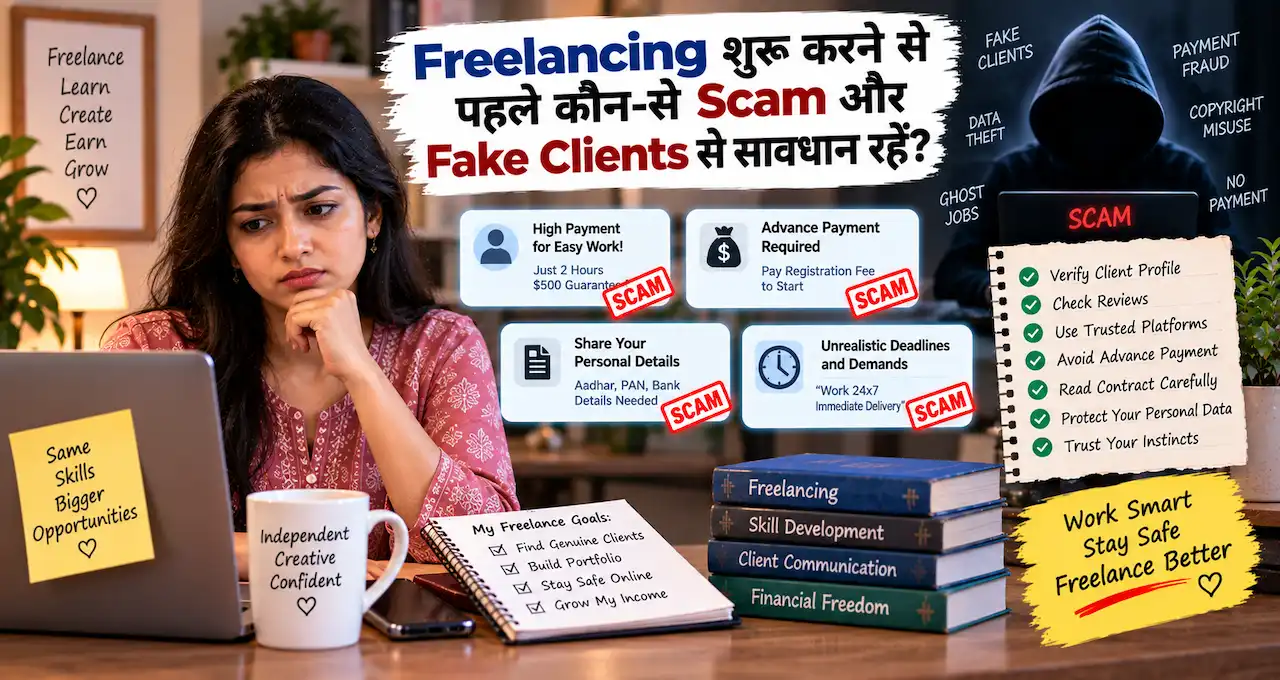


₹30,000 का freelance project मिला, लेकिन payment release करने से पहले client आपसे ₹2,000 मांग रहा है।यहीं excitement को थोड़ी देर रोकना जरूरी है। Freelancing में genuine clients भी जल्दी project शुरू करना चाहते हैं। लेकिन fake clients इसी urgency का फायदा उठा सकते हैं। वे high payment, आसान काम या long-term project का promise करके fee, free work, login details या suspicious payment मांग सकते हैं।इस guide में हम freelancing scam के common patterns समझेंगे। आप सीखेंगे कि client profile, project, payment और files को कैसे verify करना है। साथ ही direct clients और freelancing platforms दोनों के लिए practical safety workflow भी मिलेगा।क्योंकि freelancing में सिर्फ़ client मिलना important नहीं है—सही client के साथ safely काम करना ज्यादा important है।
इस लेख में आप क्या सीखेंगे?
- Fake clients पहचानना
- Payment red flags समझना
- Project safely verify करना
- Unpaid work से बचना
- Files और links check करना
- Scam होने पर action लेना
Freelancing scam क्या होता है?
Freelancing scam में कोई व्यक्ति genuine client बनकर freelancer से contact करता है। उसका असली मकसद काम करवाना जरूरी नहीं होता।वह आपका पैसा, personal information, account credentials या free work लेना चाहता हो सकता है।कुछ fake clients बहुत obvious होते हैं। लेकिन कुछ proper brief, company name और professional profile के साथ आते हैं।Upwork की current scam guidance भी unrealistic payment, vague job descriptions, free work requests, upfront payments और off-platform communication को important red flags में गिनती है। Upworkइसलिए सिर्फ़ polished profile देखकर trust न करें।पहले यह देखें:Client कौन है → project क्या है → payment कैसे होगी → आपको क्या share करना है → risk कहाँ है।अगर आप freelancing की शुरुआत समझना चाहते हैं, तो Freelancing क्या है? घर से काम करके पैसे कमाने की शुरुआत कैसे करें? useful foundation देगा।
Fake client आम तौर पर freelancer को कैसे फँसाता है?
हर scam का तरीका same नहीं होता। फिर भी pattern अक्सर familiar होता है।
- Attractive project या high budget offer किया जाता है।
- Client जल्दी reply और immediate availability मांगता है।
- Project details vague रखी जाती हैं।
- Conversation किसी दूसरे app पर shift कराई जाती है।
- Freelancer को fee, software या security payment करने को कहा जाता है।
- या बड़ा unpaid sample मांग लिया जाता है।
- Payment का fake screenshot भेजा जाता है।
- Freelancer पूरा काम deliver कर देता है।
- Client disappear हो जाता है या नई condition निकाल देता है।
कभी scam सिर्फ़ payment का नहीं होता। Suspicious document या link के जरिए account credentials भी चुराने की कोशिश हो सकती है।इसीलिए project शुरू करने से पहले client verification workflow होना चाहिए।
Fake client के 15 बड़े red flags
एक signal alone scam prove नहीं करता। लेकिन कई red flags साथ मिलें, तो project रोककर verify करें।
| Red flag | Risk क्या है? |
|---|---|
| बहुत ज्यादा budget | आपको जल्दी attract करना |
| Job description vague | असली project clear नहीं |
| तुरन्त hiring | verification का समय कम |
| Upfront fee | freelancer से पैसा लेना |
| Security deposit | fake payment demand |
| Software खरीदने को कहना | पैसे या card details लेना |
| बड़ा unpaid test | free काम करवाना |
| Payment screenshot | fake payment दिखाना |
| Off-platform pressure | platform protection हटाना |
| Unknown login link | phishing risk |
| Strange attachment | malware risk |
| OTP/PIN request | account theft |
| तीसरे व्यक्ति को पैसा भेजना | money-transfer fraud |
| Crypto/gift card insistence | difficult-to-reverse payment |
| Identity verify न करना | fake client होने का risk |
Upwork specifically warns freelancers about unusually high pay, vague work, upfront fees, off-platform payment और free work requests.Rule simple रखें:जिस project में freelancer को काम मिलने से पहले पैसा देना पड़े, उसे extra suspicion से देखें।
Client कहे “पहले registration fee दो” तो क्या करें?
Freelancer client को काम देता नहीं है। Freelancer client के लिए काम करता है।इसलिए ये demands suspicious हो सकती हैं:
- registration fee
- onboarding charge
- security deposit
- ID activation charge
- software activation fee
- payment-release fee
- account verification fee
- refundable project deposit
नाम professional होने से fee genuine नहीं हो जाती।Upwork की guidance साफ़ कहती है कि freelancer को client को काम शुरू करने के लिए upfront fee नहीं देनी चाहिए।किसी established freelancing platform की अपनी service fee अलग चीज़ है। वह platform के official billing system में दिखाई देती है।Fake client के personal UPI, wallet या payment link पर पैसे भेजना बिल्कुल अलग situation है।
“मैंने payment कर दी है” वाला screenshot क्यों काफी नहीं है?
Payment screenshot proof नहीं है।Image edit की जा सकती है। Fake transaction page भी बनाया जा सकता है। Pending transaction को successful बताया जा सकता है।काम deliver करने से पहले payment status अपने account के अंदर verify करें।Platform project है, तो platform dashboard देखें।Direct client है, तो अपने bank या payment provider में actual credit check करें।इन चीज़ों पर अकेले भरोसा न करें:
- screenshot
- email saying “payment sent”
- PDF receipt
- client का banking screen
- WhatsApp confirmation
Payment वही है जो आपके verified payment system में दिखाई दे।
Client platform छोड़कर WhatsApp या Telegram पर क्यों बुलाता है?
हर WhatsApp conversation scam नहीं होती। Direct clients सामान्य messaging apps पर भी काम करते हैं।लेकिन अगर client freelancing platform पर मिला है, तो platform rules follow करना जरूरी है।Upwork के अनुसार contract से पहले communication और payments platform के अंदर रखना safety protections बनाए रखने में मदद करता है। Off-platform payment से payment protection और dispute support खो सकती है। Upwork SupportFiverr भी users को platform के बाहर transactions करने से scam और payment risk बढ़ने की warning देता है। Fiverr Help Centerइसलिए platform client कहे:“Telegram पर आओ, वहाँ payment कर दूंगा।”तो पहले platform policy check करें।Direct client अलग case है। वहाँ आपको अपना verification और contract system बनाना होगा।
बड़ा unpaid sample मांगना कब red flag है?
हर test task scam नहीं है।Client कभी skill verify करने के लिए छोटा sample मांग सकता है। लेकिन पूरा usable deliverable “test” के नाम पर मांगना problem है।मान लें client को 20 product descriptions चाहिए।वह कहता है:“पहले 10 free लिखकर भेजो, पसंद आए तो बाकी project दूंगा।”यह reasonable test नहीं लगता।Better options:
- छोटा sample दें।
- Existing portfolio दिखाएं।
- Paid test propose करें।
- Watermarked/low-resolution preview दें।
- पूरा editable source deliver न करें।
Upwork free work requests को scam warning signal मानता है और platform पर free work मांगने के खिलाफ guidance देता है।Designers के लिए final source file और writers के लिए full publish-ready assignment तभी दें, जब payment structure clear हो।
Fake brief और genuine brief में फर्क कैसे देखें?
Genuine brief perfect होना जरूरी नहीं है। कई real clients भी requirements ठीक से नहीं लिख पाते।फिर भी genuine project में कुछ basic clarity मिलनी चाहिए।
Project goal
Client क्या बनवाना चाहता है?
Deliverables
Exactly क्या देना है?
Quantity
कितने pages, videos, designs या words चाहिए?
Deadline
Delivery कब चाहिए?
Revision scope
कितने changes expected हैं?
Budget
Fixed है, hourly है या discussion के बाद तय होगा?अगर client इनमें से किसी सवाल का जवाब नहीं देता और सिर्फ़ payment promise repeat करता है, तो caution बढ़ाएं।
Client profile verify करने के 8 practical तरीके
Platform client हो या direct client, कुछ minutes verification में लगाएं।
1. Account history देखें
Old account हमेशा genuine नहीं होता। लेकिन history context देती है।
2. Previous reviews पढ़ें
Repeated payment disputes या unusual complaints देखें।
3. Payment verification check करें
Platform यह feature देता है, तो status जरूर देखें।
4. Company name independently search करें
Client के भेजे link पर ही निर्भर न रहें।
5. Website domain देखें
Official company website और email domain match करते हैं या नहीं?
6. LinkedIn या professional presence देखें
Profile बनना proof नहीं है। लेकिन consistency check में मदद मिलती है।
7. Project knowledge test करें
Genuine client आम तौर पर अपने business और requirement पर sensible questions के answers दे सकता है।
8. Payment method पहले तय करें
“काम पूरा होने के बाद देखते हैं” जैसी vague payment condition avoid करें।
Direct client मिले तो safe payment structure कैसे बनाएं?
Platform protection नहीं है, तो freelancer को अपना process strong रखना चाहिए।मान लें ₹40,000 का website project है।पूरा project बनाकर अंत में ₹40,000 मांगना दोनों sides के लिए risky है।आप project को milestones में divide कर सकते हैं:
| Stage | Example |
|---|---|
| Project confirmation | ₹10,000 |
| Design approval | ₹10,000 |
| Development milestone | ₹10,000 |
| Final handover | ₹10,000 |
यह सिर्फ़ example है। Actual amount project और client agreement पर depend करेगा।Important बात percentage नहीं है। Important बात है कि payment और deliverables छोटे verified stages में आगे बढ़ें।Written scope में ये बातें रखें:
- deliverables
- timeline
- payment schedule
- revisions
- cancellation terms
- source files
- ownership transfer
- final handover condition
Invoice और written agreement क्यों जरूरी हैं?
Chat conversation useful है, लेकिन structured agreement ambiguity कम करता है।Simple project confirmation में भी ये details हो सकती हैं:Client:Project:Deliverables:Deadline:Price:Payment schedule:Revisions:Final file handover:Big legal contract हर छोटे gig के लिए practical नहीं होगा। लेकिन written scope लगभग हर serious project में helpful है।Client अचानक कहे:“मैंने तो 10 designs मांगे थे।”और agreement में 5 designs written हैं, तो discussion ज्यादा clear रहती है।
“Software खरीद लो, मैं पैसे भेज दूंगा” scam से कैसे बचें?
कुछ fake clients freelancer को specific software, equipment या subscription खरीदने को कहते हैं।वे कह सकते हैं:“आप पहले ₹8,000 का software खरीद लें। हम salary/project payment में reimburse कर देंगे।”यह suspicious है, खासकर जब purchase उनके बताए unknown seller से करनी हो।Upwork भी ऐसे offers के बारे में warn करता है, जहाँ client equipment या credentials खरीदने को कहता है।Unknown seller को payment न करें।Software चाहिए, तो official vendor website independently verify करें।
Client की file download करने से पहले क्या check करें?
Freelancers को briefs, images, documents, ZIP files और project assets regularly मिलते हैं। इसलिए malicious attachment का practical risk है।CERT-In unsolicited emails के attachments और suspicious URLs को सावधानी से handle करने की सलाह देता है। वह sender और file type verify करने पर भी जोर देता है।Unknown client से file आए, तो:
- extension check करें;
- unexpected executable file न खोलें;
- ZIP file blindly run न करें;
- antivirus/security scan करें;
- suspicious link पर login न करें;
- sender independently verify करें।
“Brief.pdf.exe” जैसी double-extension file बड़ा warning signal है।Client कहे कि project देखने के लिए unknown app install करना जरूरी है, तो extra caution रखें।
Fake login page से freelancer account कैसे चोरी हो सकता है?
Scammer कह सकता है:“मैंने contract भेज दिया है। इस link से login करके accept करें।”Page Upwork, Fiverr, Google Drive या payment service जैसा दिख सकता है।लेकिन URL fake हो सकता है।CERT-In की current cyber-safety guidance suspicious links, fake websites और AI-assisted phishing attempts से सावधान रहने की सलाह देती है। MFA enable करना भी recommended practice है।Link खोलने की जगह official app या website खुद खोलें।Password, OTP, UPI PIN और CVV किसी client को न दें।Genuine client को आपके freelancer account का password कभी नहीं चाहिए।
Client बोले “मेरे पैसे receive करो, फिर किसी और को भेज देना”
इस type के request से दूर रहें।Client आपको पैसे भेजकर कह सकता है:“इसमें से designer/vendor को ₹20,000 transfer कर दो।”आप project freelancer हैं, payment intermediary नहीं।Unknown third party के लिए money transfer करना financial और fraud risk create कर सकता है।Client के vendors का payment client खुद करे।आप सिर्फ़ अपनी agreed professional fee receive करें।
Fake client AI-generated profile भी बना सकता है
Professional photo, detailed bio और polished messages अब authenticity prove नहीं करते।Upwork की 2026 scam guidance AI-generated fake profiles और convincing fabricated identities के बढ़ते use का भी जिक्र करती है।इसलिए profile photo पर नहीं, evidence पर भरोसा करें:
- account history
- payment verification
- previous hires
- reviews
- company presence
- project clarity
- communication consistency
Profile अच्छा है लेकिन client fee मांग रहा है, तो profile से red flag cancel नहीं होता।
Beginner freelancer के लिए “5-minute client check”
हर enquiry पर deep investigation जरूरी नहीं है। पहले quick screening करें।
Minute 1: Project पढ़ें
Deliverable, deadline और budget clear हैं?
Minute 2: Client profile देखें
History, reviews और verification check करें।
Minute 3: Communication देखें
Urgency, strange links या platform छोड़ने का pressure है?
Minute 4: Payment condition देखें
आपको पैसा देना पड़ रहा है या client आपको pay करेगा?
Minute 5: Risk question पूछें
अगर client आज गायब हो जाए, तो मेरा कितना पैसा या work loss होगा?अगर answer uncomfortable है, तो project structure बदलें।
New client के लिए Green, Yellow और Red system
Decision आसान करने के लिए client को three buckets में रखें।
Green
- project clear है;
- realistic budget है;
- verified payment path है;
- reasonable communication है;
- कोई fee नहीं मांगी गई।
काम आगे बढ़ सकता है।
Yellow
- client नया है;
- profile history कम है;
- brief incomplete है;
- timeline बहुत tight है।
Project reject जरूरी नहीं है। लेकिन milestone छोटा रखें और verification बढ़ाएं।
Red
- freelancer से payment मांगी जा रही है;
- suspicious login link है;
- large unpaid work मांगा गया है;
- OTP/account access मांगा गया है;
- fake payment proof है;
- third-party money transfer कहा जा रहा है।
ऐसे project को रोकना बेहतर है।
Freelancing platform और direct client में safety approach अलग रखें
| Platform client | Direct client |
|---|---|
| Platform communication rules follow करें | Business identity verify करें |
| Payment protection use करें | Written payment schedule रखें |
| Funded milestone check करें | Advance/milestone policy तय करें |
| Platform dispute tools रखें | Invoice और written scope रखें |
| Client history देखें | Company/domain verify करें |
| Suspicious user report करें | Suspicious identifiers report करें |
Platform protections तभी useful हैं, जब आप platform rules के अंदर काम करें।Direct client में आपका process ही आपकी first line of protection है।अगर AI-assisted freelancing services शुरू करनी हैं, तो AI की मदद से Freelancing में कमाई कैसे शुरू करें? practical starting point है।
Writers, designers और video editors के लिए अलग safety tips
Content writers
पूरा unpaid article test में न दें। छोटा sample या existing portfolio share करें।AI Content Writing से कमाई कैसे शुरू करें? में service workflow भी समझाया गया है।
Graphic designers
Approval से पहले preview watermark useful हो सकता है। Editable source file final payment stage पर दें।AI Graphic Design से कमाई कैसे करें? service setup के लिए useful है।
Video editors
Large project में short preview या milestone delivery रखें। Raw project files और final exports की condition पहले तय करें।AI Video Editing सीखकर Freelancing से कमाई कैसे शुरू करें? इस service की practical शुरुआत cover करता है।
Fake client message को AI से analyze कैसे करें?
AI scam prove नहीं कर सकता। लेकिन red flags organize करने में मदद कर सकता है।Sensitive information हटाकर यह prompt use कर सकते हैं:
नीचे prospective freelance client का message और project brief दिया है। इसे genuine या scam declare मत करो। केवल risk signals identify करो। Project clarity, payment terms, requested personal data, links, attachments, urgency, unpaid work, platform policy और client verification को अलग-अलग assess करो। हर item को Low Concern, Needs Verification या High Concern में classify करो। आखिर में पाँच verification questions दो, जो freelancer client से पूछ सकता है। Missing facts invent मत करना।
Final decision official platform information और independent verification के आधार पर लें।AI speed के लिए, इंसान judgement और trust के लिए।
Client को कौन-से verification questions पूछें?
Suspicious लगे तो accusation करने की जरूरत नहीं है। पहले professional questions पूछें।
- Project का exact deliverable क्या है?
- Final deadline क्या है?
- Budget fixed है या hourly?
- Payment milestone कैसे work करेगा?
- कौन final approval देगा?
- Company website या business details क्या हैं?
- यह software या file क्यों जरूरी है?
- Paid test possible है?
- Platform payment क्यों नहीं use करना चाहते?
- Written project scope share कर सकते हैं?
Genuine client हर question का perfect answer दे, यह जरूरी नहीं है।लेकिन लगातार answers avoid करना red flag हो सकता है।
अगर scammer ने पैसे ले लिए तो क्या करें?
Financial cyber fraud में speed important है।National Cyber Crime Reporting Portal victims को cybercrime report करने की सुविधा देता है। Financial cyber fraud के लिए 1930 national helpline उपलब्ध है। Cyber Crime PortalPractical steps:
- Bank/payment service को तुरंत inform करें।
- Transaction ID save करें।
- Client chat और profile screenshots रखें।
- Email headers या message details preserve करें।
- 1930 पर financial cyber fraud report करें।
- National Cyber Crime Reporting Portal पर complaint करें।
- Platform पर client account report करें।
- Password compromise हुआ है, तो तुरंत बदलें।
- MFA enable करें।
- Threat मिले, तो local police से contact करें।
I4C के Report Suspect feature पर suspicious website, WhatsApp/Telegram handle, phone number, email और social-media URL भी report किए जा सकते हैं। Cyber Crime Portal
Account password या OTP share हो गया तो क्या करें?
Client से बात बंद करने से पहले account secure करें।सबसे पहले password बदलें।Same password दूसरे accounts में है, तो वहाँ भी बदलें।फिर:
- active sessions logout करें;
- MFA enable करें;
- recovery email check करें;
- unknown payment method remove करें;
- suspicious forwarding rule check करें;
- connected apps review करें।
Banking information share हुई है, तो bank को तुरंत contact करें।OTP, PIN या CVV को सिर्फ़ “verification” के नाम पर भी share न करें।
Freelancing scam से बचने की final checklist
Project accept करने से पहले यह checklist देखें:
- Client identity basic level पर verify हुई?
- Project scope clear है?
- Budget realistic है?
- Payment method तय है?
- Platform rules follow हो रहे हैं?
- कोई upfront fee नहीं मांगी गई?
- Large unpaid test नहीं है?
- Suspicious software install नहीं करना?
- Unknown link पर login नहीं करना?
- OTP या password share नहीं करना?
- Attachment verify किया?
- Milestone funded/confirmed है?
- Written scope available है?
- Final files कब देने हैं, तय है?
- Scam होने पर evidence save रहेगा?
इनमें कई answers “नहीं” हों, तो काम शुरू करने की जल्दी न करें।अगर fake job और fake recruiter scams भी समझना चाहते हैं, तो Online Job Scam से कैसे बचें? Fake Jobs पहचानने के Practical तरीके दोनों risks के फर्क को समझने में useful रहेंगे।
Sources/References
इस guide के safety points के लिए Upwork और Fiverr की current platform safety guidance, CERT-In cyber-safety advisories और India के National Cyber Crime Reporting Portal को cross-check किया गया है।
आख़िर में एक छोटी सी बात
Freelancing में हर new client पर doubt करना जरूरी नहीं है। लेकिन हर new client को बिना verification trust करना भी जरूरी नहीं है।छोटा milestone, clear scope और verified payment path तीन simple habits हैं। ये payment risk घटाने के साथ professional workflow भी बनाती हैं।क्या आपको कभी ऐसा freelance client मिला है जिसने fee, बड़ा free sample या suspicious payment मांगी हो? Comments में personal details हटाकर अपना experience share करें।