








Notebook में दस video ideas हैं, फिर भी शनिवार को camera खोलते वक्त क्या रिकॉर्ड करें समझ नहीं आता?
मान लीजिए आपका Hindi Excel channel है। Comments में duplicate names का सवाल है, लेकिन आपके calendar में पहले से shortcuts वाली video लिखी है।
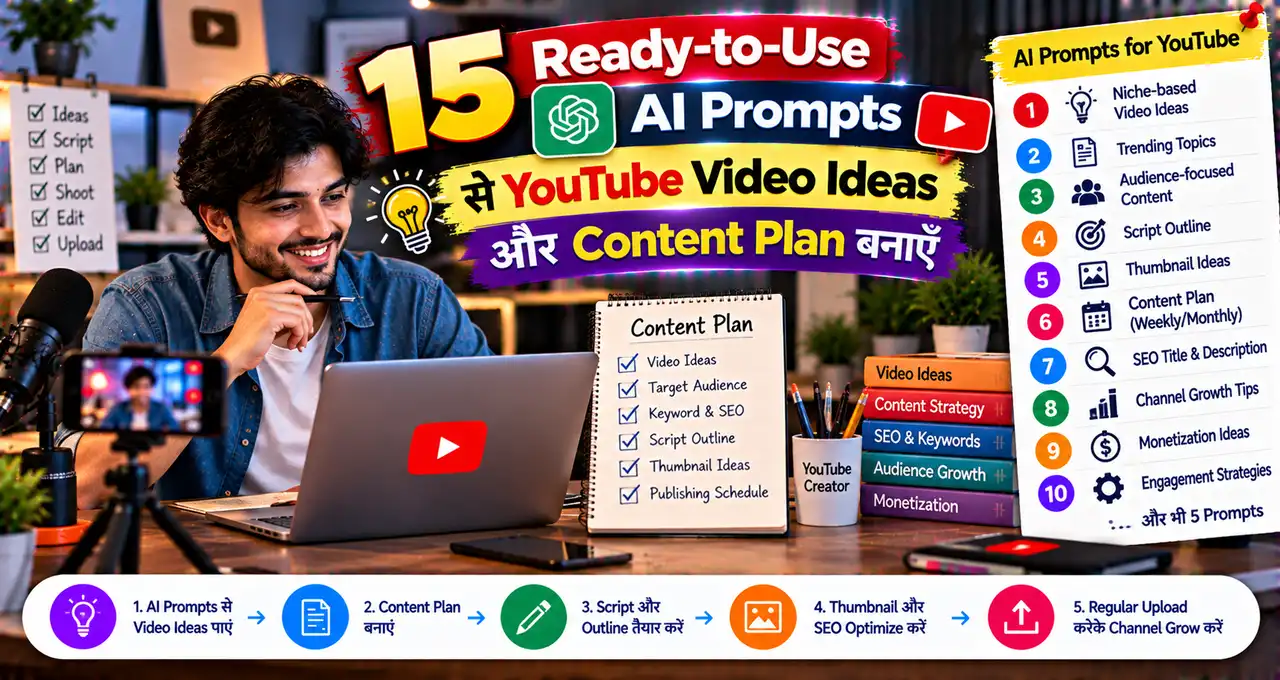
ये YouTube content planning prompts ऐसे फैसलों के लिए हैं। इनसे आप viewers के सवालों की shortlist, रिकॉर्ड करने लायक briefs और चार हफ्तों का content plan बना सकेंगे।
पहले अपनी niche, recording time और viewers के दो असली सवाल लिख लें। यही inputs आगे काम आएँगे।
इस लेख में आप क्या सीखेंगे?
- Viewer के सवाल जुटाएँ
- AI से ideas shortlist करें
- Shorts और tutorials plan करें
- चार हफ्तों का calendar बनाएँ
- Upload के signals समझें
YouTube content planning prompts इस्तेमाल करने से पहले क्या तैयार करें?
आपको हर prompt भरने के लिए पूरा analytics export चाहिए, ऐसी कोई ज़रूरत नहीं है। शुरुआत में अपनी audience, पिछले तीन topics और प्रति सप्ताह उपलब्ध समय लिखें।
Viewer का काम लिखें।
“Excel beginners” audience है, जबकि “पहली बार attendance sheet बनाने वाला नया employee” एक साफ़ situation है। Situation पता हो तो AI ऐसे video ideas दे सकता है जिनका result screen पर दिखाया जा सके।
जब आप पहली बार topic research कर रहे हों, तो YouTube trend research वाला तरीका साथ रखें। वहाँ Studio, Google Trends और search results को मिलाकर सवाल की जाँच करने का process है।
हर signal का source और date range लिखें।
Channel नया है तो search results, public questions और अपनी dummy demo file से शुरू करें। Analytics के खाली हिस्से को AI से भरवाने की ज़रूरत नहीं है।
Audience research से नए YouTube video ideas निकालें
पहले पाँच prompts बताते हैं कि audience क्या सीखना चाहती है और आपके पास किसका जवाब दिखाने की तैयारी है। हर prompt चलाना ज़रूरी नहीं है।
जहाँ input है, वहीं से शुरू करें।
अगर comments कम हैं, तो niche pillars और search signals चुनें। अगर पुरानी videos पर सवाल आते हैं, तो पहले उन्हीं से follow-up series बनाएँ। YouTube Trends की official guide से उपलब्ध cards की जानकारी मिलती है।
Prompt 1 — Niche के content pillars
जब channel पर topics बिखर गए हों।
Help me plan my YouTube channel. Use the audience, their skill level, and the demos I can make to suggest four main content themes. For each theme, give one clear viewer goal, two series I could repeat, and three sample video titles. Also give one topic that does not belong in that theme. For each idea, say what a viewer can do after watching. Point out any two themes that overlap and show me how to tell them apart. Keep ideas that need tools or demos I do not have in a separate list. End with one sentence that explains what viewers can expect from my channel.
Channel niche: [Excel tutorials in Hindi]
Audience: [New office employees]
Demos I can make: [Screen recordings and sample Excel files]
Existing videos: [VLOOKUP and attendance sheets]
Pillar के नाम से पहले उसका outcome पढ़ें। अगर दो pillars से viewer को वही काम सीखने को मिलता है, तो उन्हें मिलाएँ।
Prompt 2 — Comments से नए video ideas
जब viewers बार-बार अगला step पूछते हों।
Read the viewer comments below. Group them by the task each viewer wants to finish. For each group, give one example question, explain what the viewer wants, name the step my old video missed, and suggest two new video ideas. Use labels like C1 and C2 to show where each idea came from. If the same viewer commented twice, count that as one person. If only a few comments support an idea, mark it as an idea to test. Pick three ideas I can record this week. For each one, tell me what result to show on screen first.
Comments: [C1: How can I highlight duplicate names first? C2: How can I find repeated invoice numbers?]
Existing video: [Remove Duplicates]
Recording time: [90 minutes]
Comments paste करने से पहले usernames, email और असली customer details हटा दें।
Prompt 3 — Search signals से shortlist
जब YouTube Studio या Trends से notes इकट्ठा कर लिए हों।
Turn my search notes into a table. Include the exact search words, where I found them, the dates they cover, what the viewer wants to do, what the evidence can tell me, and what to check next. Group different spellings of the same question. Keep questions separate when viewers want different results. For each group, give one step-by-step video idea and one idea about fixing a common problem. If the date, country, or source is missing, mark it as something to check. Do not make up search numbers. Pick the three strongest ideas and tell me what to look for in current YouTube results before I record.
Search notes: [Studio: highlight duplicate names. YouTube search: Excel same names.]
Country and dates: [India, last 90 days]
Audience: [Hindi-speaking Excel beginners]
एक signal मिलने पर idea को shortlist करें। Recording का फैसला करने से पहले मौजूदा search results भी खोलें।
Prompt 4 — Competitor videos में अधूरा जवाब
जब एक ही query पर कई videos मिल रही हों।
Compare my notes about public videos. For each video, list the promise in the title, the format, the result shown on screen, and any step it leaves out. Suggest three gaps I could fill with my own demo or by helping a different group of viewers. Do not copy anyone’s script, thumbnail layout, or exact title. If a video already answers the whole question, say so. Then look for a fresh angle, such as helping complete beginners, using a newer screen layout, or sharing a small practice file. Tell me which idea has the clearest evidence and what I should check before recording.
Search question: [How can I find duplicate invoice numbers in Excel?]
Video notes: [A deletes rows. B highlights duplicates but selects the whole column.]
Demo file: [10 made-up invoices]
Competitor का title तभी इस्तेमाल करें जब आप उसकी पहचान या तुलना कर रहे हों। अपना video promise अपने demo से निकालें।
Prompt 5 — पुरानी videos से follow-up series
जब archive में अच्छे सवाल दबे हों।
Use my old videos and viewer notes to plan follow-up videos. For each old video, suggest one action: update it, make a follow-up, or leave it alone. Suggest an update only if I give you a reason, such as a changed menu or a step that no longer works. A follow-up should help viewers do a task the first video did not cover. Give me a line that links the new video to the old one. Name the new demo I need and the parts I can skip repeating. If I give you no useful data, do not guess which video is most popular. End with three videos in a useful learning order.
Old videos: [Set up an attendance sheet, learn SUMIF, export Excel to PDF]
Viewer question: [How do I get monthly attendance totals?]
Series length: [Three videos]
Sequel का title पुराने title की छोटी variation भर हो तो पहले नया result तय करें।
Shortlist को video brief और recording plan में बदलें
अब तय करें कि audience किस काम के लिए video खोलेगी। वही काम title, thumbnail और पहले shot में दिखना चाहिए।
Duplicate names वाले example में पहली screen पर दो matching cells दिख सकते हैं। पूरी spreadsheet समझाने के बाद result दिखाएँगे तो opening का असर कम हो सकता है।
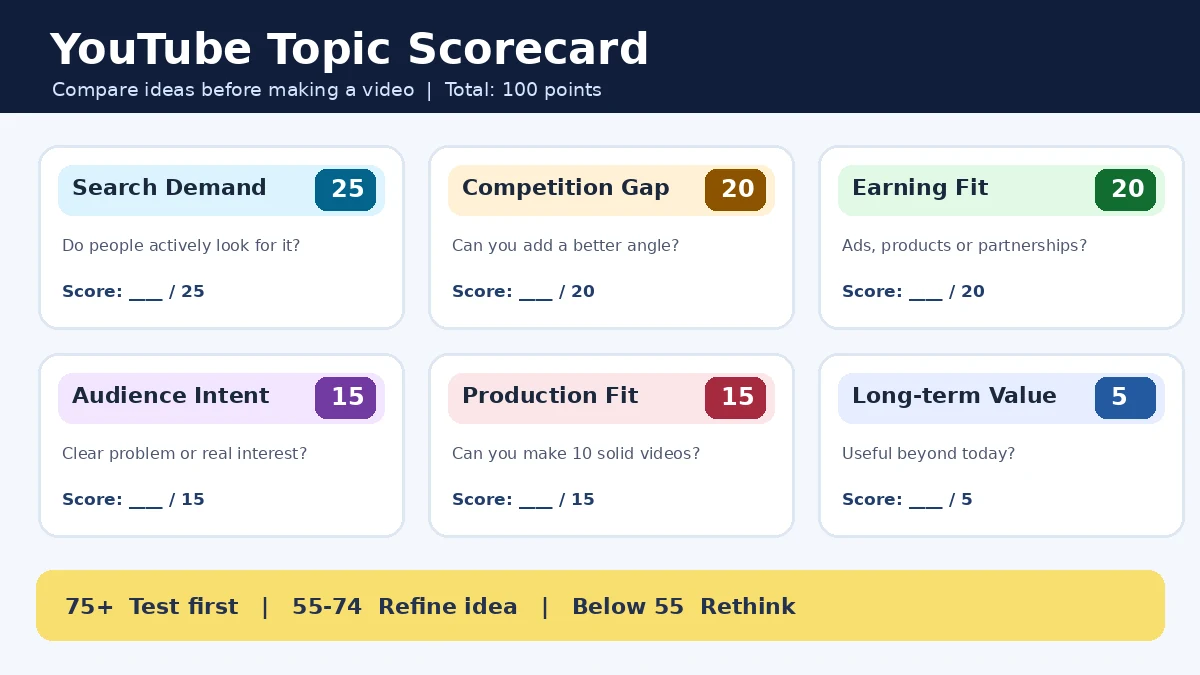
अगर आपके पास कई topics हैं, तो video topic selection वाली guide में दिया scorecard काम आएगा। उसमें demand, competition और production effort को अलग से जाँचा गया है।
Prompt 6 — Ideas को record, test और park में बाँटें
जब आपकी shortlist recording capacity से बड़ी हो।
Compare my ideas by how well they fit my audience, how good the evidence is, how clear the result is, and how much work they take. Give a short reason for each point. If you use scores, explain what the numbers mean and mark them as estimates. If an idea still needs a sample file, permission, or a fact check, flag it. Put each idea in one group: Record, Test, or Save for Later. Pick two Record ideas where I can show the result in the first shot. For each Test idea, give me one small check. For ideas saved for later, say what new evidence would make them worth another look.
Ideas: [Duplicate names, attendance dashboard, 20 shortcuts, PDF export errors]
Time each week: [Four hours]
Tools: [Screen recorder, no paid editor]
दो ideas लगभग बराबर हों तो वह चुनें जिसका result आप साफ़ दिखा सकते हैं।
Prompt 7 — Shorts और long-form की अलग भूमिका
जब एक ही topic दोनों formats में करना हो।
Turn one topic into a YouTube Short and a longer tutorial. For the Short, give one result viewers can see, a short opening line, three shots, and the final result. For the tutorial, give the starting point, three steps, one common mistake, and a practice task. Explain how each video helps the viewer. Make the Short useful on its own. Pick one shot I can record once and use in both videos. If the topic needs a long setup, choose one smaller task that can fit into the Short. End by telling me what to show first in each video.
Topic: [Check duplicates in Excel]
Short result: [Highlight two matching cells]
Tutorial result: [Compare two lists and check mistakes]
Short अपने आप में एक काम पूरा करे। Long-form में उस काम की वजह और अगला step समझाएँ।
Prompt 8 — Title और thumbnail का एक वादा
जब topic तय हो और packaging बाकी हो।
Write five title and thumbnail pairs for the video below. Each title should say what the viewer can do or learn. Each thumbnail should show one simple clue or use a short label. Do not repeat the full title on the thumbnail. For each pair, write the viewer question it answers and the moment in the video that delivers the result. Leave out promises I cannot show with my footage. Avoid scary claims, guarantees, and misleading before-and-after images. Pick two pairs that answer different viewer needs. Tell me which words or pictures to remove if either thumbnail is hard to read on a phone.
Video brief: [Show duplicate names in color without deleting them]
Footage: [Before and after views of a sample sheet]
Audience language: [Hindi with common English words]
Final thumbnail mobile size पर देखें। अगर matching cells दिख ही नहीं रहे, तो text बढ़ाने से पहले crop बदलें।
Prompt 9 — पहले 30 seconds और demo outline
जब intro लंबा हो रहा हो।
Write the first 30 seconds of my video in spoken Hindi. Give me a line to say, a screen action, and a place to point the cursor for each shot. Show the result first. Then tell the viewer which sample to use and how we will reach the same result. Skip a long greeting and any channel history. For the rest of the video, give three chapters, one common mistake, and a way to fix it. Mark any menu or feature that may differ by version so I can check it before recording. If the opening is longer than 30 seconds, tell me which line to cut first.
Video promise: [Highlight duplicate invoice numbers in Excel]
First result: [Two matching cells turn yellow]
Recording setup: [Desktop screen recording]
Script एक बार बोलकर सुनें। Screen action और आवाज़ एक साथ समझ आनी चाहिए।
चार हफ्तों का calendar बनाएँ और publish के बाद सीखें
Calendar में सिर्फ़ publish date लिखने से काम शुरू नहीं होता। हर slot के साथ recording date, तैयार sample और एक backup topic रखें।
पहले capacity तय करें।
अगर आप सिर्फ़ शनिवार को रिकॉर्ड करते हैं, तो चार tutorials और चार Shorts का calendar भी तभी ठीक है जब edit करने का समय हो। Busy week में Short को अलग demo देकर tutorial अगले slot पर ले जा सकते हैं।
Upload के बाद YouTube Reach reports में traffic source और उपलब्ध search terms देखें। इन signals को अगले महीने का plan बनाने के लिए notes में रखें।
Prompt 10 — चार हफ्तों का content calendar
जब ideas तैयार हों और publish slots तय करने हों।
Build a four-week YouTube plan from the ideas I already checked. Keep each week within the time I give you. For every slot, list the topic, video format, result for the viewer, evidence for the idea, recording date, editing deadline, and a backup idea. Mark any topic that still needs a fact check. Put related videos close together so viewers can learn one task and then move on to the next. If a week has too much work, move the idea with the weakest evidence to a later week. Leave one spare slot. Tell me which video to move first if I miss an editing deadline.
Checked ideas: [Duplicates, attendance totals, PDF print area, invoice formatting]
Weekly limit: [One tutorial and one Short]
Recording day: [Saturday]
Start week: [Enter a date]
Publish dates तय करने से पहले recording और editing deadlines देखें। Calendar तभी काम करेगा जब दोनों के लिए समय हो।
Prompt 11 — Batch recording और asset checklist
जब weekend में एक साथ कई videos रिकॉर्ड करनी हों।
Make a recording checklist for one session. Group videos that use the same sample file, camera setup, or screen layout. For each video, list what to prepare, the shots I need, when to record a shot again, and what to check before export. Put reusable shots first. Give me simple folder names and a file naming pattern so I can find the right clips later. If there is too much to record, separate the shots I need from the shots I can skip. End with a checklist for turning off notifications, closing private tabs, and using sample data before I start recording.
Videos: [Duplicates tutorial and invoice Short]
Time: [120 minutes]
Equipment: [Laptop and microphone]
Privacy rule: [Use only made-up data]
एक backup sample sheet रखें। Demo के बीच formula या formatting बदल जाए तो उसी से फिर शुरू कर पाएँगे।
Prompt 12 — एक tutorial से follow-up content
जब long video की footage तैयार हो।
Use my tutorial notes to plan three useful follow-ups: one Short, one question for a community post, and one idea for the next tutorial. Give the Short one small result it can show from start to finish. For each follow-up, tell me which footage to use and what new context I should add. Do not make up timestamps. Write the community question so the answers can help me choose a future video. Check whether any two items teach the same thing. If they do, give one a different goal or tell me which to drop. End by saying which item I can make first with the footage I have.
Tutorial steps: [Select a range, highlight duplicates, choose a color, review]
Available footage: [A clear shot of two matching rows]
Next viewer question: [Names or invoice numbers?]
Community question में दो ठोस विकल्प दें, ताकि replies से अगला demo चुन सकें।
Prompt 13 — Publish से पहले factual review
जब script में AI से आए steps या numbers हों।
Review my script before I record. Pull out every claim a viewer could check. Group the claims into menu steps, feature availability, numbers, examples, and suggestions. For each claim, quote the exact line, list the evidence I need, and suggest simple wording if I cannot confirm it. Use the links and screenshots I provide as evidence. If they do not support a claim, mark it as unconfirmed. For every demo, list where to start, what to do, and what should happen. End with the three most important things to fix before publishing. Keep style changes in a separate list so I can focus on the facts first.
Draft script: [Paste it here]
Official notes: [Link or screenshot]
Product version: [Enter your Excel version]
AI की wording approve करने से पहले menu path अपनी screen पर चलाकर देखें।
Prompt 14 — Upload के बाद signals पढ़ें
जब analytics से अगला topic चुनना हो।
Review the YouTube Analytics notes I give you. Look separately at where viewers came from, their search words, impressions, and how long they watched. Mark any number I leave out as missing. Only compare videos of the same format at a similar number of days after upload. Give possible reasons for low impressions, few clicks, and viewers leaving early. For each possible reason, suggest one check I can run. Do not say you know the reason unless the evidence supports it. Pick one question from the comments for a follow-up video. Tell me how to check whether viewers want it and whether I can make a useful demo.
Video age: [Seven days]
Numbers: [Enter actual values]
Traffic sources and search words: [Paste from Studio]
Similar video: [Same format and similar upload age]
Data छोटा हो तो observation लिखें और अगली review date तय करें। एक upload से पूरे channel की दिशा बदलने की ज़रूरत नहीं है।
Prompt 15 — Content plan को अगले महीने सुधारें
जब चार हफ्तों के बाद फिर planning करनी हो।
Review my four-week plan and what I published. For each main topic group, suggest one action: keep going, improve it, pause it, or test a new idea. Give the evidence and one limit behind each choice. Do not suggest repeating a topic just because it got many views. Check which viewer question it answered, how much work the demo took, and whether a useful follow-up exists. Plan two series I can repeat, one experiment, and one backup slot for next month. If the evidence is weak, give me a small test. End by choosing one task I can drop because it takes time without adding value for viewers.
Plan and actual uploads: [Paste your four-week log]
Results and comments: [Paste your notes]
Next month limit: [One tutorial and one Short each week]
Experiment के लिए एक variable चुनें। Topic, format और hook एक साथ बदलेंगे तो सीख निकालना मुश्किल होगा।
Master Prompt — YouTube content plan एक साथ बनाएँ
जब research notes और available time दोनों साफ़ हों, तब इस Master Prompt से पूरा plan तैयार करें। अपने inputs बदलें और output से पहले एक हफ्ते का pilot चुनें।
Help me plan four weeks of YouTube videos. Start with three tasks my viewers want to do. Turn each task into a different topic. For each idea, list the evidence I gave you, the result viewers will get, the best format, and how hard it may be to make. Keep facts and guesses separate. Do not make up trends, search numbers, viewer data, or facts about other creators.
Sort the ideas into Record, Test, and Save for Later. Put only the ideas I can finish into the calendar. For each video, give the title promise, first shot, sample file or prop, recording day, and editing deadline. Give Shorts and tutorials different results. Leave one backup slot. Add a short checklist for privacy, demo steps, and thumbnail promises. End with one question I can use to review week one. If you need more information before planning, ask up to three short questions.
Niche: [Excel tutorials in Hindi]
Audience: [New office employees]
Evidence: [Comments, Studio notes, and search results]
Weekly limit: [One tutorial and one Short]
Tools: [Sample Excel file and screen recorder]
Limits: [Two hours on Saturday, no real client data]
Review notes: [Search words, impressions, comments, and how long people watched]
Master Prompt से आए calendar में सबसे पहले week 1 देखें। उसके दो videos एक ही outcome दे रहे हों, तो एक में audience का अगला काम रखें।
अगर AI ने कोई claim बिना source लिखा है, तो उसे verify करें या script से हटाएँ। YouTube content testing की guide से packaging और testing के अगले विकल्प देख सकते हैं।
Excel channel के लिए चार हफ्तों का छोटा example
मान लें आप शनिवार को record करते हैं और हर हफ्ते एक tutorial और एक Short बना सकते हैं। नीचे का plan काल्पनिक है। इसे अपने channel की demand या results का अनुमान मानने की ज़रूरत नहीं है।
| हफ्ता | Tutorial का काम | Short में दिखने वाला result |
|---|---|---|
| 1 | Duplicate names खोजें और review करें | दो matching cells highlight |
| 2 | Attendance totals जाँचें | एक employee का present count |
| 3 | Report के print pages ठीक करें | Extra blank page हटाकर preview |
| 4 | Invoice numbers review करें | एक repeated invoice number highlight |
पहले हफ्ते का pilot चुनें।
Prompt 2 से comment का सवाल लें। Prompt 7 से tutorial और Short के अलग outcomes लिखें और Prompt 9 से पहली recording का shot plan बनाएँ।
अगर तीसरे हफ्ते का topic समय पर verify नहीं हो पाता, तो अपने backup में ऐसा demo रखें जिसे आप पहले से कर चुके हैं। अगले महीने उसी format की videos को बराबर upload उम्र पर compare करें।
आख़िर में एक छोटी सी बात
आज तीन viewer questions लिखें और एक ऐसा सवाल चुनें जिसका जवाब आप screen पर दिखा सकें। उसी सवाल से पहला video brief बनाएँ।
चार हफ्तों का plan रखने से topics की दिशा साफ़ रहती है। अगली recording शुरू करने के लिए एक तैयार demo ही काफी है।
आपके channel पर दर्शक कौन-सा सवाल बार-बार पूछते हैं? Comments में अपनी niche और वह सवाल लिखें।