














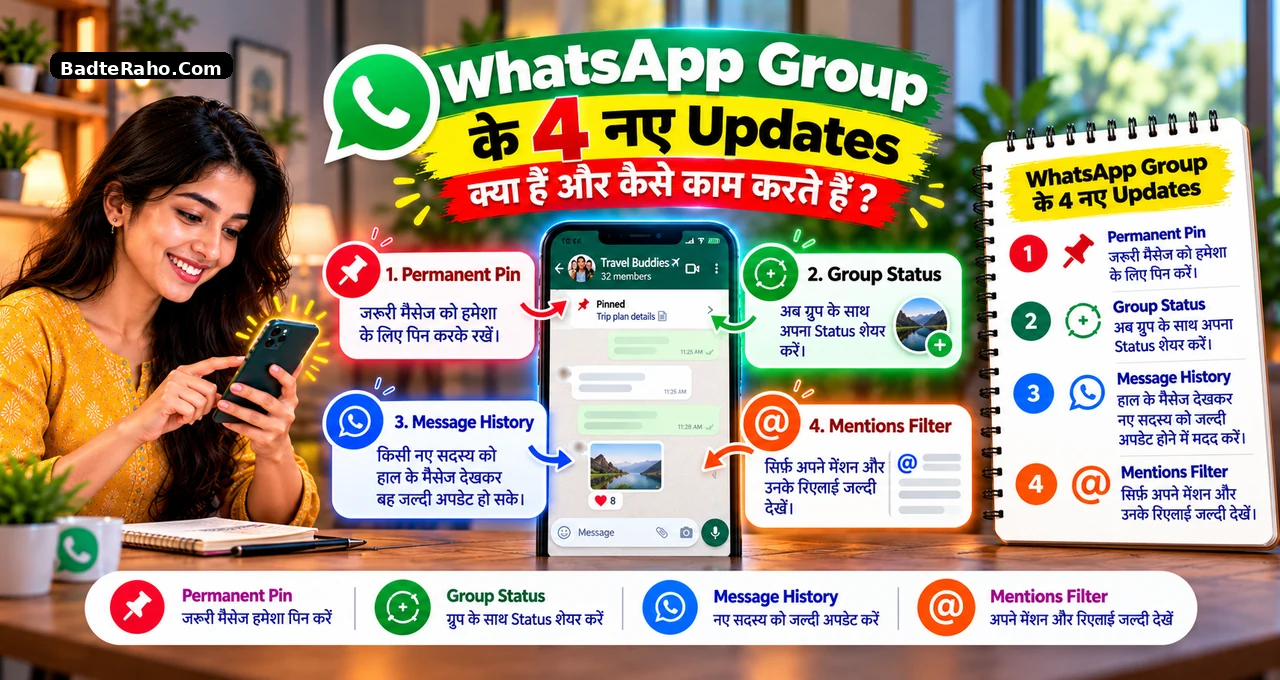



Busy WhatsApp group खोलते ही सबसे पहले यही सवाल आता है—ज़रूरी message आखिर गया कहाँ? Replies, photos और plans के बीच useful context बहुत जल्दी नीचे चला जाता है। इसी problem को solve करने के लिए WhatsApp Group Features 2026 में चार updates आए हैं।
इनमें permanent pin, join होने के बाद message history, Group Status और Mentions & Replies filter शामिल हैं। इस guide में हम इनके practical use, limits और सही use-case को सरल तरीके से समझेंगे।
कौन-सा feature आपके group में सच में useful होगा, यह समझने के लिए पहले चारों updates का फर्क साफ कर लेते हैं।
इस लेख में आप क्या सीखेंगे?
- चार नए group updates
- Permanent pin का use
- Message history का नया तरीका
- Group Status की सीमा
- Mentions filter का फायदा
- Rollout में क्या करें
WhatsApp Group Features 2026: चार updates में क्या बदला है?
WhatsApp ने 29 October 2026 को group chats के लिए चार updates announce किए। Official announcement का focus busy groups में important information जल्दी पकड़ने पर है।
पहला update message को बिना upfront time limit चुने लंबे समय तक pinned रखने देता है। दूसरा update message history को join होने के बाद भी भेजने की सुविधा देता है।
तीसरा Group Status है, जो casual updates को specific group तक सीमित रखता है। चौथा Mentions & Replies filter है, जो relevant unread group chats को सामने लाता है।
एक nuance यहाँ ज़रूरी है। Group Message History पूरी तरह नया feature नहीं है। WhatsApp ने इसे February 2026 में launch किया था, और October update ने इसे बाद में भी share करने का option दिया।
पूरी announcement आप WhatsApp के official group update में देख सकते हैं।
| Update | किस problem को solve करता है? | कहाँ useful है? |
|---|---|---|
| Permanent Pin | Important message जल्दी नीचे चला जाता है | Rules, timing, address, meeting link |
| Message History | New member को पुराना context नहीं मिलता | Office, school, event group |
| Group Status | Update सिर्फ relevant group को दिखाना है | Family, club, team, community |
| Mentions & Replies | Direct reply या mention miss हो जाता है | Busy users और large groups |
अगर आप WhatsApp के दूसरे नए tools भी track कर रहे हैं, तो message scheduling feature वाली guide भी useful context देती है।
Permanent Pin कब useful है?
Group में कई messages ऐसे होते हैं जिन्हें बार-बार ढूँढना पड़ता है। Venue, meeting link, payment rule या timetable इसका common example है।
अब ऐसे message को “forever” pinned रखने का option मिलेगा, अगर आप पहले से time limit नहीं चुनना चाहते। इससे reference information ऊपर बनी रह सकती है।
लेकिन हर message को permanent pin करना सही नहीं है। अगर pinned information जल्दी बदलती है, तो पुराना message confusion बढ़ा सकता है।
Simple rule: वही message लंबे समय के लिए pin करें जो बार-बार चाहिए और जल्दी outdated नहीं होगा।
Permanent pin के लिए तीन checks
- क्या information बार-बार चाहिए?
- क्या यह जल्दी बदलेगी?
- क्या यह पूरे group के लिए relevant है?
तीनों checks pass होते हैं, तो permanent pin practical choice हो सकता है। अगर date या rule बदलता है, तो pin भी तुरंत update करें।
एक छोटा maintenance rule भी रखें। अगर pinned message में date, price, venue या process बदल जाए, तो पुराने pin को तुरंत update या unpin करें।
Permanent pin का फायदा तभी है जब ऊपर दिख रही information भरोसेमंद रहे। पुराना pin बार-बार दिखाई देगा, इसलिए outdated information normal message से ज्यादा confusion पैदा कर सकती है।
Message History अब join होने के बाद कैसे भेजी जा सकती है?
New member group में आते ही अक्सर पूछता है—“अब तक क्या decide हुआ?” पहले context देने के लिए screenshots, forwarded messages या repeated explanation की ज़रूरत पड़ सकती थी।
WhatsApp ने February 2026 में Group Message History launch की थी। उस version में किसी को add करते समय 25 से 100 recent messages share किए जा सकते थे।
अब बड़ा change यह है कि member के join होने के बाद भी recent messages भेजे जा सकते हैं। WhatsApp के अनुसार group chat में उस member के नाम पर tap करके history share की जा सकती है।
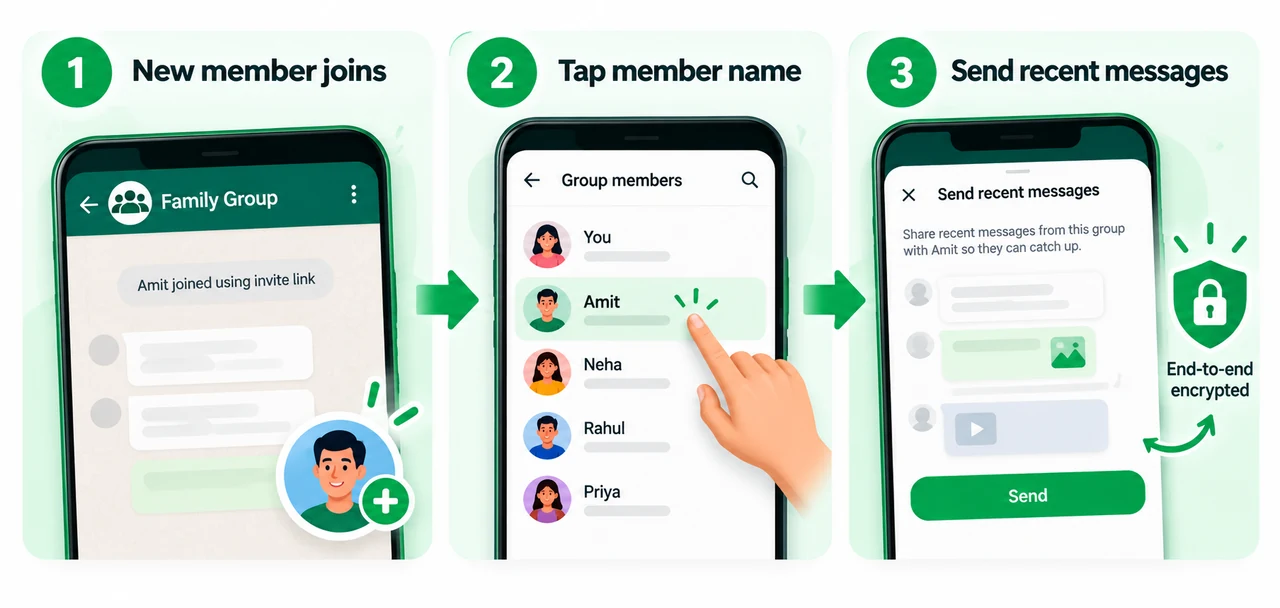
यह flow office onboarding, school-parent groups और event planning में useful हो सकता है। New member को हर decision दोबारा समझाने की ज़रूरत कम होती है।
WhatsApp कहता है कि shared history end-to-end encrypted रहती है। Group को यह भी दिखाई देता है कि history share की गई है।
Admins history sharing को control कर सकते हैं। February की official Message History announcement के अनुसार admins setting को disable कर सकते हैं, जबकि admins खुद history share कर सकते हैं।
यहाँ privacy check क्यों ज़रूरी है?
Recent messages share करने से पहले देख लें कि उनमें sensitive discussion तो नहीं है। New member को context देना useful है, लेकिन unnecessary private details भेजना ज़रूरी नहीं है।
Group Status normal WhatsApp Status से कैसे अलग है?
Regular Status का audience आपकी status privacy settings पर depend करता है। Group Status का idea ज्यादा focused है—update उसी specific group के members के लिए share करना।
मान लीजिए आपके पास family group, office team और running club है। Running club की activity हर contact को दिखाने की ज़रूरत नहीं है।
Group Status इसी situation में काम आता है। Group members status देख सकते हैं, react कर सकते हैं और अपना status भी add कर सकते हैं।
WhatsApp के अनुसार Group Status भी regular status की तरह 24 घंटे बाद disappear होता है। इसलिए इसे temporary updates के लिए use करना ज्यादा natural है।
कहाँ useful हो सकता है?
- Family event की तैयारी
- School activity का update
- Office outing का moment
- Club या community activity
Business groups में भी temporary update share किया जा सकता है। लेकिन order records, catalog और customer support के लिए structured setup बेहतर रहेगा।
अगर आप business communication के लिए WhatsApp use करते हैं, तो WhatsApp Business का सही use अलग से समझना useful है।
Mentions & Replies filter क्या दिखाता है?
कई active groups होने पर हर unread chat खोलना practical नहीं है। Problem तब बढ़ती है जब किसी ने आपको directly mention या reply किया हो।
नया Mentions & Replies filter ऐसे unread group conversations को सामने लाता है। इसमें direct mention, direct reply और @all messages शामिल हो सकते हैं।
इसका फायदा simple है। पहले वही chats देखें जहाँ आपकी attention की ज़रूरत हो सकती है, फिर बाकी unread messages खोलें।
यह filter especially office teams, parent groups और large communities में useful हो सकता है। लेकिन इसे full historical search या task manager न समझें।
Important limitation: official description unread group conversations पर focus करती है। पुरानी हर mention का permanent archive मानना सही नहीं होगा।
Group chat से discussion call पर shift करनी हो, तो WhatsApp Guest Calling वाला recent feature भी काम आ सकता है।
Family, office और business groups में इन features को कैसे use करें?
चारों features useful हैं, लेकिन हर group में चारों की ज़रूरत नहीं होगी। बेहतर तरीका है repeated problem देखकर feature चुनना।
Family या event group
Venue, timing या important instruction को permanent pin करें। Temporary photos और preparation updates Group Status में रखें।
Late-joining relative को relevant message history भेजी जा सकती है। इससे पूरा plan दोबारा explain करने की ज़रूरत कम होगी।
School या parents group
Timetable, official notice या event timing pin की जा सकती है। New parent को recent context देने के लिए Message History useful हो सकती है।
लेकिन student details, phone numbers या private discussion share करते समय extra caution रखें। Convenience privacy का replacement नहीं है।
Office team
Recurring meeting link या process note pin किया जा सकता है। Mentions filter से action-related unread chats जल्दी identify हो सकती हैं।
फिर भी critical tasks को सिर्फ WhatsApp mention पर depend न रखें। Deadline और ownership के लिए proper task system ज्यादा reliable है।
Small business group
Pickup timing, weekly rule या customer-community notice pin किया जा सकता है। Group Status temporary community update के लिए useful हो सकता है।
अगर business WhatsApp पर ज्यादा depend करता है, तो broader technology updates भी track करते रहें ताकि workflow outdated न हो।
Feature अभी नहीं दिख रहा तो क्या करें?
WhatsApp Group Features 2026 के सभी options हर account पर एक ही समय दिखें, यह ज़रूरी नहीं है। Availability app version और rollout stage के हिसाब से अलग हो सकती है।
सबसे पहले Play Store या App Store में WhatsApp update check करें। इसके बाद app दोबारा खोलकर relevant group में option देखें।
Message History के case में group permissions भी matter कर सकती हैं। इसलिए सिर्फ phone या app version को reason मानना सही नहीं होगा।
- Official app update रखें
- Group permission check करें
- कुछ समय बाद फिर देखें
- Unofficial APK से बचें
Feature जल्दी पाने के लिए modified WhatsApp या unknown APK install करना unnecessary risk है। Official rollout का इंतज़ार safer choice है।
Privacy और group control में क्या ध्यान रखें?
इन updates का मकसद convenience बढ़ाना है। Privacy rules फिर भी वही basic discipline मांगते हैं।
Permanent pin किसी message को ज्यादा visible बनाता है, ज्यादा private नहीं। इसलिए sensitive information को सिर्फ pin होने की वजह से safe न मानें।
Message History encrypted रहती है, लेकिन आप क्या share कर रहे हैं यह decision फिर भी important है। सिर्फ relevant recent context भेजें।
Group Status का audience specific group है। इसका मतलब यह नहीं कि status private diary बन गया। Group के सभी members उसे देख सकते हैं।
Mentions filter भी privacy bypass नहीं करता। वह सिर्फ unread group conversations में relevant activity को prioritize करता है।
चारों updates में कौन-सा सबसे useful है?
Best feature आपके group की repeated problem पर depend करेगा। इसलिए feature list देखकर नहीं, friction देखकर decide करें।
| अगर problem यह है | तो पहले यह feature देखें |
|---|---|
| Important message बार-बार खो जाता है | Permanent Pin |
| New member context miss करता है | Message History |
| Update सिर्फ एक group को दिखाना है | Group Status |
| Mentions और replies miss होते हैं | Mentions & Replies filter |
यानी चारों features का role अलग है। एक ही group में भी अलग situations के लिए अलग feature useful हो सकता है।
आज से क्या करें?
इन updates का फायदा तभी है जब group में basic rules clear हों। आज ही तीन छोटे changes किए जा सकते हैं।
- एक important reference message identify करके pin strategy तय करें।
- Admins से तय करें कि Message History कब share करनी है।
- Busy groups में Mentions & Replies filter दिखे तो उसे test करें।
- Temporary group updates के लिए Group Status availability check करें।
Goal हर नया feature use करना नहीं है। Goal वही friction कम करना है जो आपके group में बार-बार time waste कराती है।
आख़िर में एक छोटी सी बात
WhatsApp के ये चार updates busy groups को थोड़ा ज्यादा manageable बना सकते हैं। Permanent pin reference बचाता है, Message History context देता है, Group Status audience narrow करता है और Mentions filter attention prioritize करता है।
लेकिन feature तभी useful है जब group का purpose clear हो। सही update चुनें, outdated information हटाएँ और privacy को convenience से ऊपर रखें।
आपके WhatsApp groups में सबसे ज्यादा कौन-सी problem होती है—important message खोना, context miss होना या mentions छूट जाना? Article useful लगा हो तो अपना experience या feedback comments में ज़रूर बताइए।